

An A record points a hostname straight at an IPv4 address. A CNAME record points a hostname at another hostname, which then gets resolved separately. That's the entire distinction at the protocol level, laid out in RFC 1034 and RFC 1035.
The usage rule is just as short: use an A record on your apex or root domain, or anywhere the hostname also needs MX or TXT records. Use a CNAME for subdomain aliases or hostnames managed by a third party, like a CDN or SaaS platform, where the target's IP can change without notice. Pingfloat's own reference pages cover both record types if you want the full technical rundown before you touch a live zone.
- A record: hostname → IPv4 address (direct, one hop)
- CNAME record: hostname → another hostname (alias, requires a follow-up lookup)
- Rule of thumb: root domain or mail/auth records need A; subdomains pointing at external platforms usually want CNAME
TL;DR:
- Use an A record at the root domain or when MX, TXT, or NS records are required; reserve CNAMEs for subdomains hosted externally.
- A record resolves directly to an IPv4 address and can have multiple IPs for load balancing, with TTL controlling cache duration.
- CNAME records alias one hostname to another, requiring an additional lookup and are ideal for subdomains on third-party platforms, but cannot coexist with other records at the same name.
- Creating a CNAME at the apex or with existing records like MX or TXT violates DNS rules, unless the provider supports non-standard solutions like ALIAS or flattening.
- Checking DNS configurations with
dig +tracehelps identify chain issues or conflicts and prevents common misconfigurations that cause downtime.
Table of Contents
- What Is an A Record and How Does It Work?
- What Is a CNAME Record and How Does Aliasing Work?
- Why Can't a CNAME Coexist With Other Records?
- Does a CNAME Slow Down DNS Resolution?
- How Do You Check and Configure A and CNAME Records?
- Which Record Should You Use: A Decision Checklist
- Common DNS Gotchas and How to Fix Them
- How Pingfloat Helps You Validate DNS Changes
- What This Guide Comes Down To
- An Editorial Take on Getting DNS Right the First Time
- Sources
What Is an A Record and How Does It Work?
An A record maps a hostname to a 32-bit IPv4 address, full stop. There's no indirection, no second lookup. When a resolver hits an A record, it gets an IP and the query ends there, per RFC 1035. If your infrastructure runs IPv6 too, you'll pair it with an AAAA record at the same hostname, since A only handles IPv4.
You can publish multiple A records under one hostname. Resolvers will rotate through them, which gives you basic load distribution and a bit of redundancy if one server goes dark. TTL (time to live) controls how long resolvers cache that answer before checking again, so a low TTL of 300 seconds means faster failover but more DNS traffic; a high TTL of 86400 seconds (a day) means less traffic but slower propagation when you make a change.
A records are mandatory at the zone apex, because the root of your domain also needs to carry SOA and NS records, and only A (or an ALIAS-type workaround) can sit there alongside them.
| Zone line | Meaning |
|---|---|
example.com. A 192.0.2.10 | Root domain points to that IPv4 address |
example.com. A 192.0.2.11 | Second A record for the same host, for redundancy |
A quick check: dig example.com A should return the IP directly, no alias chain involved. For deeper reading, Pingfloat's A record reference walks through more edge cases.
What Is a CNAME Record and How Does Aliasing Work?
A CNAME record maps one hostname to another hostname, called the canonical name, rather than to an IP address directly. The resolver treats it as a redirect instruction: look up this other name instead, and whatever that name resolves to is the real answer, as DNSimple explains.
The resolution flow runs in sequence. A client asks for www.example.com, gets back a CNAME pointing to example.herokudns.com, then the resolver has to run a second query against that target to finally get an A or AAAA record. Each hop can carry its own TTL, and each one gets cached independently.
This is exactly why CNAMEs are so common for subdomains hosted on third-party platforms. If your CDN or SaaS provider changes the IP address behind their infrastructure, which happens often on shared platforms, your CNAME keeps working without you touching a thing. The provider owns the churn; you own a static pointer.
| Zone line | Meaning |
|---|---|
www.example.com. CNAME example.com. | www subdomain aliases to root |
app.example.com. CNAME app-provider.net. | Subdomain aliases to an external managed host |
- CNAME is ideal for
www,blog,app, orshopsubdomains pointed at hosted platforms - It's a poor fit anywhere you also need MX, TXT, or NS records
- Every CNAME lookup,
dig www.example.com CNAME, shows the alias target before the final IP resolves
Pingfloat's CNAME reference page has more on chaining behavior if you're troubleshooting a multi-hop setup.
Why Can't a CNAME Coexist With Other Records?
This is the rule that trips up more engineers than anything else in DNS. A CNAME record cannot share a hostname with any other record type, no A, no MX, no TXT, nothing. That's a strict requirement from RFC 1034, not a provider quirk. Once a name has a CNAME, that's the only answer the resolver is allowed to return for it.

That constraint is also why the zone apex, your bare example.com, can never be a CNAME. The apex has to carry SOA and NS records so the domain functions as a zone at all, and a CNAME there would violate the exclusivity rule immediately.
Major DNS providers solved this with non-standard workarounds: ALIAS, ANAME, or CNAME flattening. These resolve the target hostname server-side, on the provider's own infrastructure, and hand the client a plain A or AAAA answer. Amazon Route 53's alias records work this way, and other providers have their own version. None of this is standardized by the IETF, so behavior, TTL handling, and even naming vary by vendor. Check your provider's documentation before assuming ALIAS behaves the same everywhere.
The exclusivity rule has a real-world casualty: email. If you accidentally put a CNAME on a hostname that needs an MX record, or on the name where you'd normally add SPF, DKIM, or DMARC TXT records, those authentication checks silently stop working, since CNAME exclusivity blocks them from coexisting.
Pro Tip: Before assigning any subdomain a CNAME, run dig subdomain.yourdomain.com ANY first (or check individual record types) to confirm nothing else is already living at that name.
- CNAME can never share a name with A, MX, TXT, or NS records
- The apex can't be a CNAME because it must hold SOA and NS
- ALIAS/ANAME/flattening are provider-specific fixes, not IETF standards
- Misplaced CNAMEs are a common, silent cause of broken email authentication
Does a CNAME Slow Down DNS Resolution?
Technically, yes. Practically, almost never. An A record resolves in one step: query, answer, done. A CNAME adds at least one more lookup, since the resolver has to follow the alias to its target before it gets an actual IP, as Vercel's documentation notes.
- Resolver queries the hostname and gets back a CNAME pointing elsewhere
- Resolver queries that target hostname
- Target returns an A or AAAA record with the real IP
- Resolver caches both answers according to their individual TTLs
Caching is what saves you here. Once a resolver has cached both hops, repeat lookups from the same client are just as fast as an A record, since the extra round trip only happens on a cache miss. For most websites, that added hop is genuinely negligible.
Where it can matter: ultra-low-latency services, high-frequency API calls, or environments with unusually short TTLs that force frequent re-resolution. In those narrow cases, an A record (or an ALIAS at the apex) shaves off a real, if small, amount of time. Some providers also log or bill on a per-query basis, so chained CNAME resolutions can technically generate more logged lookups than a direct A record would.
How Do You Check and Configure A and CNAME Records?
Start with the zone file lines themselves. A root domain A record looks like this:
example.com.       A       192.0.2.10
example.com.       A       192.0.2.11
A www subdomain aliasing back to the root, or out to an external platform, looks like this:
www.example.com.    CNAME   example.com.
app.example.com.    CNAME   app-provider.net.
To verify either one is live, run these checks:
dig example.com A— should return the IPv4 address directly, no alias in betweendig www.example.com CNAME— should show the alias target hostnamenslookup www.example.com— a simpler alternative that shows the same chain, alias first, then the resolved IPdig +trace example.com— useful if you suspect a broken chain somewhere upstream
Reading the output is straightforward: if dig on your hostname returns an "ANSWER SECTION" with a CNAME line before the A line, you're looking at an alias chain, not a direct record. DNSimple's guidance on reading dig output is a solid reference if the format is new to you.
Before calling a change done, check propagation timing against your TTL, confirm any MX or TXT records at the root are untouched, and re-run your lookup from a second network if possible.
Which Record Should You Use: A Decision Checklist
Run through these four questions before you touch your zone file, and the right record usually becomes obvious.
- Is this the zone apex or root domain? Use an A record, or your provider's ALIAS/ANAME equivalent if you need CNAME-like flexibility there.
- Does this hostname also need MX, TXT, or NS records? If yes, avoid CNAME entirely. Use A.
- Is the target managed by a third party whose IPs might change without warning? A CNAME is the more convenient, lower-maintenance choice, since the provider absorbs the IP churn instead of you.
- Does your DNS provider support ALIAS, ANAME, or flattening at the apex? If you need CNAME-style aliasing at the root itself, confirm this before you commit to an architecture that assumes it.
If your answers point in different directions, apex requirements and coexisting records win every time. That's not a stylistic preference. It's a hard constraint of how DNS resolves names.
Common DNS Gotchas and How to Fix Them
A handful of mistakes account for most DNS outages tied to A and CNAME misconfiguration.
- CNAME at the apex: your registrar or provider will usually reject it outright, since it conflicts with required SOA and NS records. If email suddenly stops or the site won't resolve, this is the first thing to check.
- CNAME shadowing MX or TXT: someone adds a CNAME to a hostname that already needs mail or SPF/DKIM/DMARC records, and those checks quietly fail. Symptom: messages bouncing or landing in spam with no obvious cause.
- Long CNAME chains: alias pointing to alias pointing to alias. Each hop adds latency and a place for something to break, and troubleshooting gets harder with every link in the chain.
Pro Tip: Run dig +trace yourhostname.com when something feels off. It walks the full resolution path and shows exactly where a chain breaks or where an unexpected CNAME snuck in.
How Pingfloat Helps You Validate DNS Changes
Reading about record types only gets you so far. Once you've made a change, you need a fast way to confirm it actually took effect. Pingfloat's DNS reference hub covers A, AAAA, CNAME, MX, and TXT records in more depth than any single article can.
For the validation step itself:
- Run your
digornslookupcheck first, then cross-reference with Pingfloat's What's My IP tool to confirm the IP your new A record resolves to matches what you expect from your own network. - Use Traceroute if a resolved address isn't reachable, to spot where the connection is failing along the path.
- After a CNAME points to a new provider, an SSL Checker confirms the certificate on the new endpoint is valid before you send real traffic there.
What This Guide Comes Down To
Choosing between A and CNAME isn't really a choice at all, once you know the constraints. A CNAME cannot exist at the zone apex, and it cannot share a hostname with MX or TXT records. Every configuration decision follows from those two facts.
| Point | Details |
|---|---|
| A maps to IPv4 | Use it at the apex or anywhere MX/TXT/NS also live on that hostname. |
| CNAME maps to a hostname | Use it for subdomains pointed at platforms whose target IPs may change. |
| Exclusivity is absolute | A CNAME can never coexist with any other record type at the same name. |
| Apex aliasing needs a workaround | ALIAS, ANAME, or flattening are provider-specific, not IETF standard. |
| Verify with dig, not assumption | dig +trace reveals chain breaks and shadowed records fast. |
An Editorial Take on Getting DNS Right the First Time
Most DNS guides treat A and CNAME as a trivia question, define both, move on. That misses what actually costs people uptime: the exclusivity rule. Engineers don't break their sites by misunderstanding what a CNAME does. They break it by adding one to a hostname that already has a TXT record for SPF, or by trying to alias the apex because "it worked on the last project."
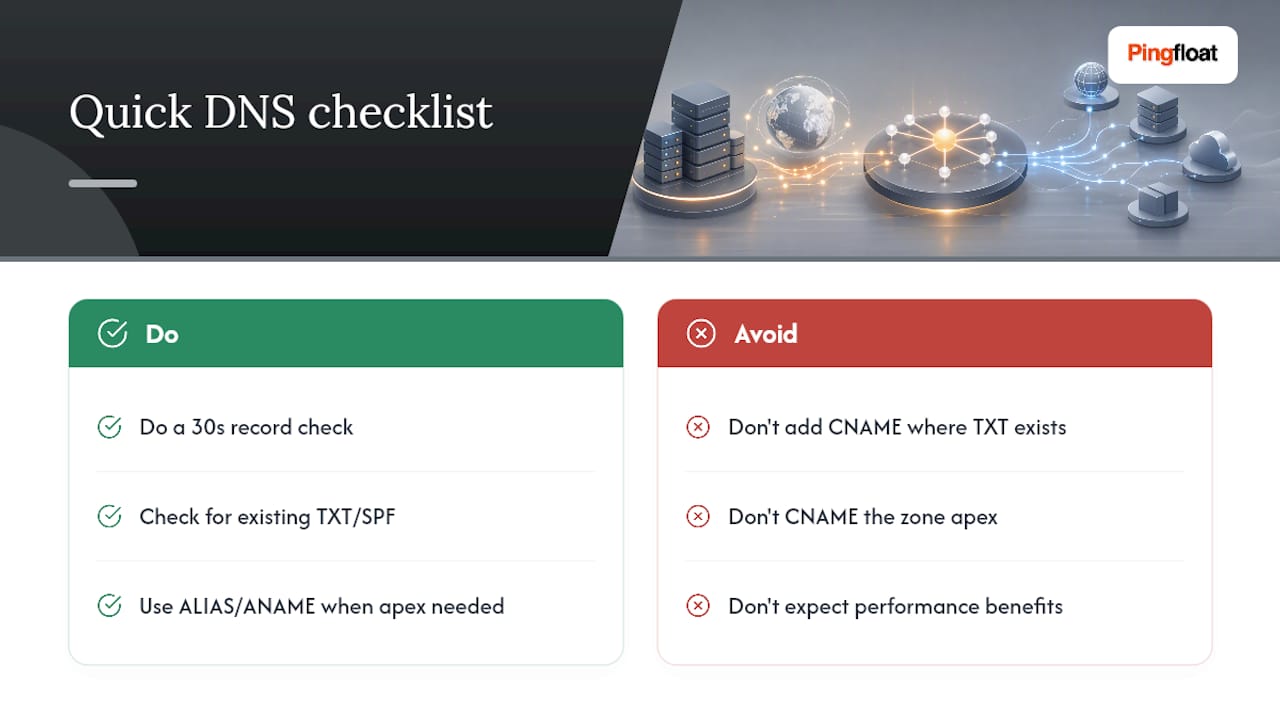
The conventional advice, "use CNAME for flexibility," is true but incomplete. Flexibility only helps you if you're not also fighting a protocol constraint that has zero tolerance for exceptions. The apex restriction and the coexistence rule aren't provider policy. They're baked into how DNS resolution works at the specification level, which is why every workaround, ALIAS, ANAME, flattening, exists as a server-side trick rather than a real CNAME.
If you take one thing from this guide, make it this: before adding any record, check what's already sitting at that hostname. That thirty-second check prevents nearly every incident this article describes. Performance differences between A and CNAME are close to irrelevant for most sites. Coexistence conflicts are not.
— Andreas
Sources
- Differences Between A and CNAME Records - DNSimple Help
- CNAME vs A record - Vercel documentation article
- Choosing alias vs. non‑alias records - Amazon Route 53 Developer Guide