

DNS propagation time is how long a cached DNS answer stays valid before a resolver checks again, and that window is set almost entirely by the record's TTL. There's no push mechanism spreading your change across the internet. Most updates become fully visible within minutes to 24 hours; the old "48 to 72 hours" advice is outdated and no longer reflects typical timing.
TL;DR:
- Reducing your DNS record's TTL at least one full cycle before changes minimizes the maximum propagation delay to the new record across resolvers.
- DNS caches operate independently on multiple layers, including registries, resolvers, and browsers, which can extend update times beyond TTL alone.
- The worst-case delay for DNS updates is determined by the pre-change TTL cached at each resolver, up to a maximum of 24 hours with typical modern defaults.
- Verifying DNS propagation requires querying multiple public resolvers and checking their remaining TTL, not relying on a single source or assumption.
- Changing DNS records during low traffic periods and after confirming cache flushes helps avoid mail or service disruption, especially for critical records like MX or NS.
Table of Contents
- What DNS Propagation Really Means (and Why Caches Exist)
- How Long DNS Changes Actually Take: TTL Math and a Worked Example
- Five Caches, Five Timers: Why One TTL Isn't the Whole Story
- The Playbook: Minimizing Downtime During a DNS Change
- Checking Propagation From Multiple Vantage Points
- How Pingfloat Fits Into Your Verification Workflow
- Measurement Beats Waiting
- Try Pingfloat's Diagnostic Tools During Your Next DNS Change
- Sources
- FAQ
What DNS Propagation Really Means (and Why Caches Exist)
DNS is a pull-based, hierarchical lookup system, not a broadcast network. When a resolver asks for a record, it doesn't just get an answer. It gets an answer plus a Time to Live, a countdown telling it how long that answer is safe to reuse before asking again. DNS doesn't actually propagate in the way the term suggests. Nothing spreads outward from your authoritative server. Every resolver on the internet independently decides when its cached copy expires, and until that timer runs out, it keeps serving the old answer regardless of what you've changed.
There's also a second, less obvious timer: negative caching. If a resolver asked for a record that didn't exist and got an NXDOMAIN response, that "no record" answer gets cached too, governed by the SOA record's minimum field, not the record's TTL.
Caching exists for good reason:
- It cuts query latency by answering locally instead of round tripping to an authoritative server every time.
- It reduces load on authoritative name servers, which would otherwise field billions of redundant lookups.
- It keeps the wider DNS system stable during traffic spikes or partial outages.
Understanding DNS record types and how each one interacts with caching is the foundation for predicting delay instead of guessing at it.
How Long DNS Changes Actually Take: TTL Math and a Worked Example
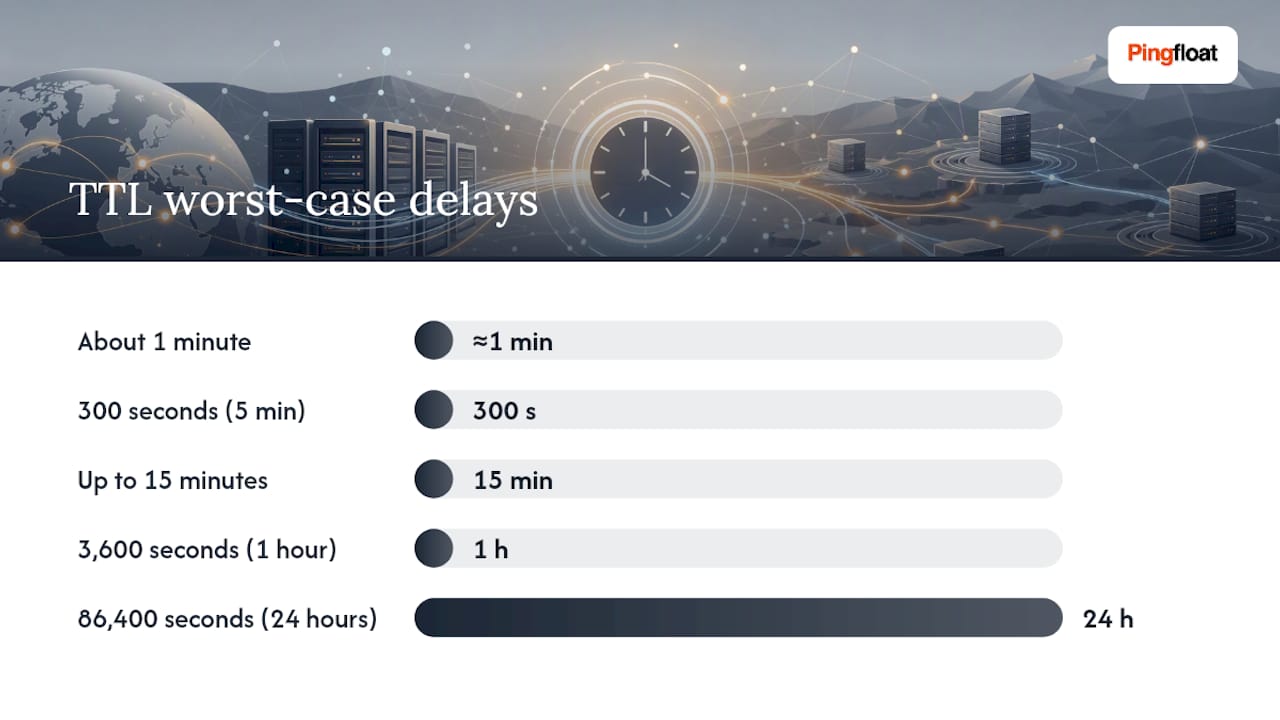
The math is simple: worst-case delay equals the TTL that was live before your change, not the new one you just set. If a resolver cached your record 1 second before you updated it, that resolver holds the old answer for the full TTL duration.
| Old TTL | Worst-case delay before all resolvers see the update |
|---|---|
| About 1 minute | About 1 minute |
| 300 seconds (5 minutes) | Up to 5 minutes |
| Up to 15 minutes | Up to 15 minutes |
| 3,600 seconds (1 hour) | Up to 1 hour |
| 86,400 seconds (24 hours) | Up to 24 hours |
A 24 hour TTL with no advance planning means some resolvers can legitimately serve your old IP address for a full day. That's the entire mechanism behind the outdated "wait 48 to 72 hours" guidance: it was padding for legacy defaults and stubborn ISP resolvers, not a hard technical limit. Modern TTL defaults make 24 hours an achievable worst case, and most real-world changes finish well under that.
Here's a worked example. Say your zone runs an 86,400 second TTL and you change your A record at 9:00 AM without touching the TTL first. A resolver that queried your domain at 8:59 AM has a fresh 24 hour cache entry and won't re-check until roughly 8:59 AM the next day. Drop that TTL to 300 seconds a day ahead of the change, though, and the same scenario resolves inside 5 minutes.
Five Caches, Five Timers: Why One TTL Isn't the Whole Story
TTL only controls one layer. In practice, five independent caches sit between your update and a user's browser, and each has its own clock.
- Registrar and registry. Nameserver changes at the registrar level (switching who's authoritative for your domain) depend on how fast the registry updates its TLD zone, often within minutes but occasionally slower. Check this by querying the TLD's name servers directly with
dig +trace yourdomain.com. - Authoritative TTL. This is the one value you actually control. Set it on the record itself, and it's the baseline every other cache in the chain respects, at least in theory.
- Recursive resolver caching. Public resolvers and ISP resolvers cache independently. Some honor your TTL exactly; others cap or override it, holding records longer than published. This is the single most common source of "it works for me but not for my coworker."
- OS stub-resolver cache. Windows, macOS, and Linux all keep a local DNS cache. Flush it with
ipconfig /flushdnson Windows orsudo dscacheutil -flushcacheon macOS before testing anything locally. - Browser cache and negative cache. Chrome and Firefox cache DNS answers separately from the OS, and if a domain previously returned NXDOMAIN, that "no record" state can linger based on the SOA minimum field, sometimes for an hour or more after you've fixed the actual record.
Pro Tip: If a fix to a missing record still returns NXDOMAIN after your TTL should have expired, check the zone's SOA minimum. That value, not the record's own TTL, controls how long "this doesn't exist" answers get cached.
Nameserver changes deserve extra caution since they touch layer one and layer two simultaneously; verify with the NS record reference before assuming a delegation change has taken effect everywhere.
The Playbook: Minimizing Downtime During a DNS Change
You control exactly one variable that meaningfully shrinks your risk window: TTL, set in advance.
Before the change:
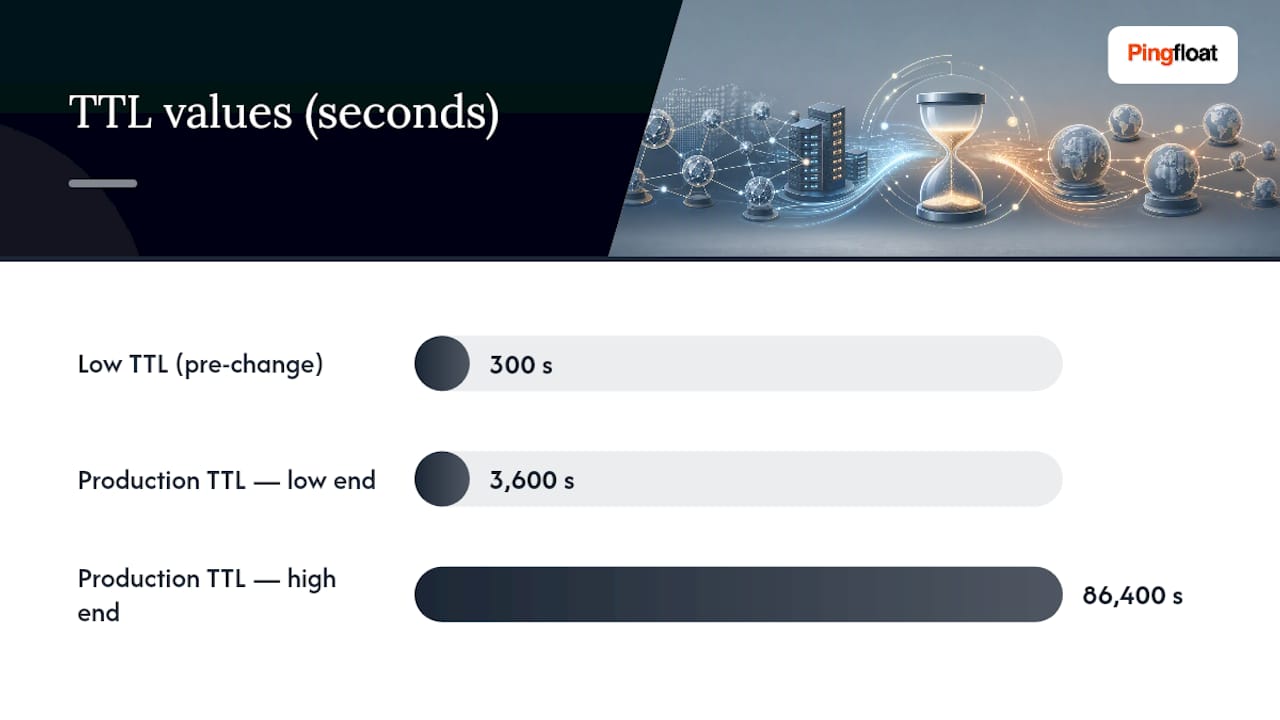
- Lower the record's TTL to something short, 300 seconds is a solid default, at least one full old-TTL period before you touch anything else.
- Confirm the shorter TTL has actually taken hold by querying your authoritative server directly.
- Document the current record values as a rollback reference.
During the change:
- Update the record at the authoritative source.
- Query the authoritative server again immediately to confirm the change took effect there.
- Probe two or three public resolvers to see how quickly the new answer surfaces.
After the change:
- Run
digagainst multiple resolvers over the next hour to confirm consistency. - Once every resolver you check agrees, raise the TTL back to a normal production value, commonly 3,600 to 86,400 seconds depending on how often the record changes.
- Set a rollback trigger in advance: if error rates spike and don't recover within your old TTL window, revert rather than waiting it out.
Special cases need extra buffer. MX changes affect mail routing, where a stale record means bounced or misdelivered mail, so extend your low-TTL window generously before touching mail records. NS changes ripple through the registrar and registry layer, which you don't control directly, so budget more patience there than for a simple A record swap. Lowering TTL ahead of the change and waiting a full old-TTL cycle before flipping the record is the single highest-leverage habit in this entire process.
Checking Propagation From Multiple Vantage Points
Don't trust a single query. Query several public resolvers and compare:
- Google:
8.8.8.8 - Cloudflare:
1.1.1.1 - Quad9:
9.9.9.9 - OpenDNS:
208.67.222.222
The command looks like this: dig @8.8.8.8 yourdomain.com A. Read the ANSWER section for the current value and the TTL field for how much time remains on that resolver's cached copy, a low remaining TTL means it'll refresh soon; a high one means you're waiting out the full window. Repeat against each resolver above, and if they all return the new value, the change is effectively live for the overwhelming majority of users.
Dispersion across resolvers is normal for the first few minutes after a change and only becomes a real problem if it persists past your TTL window. A dedicated propagation checker that queries dozens of global locations at once can save you from manually running the same dig command repeatedly, though it's checking the same underlying resolver caches you'd hit yourself.
If dig shows the new value everywhere but users still report the old site, the resolver layer isn't the culprit anymore. Check the browser cache and the OS stub-resolver next. Pro Tip: Ask the affected user to run the same dig command from their own machine. If it returns the correct answer but their browser still shows the old page, the problem is a browser or application cache, not DNS at all.
How Pingfloat Fits Into Your Verification Workflow
Command-line checks and multi-resolver queries confirm what DNS itself is doing. They can't tell you whether your server is actually reachable once the record resolves correctly. Pairing dig output with a traceroute run catches routing issues that look like DNS problems but aren't, and running an uptime monitor against your endpoint through a migration window flags the moment your new infrastructure starts responding reliably. Pingfloat's networking reference and diagnostic tools are built to sit alongside dig, not replace it, giving you the availability side of the picture that raw DNS queries can't.
Measurement Beats Waiting
Anecdotal patience is the worst tool in DNS troubleshooting. If you're staring at a browser wondering whether "enough time has passed," you're already doing this wrong. Query resolvers directly, read the TTL fields, and you'll know in seconds instead of guessing for hours.
The costlier mistake I see is the opposite one: panicking and rolling back a change that was actually working fine, just still sitting inside a stale resolver's cache window. A rollback triggered by impatience creates a second wave of propagation delay on top of the first. Instrument the check, trust the TTL math, and only roll back when the data across multiple resolvers actually says something is broken.
— Andreas
Try Pingfloat's Diagnostic Tools During Your Next DNS Change
Pingfloat gives you the availability and network layer checks that dig and resolver queries don't cover. Once your DNS change resolves correctly across public resolvers, the next question is whether your server is actually answering reliably, and that's where an uptime monitor earns its keep, alerting you the moment your new endpoint is live and stable instead of leaving you refreshing a browser tab.

During a migration, a traceroute tool helps you separate a routing problem from a DNS problem in seconds rather than minutes of guessing, and Pingfloat's networking reference pages back that up with plain explanations of what each hop and header actually means. If you're touching response caching headers as part of the same deployment, the response headers inspector shows you exactly what your server is sending before a user's browser ever sees it. All of it is free to run right now: point it at your domain and watch the change confirm itself instead of waiting on faith.
Sources
- Why your DNS change isn't propagating: the five timers that actually govern it — StatusDetector Notebook
- DNS propagation explained — beginner guide & how to check it | EdgeDNS
FAQ
How Do I Check if DNS Propagation Is Done?
Query multiple public resolvers directly with dig @8.8.8.8 yourdomain.com (and repeat for 1.1.1.1, 9.9.9.9, and 208.67.222); once all of them return the new value, the change is effectively live for most users.
How Can I Speed Up DNS Propagation Time?
Lower the record's TTL to a short value like 300 seconds at least one full old-TTL period before making the change, then raise it back once every resolver you check confirms the new answer.
Does Using 8.8.8.8 Make My Internet Faster?
Not inherently. Google's public resolver at 8.8.8.8 can resolve queries quickly and consistently, but it won't speed up your general internet connection, it only affects how fast DNS lookups themselves complete.
Is There a Way to Force DNS Propagation?
No single query can force every resolver worldwide to expire its cache early. The only reliable lever is planning ahead by lowering the TTL before you change the record, since that shrinks the worst-case wait to whatever short TTL you set.