
IPv6 is the modern successor to IPv4. It delivers a vastly larger address pool and cleaner protocol design, but IPv4 isn't going anywhere for years. IPv4 uses 32-bit addresses like 192.168.1.x; IPv6 uses 128-bit addresses like 2001:db8::1, and that jump in size is what fixes IPv4's core problem: it ran out of unique addresses to hand out. IPv6 also strips out obsolete features and adds ones IPv4 never had, but replacing a global protocol takes time, so both will run side by side for the foreseeable future.
Three things to do right now:
- Check whether your ISP and router support IPv6, and turn it on if they do.
- Test your setup in dual-stack mode rather than switching cold.
- Run a quick check with a tool like What's My IP to see which protocol you're actually using today.
Key Takeaways
IPv6 solves IPv4's address exhaustion with a 128-bit address space, but dual-stack coexistence with IPv4 will continue for years across most networks.
| Point | Details |
|---|---|
| Address space gap | IPv4 offers about 4.29 billion addresses; IPv6 offers roughly 3.4 × 10^38, removing the exhaustion problem entirely. |
| Header design changed | IPv6 uses a fixed 40-byte base header with no checksum, shifting extras into optional extension headers. |
| NAT becomes optional | IPv6's address abundance restores end-to-end connectivity that NAT broke to stretch IPv4 further. |
| Migrate with dual-stack | Running IPv4 and IPv6 together, per RFC 4213, is the most practical way to transition without breaking existing traffic. |
| Verify before you trust it | Tools like Pingfloat's What's My IP and Traceroute confirm which protocol your connection actually uses and where paths diverge. |
Table of Contents
- IPv4 vs IPv6 Quick Facts
- What Are the Technical Differences Between IPv4 and IPv6?
- How Do NAT and DNS Behavior Change in Practice?
- Does IPv6 Actually Improve Security and Performance?
- How Do You Migrate to IPv6 Without Breaking Things?
- What Should You Actually Do About IPv4 vs IPv6 Today?
- Does Your Hardware Even Support IPv6?
- Mobility and Multicast: Where IPv6 Pulls Ahead
- Why IoT and Emerging Tech Need IPv6
- Sources
IPv4 vs IPv6 Quick Facts
The numbers behind this comparison are stark. IPv4's 32-bit address space caps out around 4.29 billion addresses; IPv6's 128-bit space supports roughly 3.4 × 10^38 addresses, which is enough to assign a unique identifier to every grain of sand on Earth many times over.
Quick stat: IPv6 offers roughly 340 undecillion addresses against IPv4's 4.29 billion, a difference so large it's effectively unlimited for practical planning purposes.
| Attribute | IPv4 | IPv6 |
|---|---|---|
| Address size | 32-bit | 128-bit |
| Total addresses | ~4.29 billion | ~3.4 × 10^38 |
| Example address | 192.168.1.x | 2001:db8::1 |
| Loopback address | 127.x.x.x | ::1 |
| Base header size | variable length, depending on options | 40 bytes (fixed) |
| DNS record type | A | AAAA |
Those DNS record types matter more than they look. An A record points a domain to an IPv4 address; an AAAA record points it to an IPv6 address, and most domains today publish both.
What Are the Technical Differences Between IPv4 and IPv6?
Understanding IPv4 addressing starts with the notation itself: four decimal numbers separated by dots, each representing 8 bits, for a 32-bit total. IPv6 addresses use eight groups of four hexadecimal digits separated by colons, and because that gets unwieldy, the format allows compression: leading zeros drop, and one run of consecutive all-zero groups collapses to a double colon. That's how 2001:0db8:0000:0000:0000:0000:0000:0001 becomes the far more readable 2001:db8::1.
Header design changed just as much as the addresses did. IPv4's header is variable length, carries a checksum that every router has to recompute at each hop, and stuffs options directly into the header itself. IPv6 fixed that with a streamlined 40-byte base header and no checksum at all, since that job now belongs to the transport and link layers. Anything extra, like fragmentation info or security parameters, moves into optional extension headers that routers can skip past instead of parsing line by line.
Addressing modes shifted too:
- Unicast sends a packet to exactly one host, in both protocols.
- Multicast sends a packet to a group of interested hosts, and IPv6 relies on it far more heavily than IPv4 does.
- Anycast routes a packet to the nearest of several nodes sharing an address, useful for load distribution.
- Broadcast exists in IPv4 for sending to every host on a segment, but IPv6 drops it entirely in favor of multicast.
Fragmentation responsibility also moved. In IPv4, routers along the path can fragment an oversized packet. In IPv6, only the originating host fragments; routers just drop packets that exceed the path's maximum transmission unit and send back an error. That single change is why understanding IPv4 addressing and its fragmentation quirks helps explain some IPv6 troubleshooting behavior you'll never see on the older protocol.
Address configuration diverged too. IPv4 hosts typically get an address via DHCP, a server explicitly leasing out addresses. IPv6 adds SLAAC (Stateless Address Autoconfiguration), letting a device generate its own address from router advertisements without a server in the loop, alongside DHCPv6 for networks that still want centralized control.
Pro Tip: If a device seems to have two different IPv6 addresses at once, that's normal. SLAAC often assigns both a stable address and a temporary "privacy" address that rotates periodically.
How Do NAT and DNS Behavior Change in Practice?
Network Address Translation kept IPv4 alive far past its expected shelf life by letting entire networks share a single public address. It works, but it comes with real costs.
- End-to-end connectivity breaks down. A device behind NAT can't be reached directly from the internet without extra configuration like port forwarding.
- Geolocation and logging get murkier. Multiple users behind the same NAT address look identical to external services.
- Carrier-grade NAT adds another layer. Many mobile and broadband providers now share a single IPv4 address across thousands of subscribers, which increases complexity and occasionally breaks applications that assume one address per device.
IPv6's address abundance removes most of the pressure that made NAT necessary in the first place, restoring the end-to-end reachability the original internet design assumed.
DNS resolution is where protocol choice actually gets decided. A client queries for both A and AAAA records, and address selection rules defined in RFC 6724 determine which one wins, with most modern operating systems defaulting to IPv6 when it's available and working. When that path fails silently, a technique called Happy Eyeballs kicks in, racing both protocols and quietly falling back to whichever connects first, so users rarely notice the switch. Routing also gets simpler on the IPv6 side, since fewer translation layers mean less state for routers to track and cleaner address aggregation in routing tables.
Does IPv6 Actually Improve Security and Performance?
IPv6 was designed with IPsec support built into the specification, but that's not the security upgrade it sounds like. IPsec is optional in practice, plenty of IPv6 deployments never turn it on, and standards guidance is clear that real-world security depends on how a network is configured, not on which protocol carries the packets.
Performance claims deserve the same skepticism. Removing NAT can reduce processing overhead per packet, but middleboxes, firewall rules, and inconsistent hardware support often cancel out any theoretical gain. Benchmarks vary wildly depending on network conditions, so treat any blanket "IPv6 is faster" claim with caution.
Common risks worth watching for:
- Firewalls configured only for IPv4, leaving IPv6 traffic unfiltered by accident.
- Dual-stack networks where IPv6 gets enabled without a matching security policy.
- Extension header abuse, since some older middleboxes don't inspect them properly.
- SLAAC-assigned addresses that admins forget to include in access control lists.
How Do You Migrate to IPv6 Without Breaking Things?
Dual-stack IPv4 IPv6 deployment is the approach most networks actually use, and for good reason. Running both protocols simultaneously means existing IPv4 traffic keeps working exactly as before while IPv6 traffic grows in parallel, with no hard cutover date to hit.
When dual-stack isn't feasible everywhere, a handful of translation and tunneling techniques bridge the gap:
- NAT64/DNS64 lets IPv6-only clients reach IPv4-only destinations by synthesizing addresses on the fly.
- 464XLAT extends that idea for mobile networks that are IPv6-only at the access layer.
- DS-Lite tunnels IPv4 traffic over an IPv6-only ISP network, useful where providers have gone IPv6-first.
- Manual tunnels (like 6in4) connect isolated IPv6 islands across an IPv4-only backbone, a stopgap rather than a long-term fix.
The most reliable rollout order starts at the edge and works inward: enable IPv6 on your border routers and DNS first, dual-stack your servers next, and monitor traffic with NetFlow or similar tools before touching client-facing segments. That staged approach catches legacy applications with hard-coded IPv4 assumptions before they break in production.
Pro Tip: Don't remove IPv4 from anything until IPv6 traffic has run stable for at least one full billing cycle. Traffic patterns shift with weekday/weekend and month-end usage.
Expect this transition to take years, not months. Adoption is being pushed by NAT limitations, government mandates, and IoT growth, and coexistence between IPv4 and IPv6 will remain the norm well into the next decade.
What Should You Actually Do About IPv4 vs IPv6 Today?
The right move depends on which seat you're in.
- Home users: confirm your ISP offers IPv6, enable it on your router if it's off by default, and run a traceroute to compare paths.
- Developers: test every build against both address families, verify your AAAA records resolve correctly, and never hard-code an IPv4 literal into connection logic.
- Small organizations: dual-stack your public-facing endpoints first, watch how traffic shifts between protocols, and update firewall rules and logs to cover IPv6 explicitly, not just IPv4.
Pro Tip: A surprising number of "IPv6 is broken" support tickets turn out to be a firewall rule that only ever got written for IPv4. Check both rule sets before assuming a protocol-level bug.
Does Your Hardware Even Support IPv6?
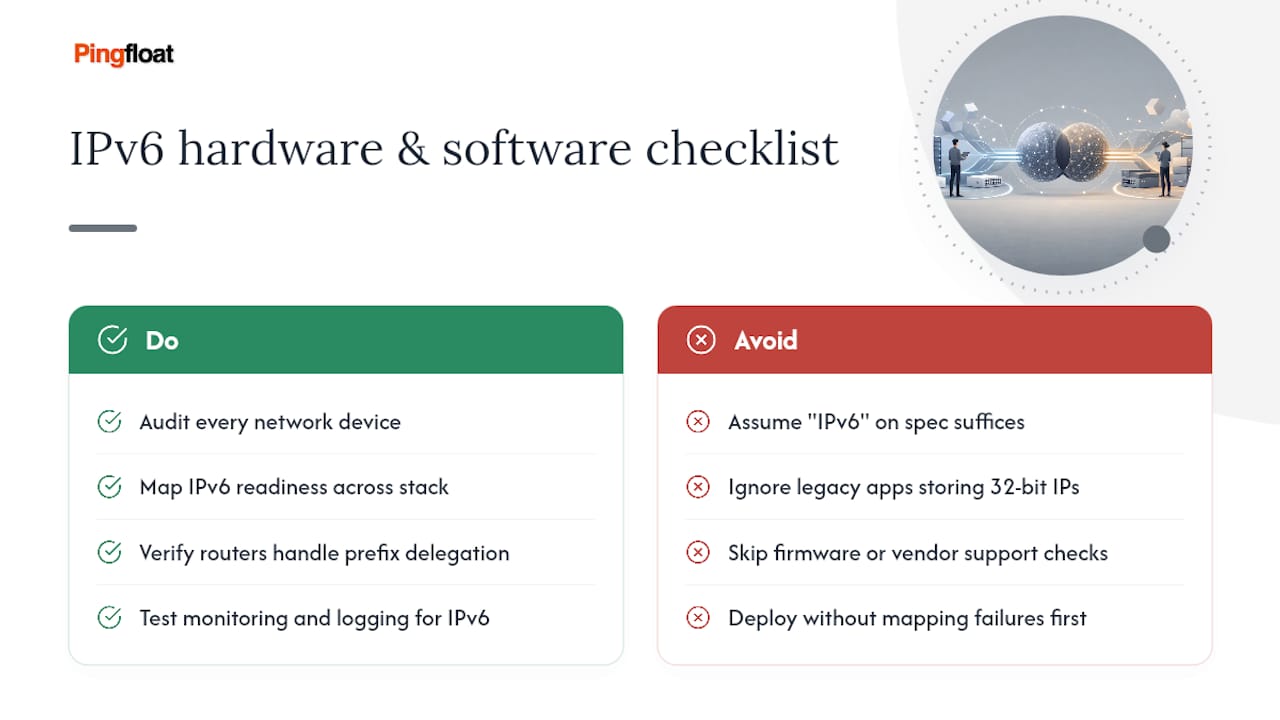
Older routers and switches, especially anything more than eight to ten years old, may lack IPv6 support entirely or only offer it through a firmware update the manufacturer never shipped. This is the part of the ipv4 vs ipv6 conversation that catches small businesses off guard: the transition isn't just a settings toggle, it's an inventory problem.
Enterprise-grade equipment from major vendors has supported dual-stack IPv4 IPv6 operation for well over a decade, but consumer routers vary enormously. Some cheaper models advertise IPv6 support but handle it poorly, dropping connections under load or failing to pass through prefix delegation from the ISP correctly. Before committing to a migration timeline, audit every piece of network hardware, from edge routers down to load balancers and firewalls, for IPv6 capability, not just IPv6 presence in a spec sheet.
Software matters just as much as hardware. Legacy applications sometimes store IP addresses as 32-bit integers internally, which works fine for IPv4 but simply can't represent an IPv6 address. That's a code change, not a network change, and it's often the slowest part of any migration. Monitoring and logging systems have the same problem: a log parser built to expect dotted-decimal addresses will choke on hex-colon notation unless someone updates it first.
The practical takeaway is that IPv6 readiness isn't binary. A network can have IPv6-capable routers, IPv6-blind switches, and applications that silently fail on anything but IPv4, all in the same infrastructure stack. Map that out before setting a migration date.
Mobility and Multicast: Where IPv6 Pulls Ahead
Mobile devices switch networks constantly, moving from Wi-Fi to cellular and back, and IPv4 was never designed with that kind of movement in mind. Mobile IPv4 exists as a workaround, but it's clunky, requiring a home agent to track a device's current location and tunnel traffic accordingly.

IPv6 builds mobility support closer to the core protocol through Mobile IPv6, which handles the same handoff problem more efficiently by letting a device keep a stable address while its actual point of attachment changes underneath it. Neighbor Discovery, a core IPv6 mechanism, also simplifies how a device figures out it has moved to a new network, replacing several IPv4-era protocols (ARP, ICMP router discovery) with a single, more coherent system.
Multicast tells a similar story. IPv4 supports multicast, but it's an afterthought bolted onto a protocol built for one-to-one communication. IPv6 makes multicast a first-class citizen and, as noted earlier, eliminates broadcast entirely in favor of it. Every IPv6 node listens on specific multicast groups by design, which is how core functions like address resolution and router discovery work in IPv6 without needing a broadcast mechanism at all.
For streaming services, video conferencing platforms, and any application sending the same data to many recipients at once, that native multicast support means less duplicated traffic and more efficient use of network bandwidth. It's a quieter advantage than the address-count headline, but for anyone running real-time applications at scale, it's one of the more meaningful differences between IPv4 and IPv6 in daily operation.
Why IoT and Emerging Tech Need IPv6
Connected devices are the clearest real-world argument for why IPv6 matters. A single smart home can now have a dozen or more devices needing a network address: thermostats, cameras, locks, light bulbs, appliances. Multiply that across billions of households and industrial sensors worldwide, and IPv4's 4.29 billion address ceiling becomes an obvious bottleneck.
IPv6 addresses eliminate that constraint outright, giving every device its own globally routable address without relying on NAT or carrier-grade address sharing to stretch a limited pool further. That matters practically: NAT introduces latency and complexity that low-power IoT devices, often running on constrained processors and battery budgets, aren't well equipped to handle.
IPv6's design also fits IoT's technical needs better in ways beyond raw address count. Stateless autoconfiguration lets a sensor join a network and get an address without manual setup or a DHCP server, which matters when you're deploying thousands of units in the field. Smaller, simpler headers reduce processing overhead on low-power hardware. And native multicast support helps IoT protocols that need to send the same command to many devices simultaneously, like a firmware update pushed across an entire fleet of sensors.
5G networks and edge computing infrastructure are being built IPv6-first for exactly these reasons. Mobile carriers rolling out 5G face the same address math as everyone else, just at a larger scale, and building on IPv6 from day one avoids inheriting the NAT workarounds that IPv4 networks have accumulated for decades.
A Staged Approach Beats a Rushed One
IPv6 solves a real problem, but rushing a cutover creates more support tickets than it prevents. Andreas has watched enough network migrations to know that the failures rarely come from the protocol itself. They come from skipped inventory steps and firewall rules nobody updated. Pingfloat's What's My IP, Traceroute, and networking reference pages exist to let you check that behavior yourself before you trust it in production. Move in stages, verify at each one, and IPv6 adoption stops being a leap of faith.
— Andreas
Confirm Your IPv6 Setup Before You Trust It
Reading about dual-stack behavior and actually confirming it on your own network are two different things. Pingfloat's free diagnostic tools let you check exactly what's happening on your connection without installing anything.

Start with What's My IP to see whether your device is actually using IPv6 or falling back to IPv4, then run Traceroute to compare the path each protocol takes to the same destination, useful for spotting a misconfigured router or an ISP that hasn't fully enabled IPv6 yet. If you're managing a server or domain, the SSL Checker confirms your TLS certificate covers connections over both protocols, since an IPv6-only gap in certificate coverage is an easy thing to miss during migration. All three tools are free, run in your browser, and take under a minute. Check your setup now at Pingfloat before you assume your dual-stack configuration is working the way you think it is.
Sources
- RFC 4213 — Basic IPv6 Transition Mechanisms
- RFC 6180 — IPv6 Transition Guidelines
- Difference Between IPv4 and IPv6 — GeeksforGeeks