

JSON Schema validation checks a JSON instance against a declarative schema to enforce types, required fields, formats, and structural rules. Developers rely on it for API request validation, configuration files, form input, and data pipelines, catching bad data before it breaks something downstream. A validator returns either a clean pass or a detailed list of violations with exact JSON Pointer paths, so pick one that matches the draft your schema targets.
TL;DR:
- Validating the
$schemafield ensures you use the correct draft, avoiding silent failures if schema keywords differ between drafts.- Always run schema validation against its meta-schema and include example instances in CI to prevent breaking changes unnoticed.
- Use streaming validators for large payloads to maintain performance, and validate at the API gateway to reject malformed data early.
- Read validator errors carefully with JSON Pointer paths to quickly pinpoint issues, like type mismatches or unexpected fields, and fix accordingly.
Table of Contents
- How to Validate a JSON Schema Step by Step
- Core JSON Schema Keywords You'll Use Constantly
- Choosing a JSON Schema Validator for Your Stack
- Validate the Schema Itself, Not Just the Data
- Validating Large JSON Payloads Without Killing Performance
- Reading Validator Errors and Fixing Them Fast
- A Checklist and Two Schemas You Can Run Right Now
- Why Schema Validation Pays Off Earlier Than Teams Expect
- Test Your Schemas With Pingfloat's Free JSON Tools
- Sources
- FAQ
How to Validate a JSON Schema Step by Step
Most validation headaches trace back to one thing: mismatched draft versions between the schema and the tool checking it. Here's the sequence that avoids that trap.
- Check the
$schemafield first. Every well-formed schema declares which draft it follows, Draft-07, 2019-09, or 2020-12, and that string tells the validator which keyword set to enforce. - Run the validator against your instance. Feed the schema and the JSON document into an online tool, a CLI, or a library call. The JSON Schema specification defines how validators expose results, typically a boolean plus an array of error objects.
- Read the response and iterate. A passing result returns
valid: truewith no errors. A failing result lists each violation with a JSON Pointer path like/user/email, the keyword that failed, and a message such as "must match format 'email.'" - Fix the right side. Sometimes the instance is wrong. Sometimes the schema is too strict or has a typo. Don't assume it's always the data.
A validator response for a bad payload usually looks like a short array: one entry per broken rule, each pointing at the exact location in the document. That precision is what makes debugging fast instead of guess-based.
Core JSON Schema Keywords You'll Use Constantly
A handful of keywords cover the vast majority of real-world schemas. Learn these first and you can read almost any schema you'll encounter.
type: restricts a value tostring,number,object,array,boolean, ornull.properties: defines the expected fields on an object and their individual schemas.required: lists which properties must be present.enum: restricts a value to a fixed set of options.pattern: enforces a regular expression on string values.additionalProperties: controls whether extra, undeclared fields are allowed.
Here's a minimal user profile schema:
{
  "$schema": "https://json-schema.org/draft/2020-12/schema",
  "type": "object",
  "properties": {
    "username": { "type": "string", "minLength": 3 },
    "role": { "type": "string", "enum": ["admin", "editor", "viewer"] }
  },
  "required": ["username", "role"],
  "additionalProperties": false
}
A valid instance: {"username": "jdoe", "role": "editor"}. A failing one, {"username": "jd", "role": "owner"}, trips two rules at once: minLength on username and the enum mismatch on role.
Pro Tip: Set additionalProperties: false from day one. It's the single fastest way to catch typos and stray fields before they cause a silent data bug three sprints later.
The $schema and $id fields matter more than they look. $schema tells every downstream tool which draft's rules apply, since keywords like prefixItems and unevaluatedProperties only exist in newer drafts, per the JSON Schema specification.
Choosing a JSON Schema Validator for Your Stack
Validator choice usually comes down to your language and your workflow, not raw feature count. A few categories cover almost every use case:
- Browser and online tools: fast for one-off checks and for reading error messages before committing to code, like JSONLint's schema validator.
- Node.js: Ajv is the de facto standard, supporting both Draft-07 and Draft 2020-12 with fast compiled validation functions.
- Python: libraries built around the
jsonschemapackage handle most drafts with a straightforward API. - Java and .NET: mature implementations exist for enterprise pipelines, often with streaming support built in.
- CLI testers: useful for scripting validation into build steps without writing custom code.
Draft support isn't a formality. A schema written for 2020-12 that uses $defs or prefixItems will silently misbehave, or outright fail to load, in a validator that only understands Draft-07. Pingfloat's JSON formatter and validator is a fast way to sanity-check a schema and payload before wiring either into a build pipeline. Whatever you pick, wire it into your IDE and CI pipeline early. Catching a schema violation in a pull request costs a few minutes; catching it in production costs a lot more.
Validate the Schema Itself, Not Just the Data
A schema with a typo in a keyword name won't always error loudly, it might just silently stop enforcing the rule you meant to write. That's why validating the schema against its own meta-schema is a step teams routinely skip and later regret.
- Run your library's built in check, such as
ajv.validateSchema(...), which confirms your schema is syntactically valid against the Ajv implementation of its declared draft. - Build a test suite of example instances, both valid and deliberately broken, and run them against the schema in CI.
- Document the
$schemavalue in every schema file and block merges that change validation behavior without a matching test update.
Pro Tip: Treat schema changes like API changes. A loosened required array or a removed enum value can break every consumer downstream without anyone noticing until support tickets start rolling in.
Validating Large JSON Payloads Without Killing Performance
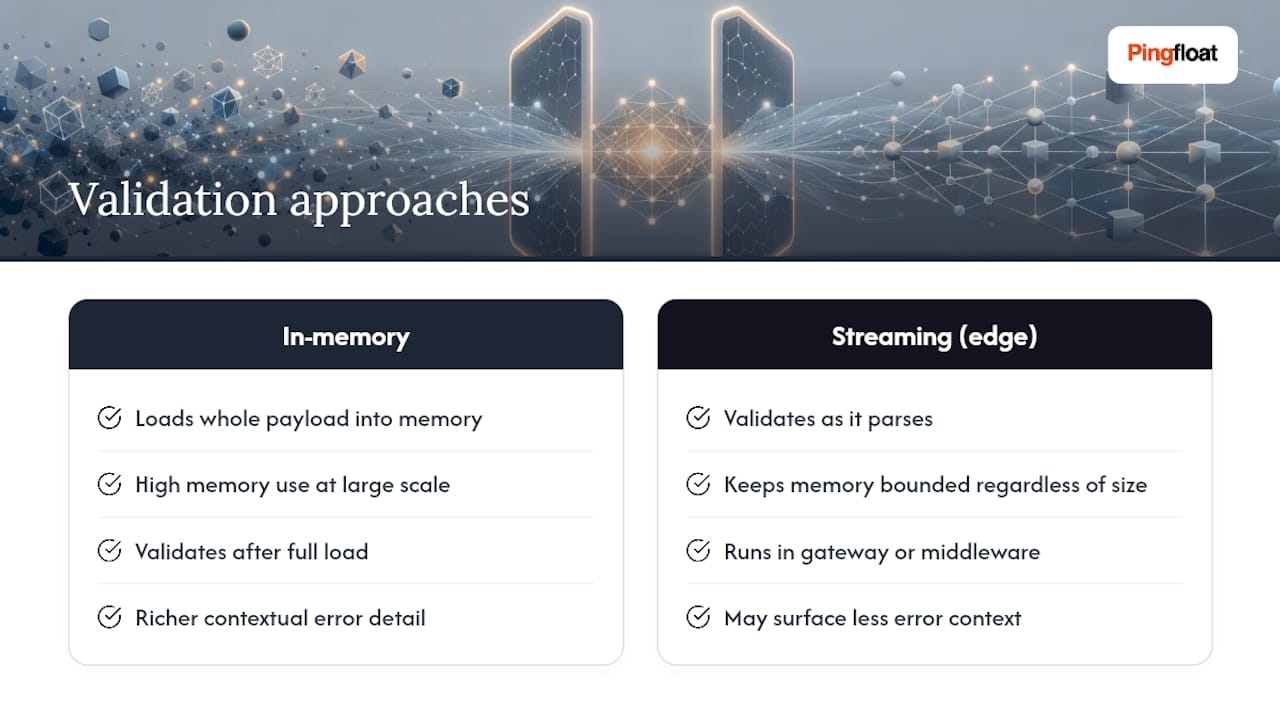
Loading a multi-megabyte JSON document fully into memory before validating it works fine at small scale and falls apart at large scale. Streaming validators, such as JsonValidatingReader in Json.NET, validate as they parse, which keeps memory use bounded regardless of payload size.
Where possible, validate at the edge, in the API gateway or request middleware, so malformed input never reaches your application logic. The tradeoff is real: streaming validators sometimes surface less contextual detail per error than a full in-memory pass. For high-throughput systems, that tradeoff is almost always worth it.
Reading Validator Errors and Fixing Them Fast
Every solid validator reports errors as JSON Pointer paths paired with a human-readable message. The Jsonic validation guide breaks down the common ones: a missing required property, a type mismatch, a failed pattern or format check, or a rejected additional property.
- Locate the path, something like
/items/2/price, to find the exact spot in the document. - Compare that node against the matching part of the schema.
- Decide whether the instance is wrong or the schema is too strict, then fix accordingly.
Example: an error reading "/user/age" must be integer when the payload has "age": "29" means the string needs converting to a number, not that the schema is broken.
A Checklist and Two Schemas You Can Run Right Now
Before shipping a schema to production, run through this list:
- Confirm
$schemais set to the draft you intend. - Validate the schema itself against its meta-schema.
- Test at least one valid and one invalid instance.
- Add both to a CI gate so future changes can't silently break validation.
- Default to
additionalProperties: falseunless you have a specific reason not to.
Example 1, simple object: the user profile schema from earlier in this guide works as a drop-in starting point for any object-shaped payload.
Example 2, conditional logic: an if/then/else block lets you require different fields based on context, for instance requiring a shippingAddress only when deliveryMethod equals "mail". The getting started guide walks through this pattern along with oneOf and dependentRequired, both common in real-world schemas that need to express "this field is required only if that one is set."
Why Schema Validation Pays Off Earlier Than Teams Expect
Teams that push schema checks to the API gateway or request middleware consistently spend less time chasing downstream bugs caused by malformed input. The pattern that works isn't complicated: validate at the boundary, fail loud, fail early. A quick loop through Pingfloat's JSON formatter and validator during development catches most schema typos before they ever reach a CI pipeline.
— Andreas
Test Your Schemas With Pingfloat's Free JSON Tools
Writing a schema is one thing. Confirming it actually rejects the payloads it should, and accepts the ones it shouldn't, is where most bugs hide. Pingfloat's JSON Formatter, Validator & Beautifier gives you a place to paste both schema and instance, see formatted output, and read error messages without spinning up a local script first.

It's built for the moments before CI matters: drafting a new schema, debugging a confusing error message from a teammate's payload, or double checking a conditional rule before you commit it. No sign up wall, no rate limit that stalls a debugging session. If your workflow also touches API health or response headers, Pingfloat's uptime monitor and response headers inspector cover the rest of the request lifecycle. Paste your next schema in and see what breaks.
Sources
- JSON Schema specification
- JSON Schema Validator — JSONLint
- Ajv — JSON Schema Validator for JavaScript
FAQ
What Are the Limitations of JSON Schema Validators?
Validators can only check what the schema describes, so a loosely written schema with few constraints will let bad data through even when the tool reports "valid." Cross-field logic and draft mismatches are also common failure points if the schema's $schema doesn't match what the validator implements.
How Do I Validate the Structure of a JSON Document?
Pair the document with a schema that declares the expected type, properties, and required fields, then run both through a validator like Ajv or an online tool to get a pass or a list of path-specific errors.
How Do I Validate a Schema Itself?
Run the schema through your library's meta-schema check, such as ajv.validateSchema(...), which confirms the schema's own syntax is valid for its declared draft before you ever test it against real data.
What Types of JSON Schema Validators Exist?
Options range from browser-based online checkers and CLI testers to language-specific libraries like Ajv for Node.js, jsonschema for Python, and streaming validators such as JsonValidatingReader in .NET for large payloads.