

Use JSON when machines exchange data; use YAML when humans write and maintain configuration files. YAML 1.2 is a strict superset of JSON, meaning any valid JSON document is also valid YAML, but that compatibility runs one direction only. JSON parses faster and stays unambiguous. YAML reads easier and supports comments, at the cost of subtle typing traps developers keep tripping over.
TL;DR:
- JSON's speed is roughly five to ten times faster than YAML's, making it essential for high-throughput API parsing and data processing.
- YAML supports comments, multi-line strings, and reusable anchors, but these features increase complexity and risk subtle indentation or type-related bugs.
- Always quote scalars prone to misinterpretation, like country codes or versions, to avoid silent errors caused by YAML's implicit type inference.
- Converting YAML to JSON is straightforward, but converting JSON to YAML causes loss of comments, anchors, and other human-friendly features.
- Use safe loading functions for YAML from untrusted sources to prevent security vulnerabilities like remote code execution.
Table of Contents
- JSON vs YAML: What Each Format Actually Is
- Syntax Side by Side: Braces vs Indentation
- Data Types, Coercion, and the Norway Problem
- When to Use JSON or YAML: A Practical Checklist
- Common Pitfalls and How to Avoid Them
- Converting Between the Two: What Survives and What Doesn't
- Performance, Tooling, and Security in Production
- How Pingfloat's Tools Fit Into Your JSON and YAML Workflow
- An Editor's Take on Standardizing Your Team's Format Policy
- Sources
JSON vs YAML: What Each Format Actually Is
JSON is a strict data interchange format built for machines. It has almost universal parser support across every language and runtime you'll touch, from JavaScript's native JSON.parse() to Python's json module. It doesn't support comments, and its syntax is rigid by design: braces, brackets, and quoted keys, nothing else.
YAML is a human friendly serialization format built for people who have to read and edit files by hand. It supports comments, anchors and aliases for reusing blocks of config, and multi-line strings that don't require escape characters. The relationship between the two matters more than most developers realize: YAML 1.2 adopted JSON's grammar as a subset, so a JSON file will parse correctly as YAML without modification. The reverse isn't true.
That asymmetry shapes almost every practical decision covered in this article. A few things worth knowing upfront:
- JSON has no comment syntax at all, by design, to keep parsing deterministic.
- YAML uses indentation instead of braces, which makes files shorter but sensitive to whitespace errors.
- YAML supports anchors (
&) and aliases (*) for referencing repeated blocks; JSON has no equivalent mechanism. - Every JSON document is valid YAML, but not every YAML document is valid JSON.
Syntax Side by Side: Braces vs Indentation
The surface differences are the first thing you notice, and they explain most of the emotional reactions developers have to each format. JSON wraps everything in braces and brackets, requires double quotes around every string key and most string values, and forbids trailing commas. YAML drops the punctuation almost entirely and relies on indentation to define structure, which is either liberating or terrifying depending on how many times you've debugged a misaligned block.

Here's the same configuration object in both formats:
JSON:
{
  "service": "api-gateway",
  "port": 8080,
  "replicas": 3,
  "env": ["production", "staging"]
}
YAML:
# Gateway service config
service: api-gateway
port: 8080
replicas: 3
env:
  - production
  - staging
Notice the comment in the YAML version. JSON simply can't do that, which is one reason config-heavy tools lean YAML. YAML also supports block scalars (| for literal multi-line strings, > for folded ones) and anchors for reusing values across a document, a DRY pattern with no JSON equivalent.
| Feature | JSON | YAML |
|---|---|---|
| Comments | Not supported | Supported with # |
| Structure | Braces and brackets | Indentation |
| Multi-line strings | Escaped ` | |
| ` only | Native block scalars (` | , >`) |
| Reuse (anchors/aliases) | Not supported | Supported (&, *) |
| Quoting | Required for keys and most strings | Optional in most cases |
Data Types, Coercion, and the Norway Problem
JSON's typing is explicit and boring, which is exactly what you want in a data format. A string is quoted. A number isn't. A boolean is true or false, nothing else. There's no ambiguity for a parser to resolve.
YAML infers types from unquoted scalars, and that inference has caused real production bugs. The most famous case is the "Norway problem": in YAML 1.1, an unquoted NO (Norway's country code) gets parsed as the boolean false, silently corrupting data. YAML 1.2's core schema narrowed these implicit conversions, but plenty of parsers in production still default to 1.1 behavior, and the trap hasn't fully disappeared from the ecosystem.
A few defensive habits solve most of this:
- Quote any scalar that could be misread as a boolean, number, or date (
"NO","2026","on"). - Confirm which YAML version your parser targets before trusting unquoted values.
- Validate incoming YAML against a schema rather than trusting inferred types.
Pro Tip: If your YAML config includes country codes, version strings, or anything that looks like yes/no/on/off, quote it explicitly. That one habit eliminates the single most common YAML parsing bug developers hit in production.
When to Use JSON or YAML: A Practical Checklist
The decision usually comes down to who's touching the file and what happens to it next. Run through these questions before picking a format:
- Who edits it? If it's a person hand-tuning values with comments explaining why, YAML wins. If it's exclusively generated and consumed by code, JSON wins.
- Who consumes it? REST and GraphQL APIs, log streams, and NDJSON pipelines are built around JSON because every client library expects it.
- Does performance matter? High-throughput services parsing thousands of payloads per second should default to JSON's speed advantage.
- Do you need comments or multi-line text? YAML handles inline documentation and long text blocks (shell scripts, SQL) far more cleanly than JSON's escaped strings.
- What does your toolchain expect? Kubernetes manifests, GitHub Actions workflows, and Docker Compose files are all YAML by convention. Fighting that convention creates friction for no benefit.
Mixed projects are common and fine: define infrastructure in YAML, exchange runtime data in JSON, and convert between the two only at the boundary where a human hands off to a machine, not throughout the pipeline.
Common Pitfalls and How to Avoid Them
Most YAML bugs come down to whitespace. Indentation errors are the number one complaint, and mixing tabs with spaces will break a parser outright since YAML forbids tabs for indentation entirely. Unquoted ambiguous scalars (dates, version numbers, boolean-looking strings) are the second most common issue. JSON has its own smaller set of traps, mainly trailing commas after the last item in an array or object, which most parsers reject outright.
The more serious pitfall is security. Older YAML loaders in some languages allowed arbitrary object construction from untrusted input, which could lead to remote code execution. Libraries like PyYAML historically shipped with unsafe defaults that instantiated arbitrary Python objects from tags in the YAML file. The fix is straightforward and non-negotiable for any YAML parsing untrusted input: use yaml.safe_load() instead of yaml.load(), and set limits on alias expansion to prevent billion-laughs style denial-of-service attacks.
- Never use tabs for YAML indentation; enforce spaces only.
- Quote scalars that could be misread as booleans, numbers, or dates.
- Reject trailing commas in JSON at the linter level, not just the parser.
- Always use safe-loading functions for YAML from untrusted sources.
Pro Tip: Add a YAML linter and a JSON schema validator to your CI pipeline, not just your editor. Catching an indentation error or a coercion bug in a pull request costs you two minutes; catching it in production costs you an incident report.
Converting Between the Two: What Survives and What Doesn't
Converting JSON to YAML is clean since JSON's grammar is a strict subset. Converting YAML to JSON is where you lose things. Comments disappear entirely, because JSON has no syntax to hold them. Anchors and aliases get expanded into their full repeated form, which can bloat file size and remove the DRY structure you built. Round-tripping YAML through JSON and back preserves the data shape in most cases, but not the human-readable scaffolding around it.
A sane conversion workflow:
- Keep the original YAML source as the source of truth when comments matter.
- Convert to JSON only at the point of consumption, not as a permanent storage format.
- Lint and validate the converted output against a schema before it ships.
- Watch for multi-document YAML files (separated by
---), which don't map to a single JSON document cleanly.
Performance, Tooling, and Security in Production
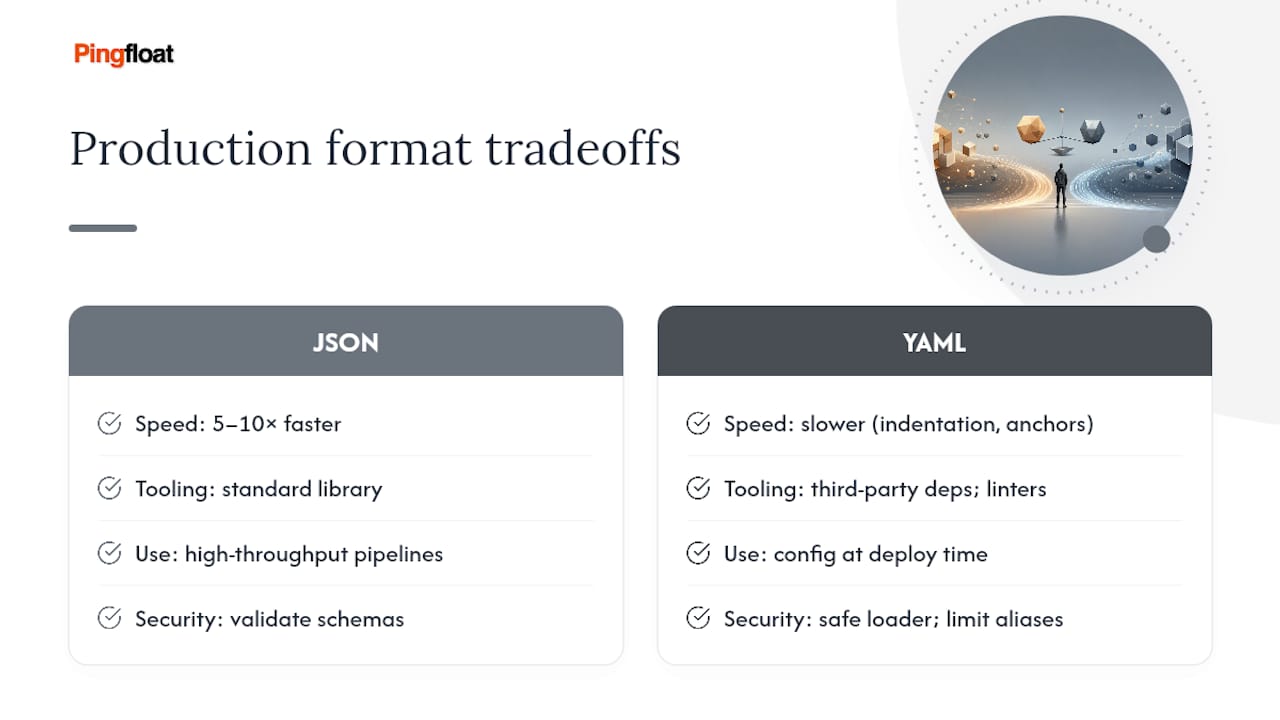
Speed is where JSON has a clear, measurable edge. JSON parsers are typically several times faster than YAML parsers across common runtime benchmarks, largely because JSON's grammar is simpler to tokenize and there's no indentation logic or anchor resolution to handle. That gap matters enormously for a service parsing thousands of API payloads per second. It matters far less for a Kubernetes manifest that gets parsed once at deploy time.
JSON's speed advantage over YAML runs roughly 5 to 10 times faster in typical parser benchmarks — a gap that's decisive for high-throughput data pipelines and irrelevant for a config file read once at startup.
Tooling favors JSON for raw availability: every language's standard library includes a JSON parser, while YAML support usually comes from a third-party dependency (PyYAML, js-yaml, SnakeYAML). YAML's tooling has caught up on the developer-experience side, though, with mature linters and formatters built specifically for catching indentation and quoting issues before they ship.
On security, the rule is simple: never load YAML from untrusted sources without a safe loader, cap alias expansion to prevent memory exhaustion attacks, and validate everything against a schema regardless of which format you're using.
How Pingfloat's Tools Fit Into Your JSON and YAML Workflow
Pingfloat's JSON Formatter and Validator gives you a fast way to catch syntax errors and pretty-print a payload before it goes into version control or a pull request. It's a quick sanity check that catches the trailing-comma and bracket-mismatch errors that slip past a tired set of eyes.
For teams enforcing schema checks in CI, Pingfloat's Schema Markup Validator and general validation tools can be wired into your pipeline alongside a YAML linter. And if you're debugging why a boolean field in a config file isn't behaving the way you expect, Pingfloat's reference on misleading boolean attribute values covers the same coercion logic that trips people up in YAML's type inference. Keep your original YAML source around whenever comments matter. A converted JSON file can't get them back.
An Editor's Take on Standardizing Your Team's Format Policy
The policy I'd push on any engineering team: JSON for anything machines send or receive, YAML for anything a human hand-edits, and a schema validator sitting between the two so neither format's flexibility becomes a liability. Skip the debate about which format is "better." It's the wrong question. Ask which one fits the job at hand.
Rolling this out takes four steps: add a linter for both formats to your pre-commit hooks, wire schema validation into CI so bad config never reaches a deploy, document your quoting rules so nobody guesses, and default to safe loaders for any YAML that touches untrusted input. None of this is glamorous work. It's the difference between a config bug you catch in review and one you catch at 2 AM.
— Andreas