

The recommended approach is short-lived access tokens (around 15 minutes) paired with server-tracked refresh tokens that rotate on every use and trigger family-wide revocation on reuse. Verify exp and signature on every request, allow only a small clock-skew leeway, and pass an explicit algorithm allowlist to your verification calls. On the client, run silent refresh through an interceptor so users never see a failed request from an expired token.
TL;DR:
- Short-lived access tokens of 5 to 15 minutes minimize damage from theft, while refresh tokens lasting up to 30 days enable session continuity.
- Always verify the
exp,nbf, andiatclaims with an explicit algorithm allowlist to prevent forgery and accept only trusted cryptographic methods.- Rotate refresh tokens on every use and link them to a family ID to detect reuse and revoke entire session chains instantly when stolen tokens are identified.
- Use a denylist with
jtientries for targeted token revocation and a token version number for immediate global account session invalidation.- Implement client-side refresh timers and interceptors that serialize refresh requests to avoid race conditions and ensure user sessions remain seamless and secure.
Table of Contents
- What Does the exp Claim Actually Require?
- How Long Should Access and Refresh Tokens Last?
- How Do You Rotate Refresh Tokens and Catch Reuse?
- Denylist, Version Numbers, or Both for Revocation
- What Client-Side Patterns Prevent Refresh Race Conditions?
- Locking Down Signature Validation and Rotating Keys
- Handling Long Jobs That Outlive a Token's TTL
- Debugging Expiration Errors: Tools and Techniques
- Why I Default to Short Tokens Plus Rotation in Production
- Debug JWT Expiry Issues Faster With Pingfloat's Free Tools
- Sources
- FAQ
What Does the exp Claim Actually Require?
The exp claim is a Unix timestamp (technically a NumericDate, meaning seconds since the epoch) that marks the moment a token stops being valid. RFC 7519 is unambiguous about the consequence: once the current time passes exp, the token must not be accepted, full stop. There's no gray zone in the spec, but there is one practical exception every implementer runs into.
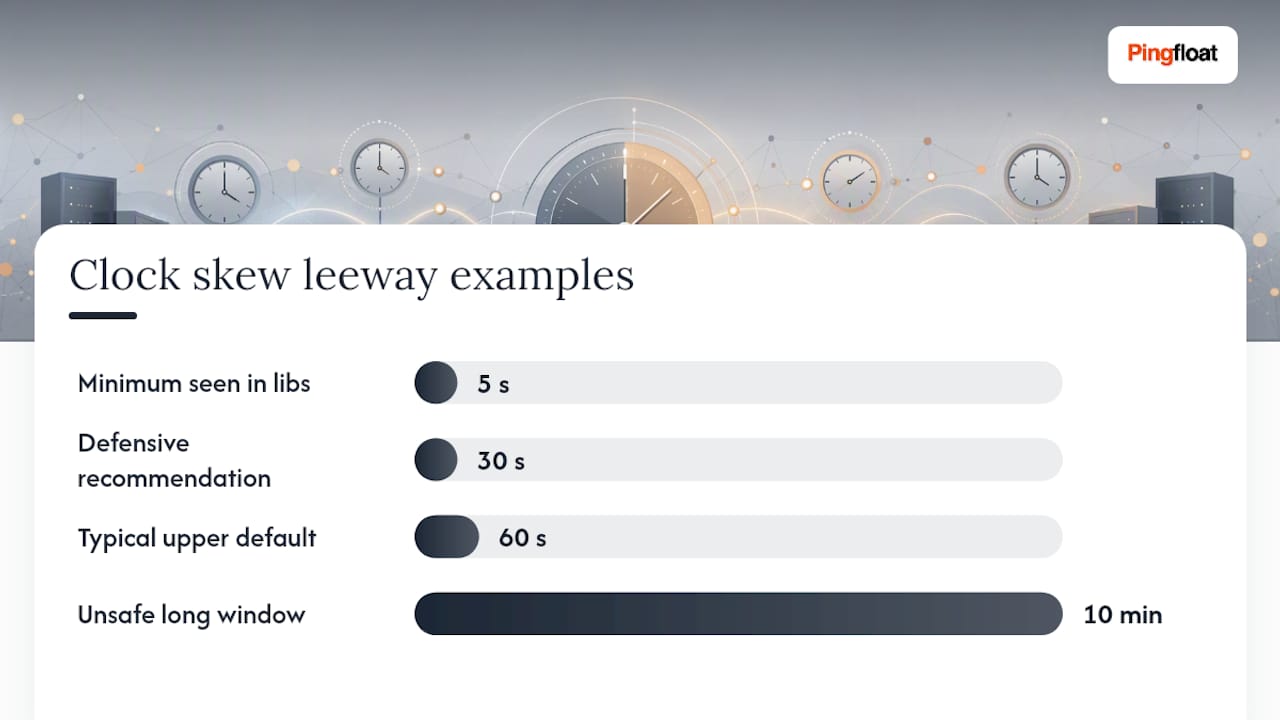
Clock drift between servers is real. A load balancer, a container host, and an auth server can disagree by a few seconds without anyone noticing, and that disagreement can cause a perfectly valid token to get rejected right at the boundary. RFC 7519 acknowledges this and says implementers may allow a small leeway for clock skew. Most JWT libraries expose this as a clockTolerance or leeway parameter, typically set between 5 and 60 seconds. Set it defensively, not generously. A 30-second window absorbs real drift; a 10-minute window just extends your attack surface.
Two other timestamp claims deserve attention alongside exp:
nbf(not before) rejects a token if it's used too early, useful for tokens issued for future-dated access windows.iat(issued at) tells you when the token was minted, which you can use to invalidate all tokens issued before a specific security event, like a forced password reset.
Verification also needs to lock down which signing algorithms it will accept. RFC 8725 requires implementers to validate cryptographic operations and pin allowed algorithms rather than trusting whatever algorithm the token header claims to use. If your verify call doesn't take an explicit algorithms: ['RS256'] argument (or your framework's equivalent), you're leaving the door open for an attacker to specify none or swap RS256 for HS256 and forge a signature using your own public key as the secret.
How Long Should Access and Refresh Tokens Last?
Access tokens should live for 5 to 15 minutes. Refresh tokens should live for 7 to 30 days, depending on how much friction your product tolerates. This isn't an arbitrary range: it's the pattern that shows up across secure implementation guides and the one OWASP's Microservices Security Cheat Sheet recommends specifically, citing 15 minutes as a sane default for access token TTL.
The logic behind the short window is simple: a stolen access token is only useful for as long as it's valid. Fifteen minutes of exposure is a very different incident than 24 hours of exposure. The trade-off is that short-lived tokens push you back toward statefulness, since something has to track refresh tokens to issue new access tokens without forcing a full re-login every 15 minutes.
Pro Tip: Treat access token TTL as a dial, not a fixed constant. Financial and admin-facing endpoints can run a shorter TTL (5 minutes) than a read-only dashboard (15 minutes), even within the same app.
Storage location matters as much as duration:
- Store refresh tokens in an HttpOnly, Secure, SameSite cookie, never in localStorage, where any injected script can read them.
- Keep access tokens in memory in single-page apps, not in persistent storage, so a page reload naturally clears them.
- Use a database-backed session or a service-side secret for server-rendered apps instead of exposing any token to JavaScript at all.
A related decision is whether your refresh token should be a JWT itself or an opaque random string mapped to a database row. Opaque tokens are the safer default: they can't be decoded, they carry no payload to leak, and revoking one is a single database write. A JWT refresh token adds cryptographic overhead for a token whose only job is to be looked up and swapped, and OWASP's guidance leans toward server-side tracking anyway, which erases most of the appeal of making the refresh token self-contained. Reach for a JWT refresh token only when you specifically need it to carry claims that a downstream service can read without a database round trip.
How Do You Rotate Refresh Tokens and Catch Reuse?
Rotation turns a silent theft into a detectable event. Every time a refresh token gets used, you issue a brand-new one and immediately invalidate the old one. If that old, now-dead token ever shows up again, you know with high confidence it was copied, and you can shut the whole session family down before real damage happens. This pattern is the backbone of modern refresh token security, and it's worth implementing exactly, not approximately.
Here's the flow, step by step:
- Client presents a refresh token. The server looks it up by its hash (never store raw tokens) and checks whether it's already been marked used or revoked.
- If valid and unused, the server issues a new access token and a new refresh token, marks the presented refresh token as used, and links the new token to the same family ID as its parent.
- If the presented token is already marked used or revoked, treat this as reuse. Revoke every token in that family immediately and force the user to log in again.
- Store metadata with each token: a hash of the token value, its
jti, the family ID, the device or user agent, and itsexpiresAt. This metadata is what makes reuse detection and forensic review possible after the fact. - Return the new refresh token to the client the same way the old one arrived (typically an HttpOnly cookie), so the client never has to manage rotation logic itself.
The family ID is the piece teams skip and then regret. Without it, revoking "the token that got stolen" only kills one link in a chain, leaving every token issued after it still valid. With a family ID, one revoke call kills the entire lineage.
Pro Tip: Log every family revocation event with the trigger reason (reuse detected, manual logout, password reset). When a support ticket comes in about "getting logged out randomly," that log is the fastest way to tell if it was fraud or just an app bug.
There's a subtler failure mode worth planning for: race conditions. If a user's app fires two refresh requests within milliseconds of each other, both requests can grab the same "unused" refresh token before either one marks it used. This looks identical to theft from the server's point of view. Guard against it with a database transaction or a short-lived lock on the token row during rotation, and debounce refresh calls on the client so this scenario is rare in the first place.
Denylist, Version Numbers, or Both for Revocation
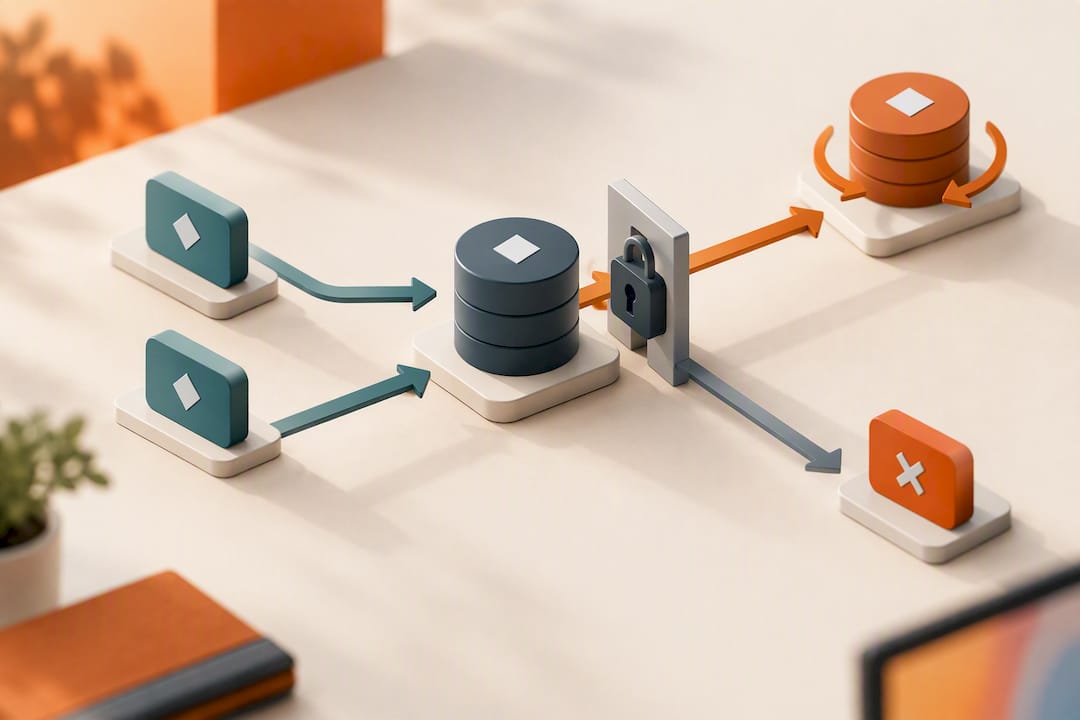
Immediate revocation needs a mechanism that short-lived tokens don't provide on their own, since a valid signature and an unexpired exp are all a JWT needs to pass verification. Two patterns cover almost every real-world case, and most production systems end up using both.
A denylist keyed on jti stores revoked token IDs in a fast lookup store like Redis, with a TTL set to match the token's remaining lifetime. That TTL detail matters: once the token would have expired naturally anyway, the denylist entry is worthless, so let it expire and keep the list from growing forever. Storage cost per entry is small, roughly 100 bytes per revoked token, which keeps this approach cheap even at meaningful scale.
A token-version integer on the user row is the blunt instrument for "kill every session this user has, right now." Increment the version, and every token that was signed with the old version number fails validation on its next check. It's a single write instead of enumerating every active token, which makes it the right tool for a password reset or a suspected account compromise.
| Method | Best for | Latency cost | Storage growth |
|---|---|---|---|
| Denylist (jti) | Revoking one specific token or session | One Redis lookup per request | Bounded by TTL auto-expiry |
| Token version | Killing all sessions for a user at once | One extra field check on verify | None, fixed per user |
Use the denylist when a user logs out of one device and you want that session dead immediately, not just expired. Use the version bump when the concern is "this account may be compromised" and you need every session gone in one operation. Neither replaces short access TTLs. Both exist to close the residual window a 15-minute token leaves open.
What Client-Side Patterns Prevent Refresh Race Conditions?
The most common bug in client-side JWT handling isn't expiration itself. It's what happens when multiple parts of your app try to refresh at the same moment.
Start with a refresh timer: schedule the refresh call to fire roughly 60 seconds before exp, not after the token has already died. This keeps the user's session invisible to them, since the access token gets swapped out before any request can fail. On page load, bootstrap this timer from whatever token is already in memory or from a silent refresh call if none exists yet.
Next, wire up an HTTP interceptor (Axios and most fetch wrappers support this natively) that watches for a 401 response, attempts exactly one refresh, and retries the original request once with the new token. This catches the edge case where the timer didn't fire in time, or the token expired mid-request due to network latency.
The part teams get wrong is concurrency. If five API calls fire at once and all five hit a 401 simultaneously, you don't want five separate refresh requests racing each other. The fix is a shared, in-flight promise: the first 401 kicks off the refresh and stores the pending promise; every other 401 that arrives while that promise is unresolved just awaits the same promise instead of starting a new refresh call. Once it resolves, all five original requests retry with the fresh token.
- Start a refresh timer on login and on page bootstrap, set to fire before expiration.
- Route all outgoing requests through an interceptor that checks for 401 responses.
- On a 401, check for an existing
refreshPromise. If one exists, await it. If not, create it. - Retry the original request exactly once after the shared promise resolves.
- If the retry also fails, clear local session state and redirect to login.
Pro Tip: Log clock-skew mismatches you detect client-side (a token whose exp looks already expired at issue time) with the actual client and server timestamps attached. This is the fastest way to catch a misconfigured server clock before users start complaining.
Locking Down Signature Validation and Rotating Keys
Verification is where JWT implementations fail quietly, because a misconfigured verify call still returns a result. It just returns the wrong one.
The rule that matters most: always pass an explicit algorithm allowlist to your verify function, and never let the token's own header dictate which algorithm gets used to check it. RFC 8725 exists largely because early JWT libraries trusted the header, which let attackers submit a token claiming alg: none or swap the intended asymmetric algorithm for a symmetric one and sign it with a key they could guess. Every mainstream JWT library today supports an explicit algorithms parameter. Use it every time.
Beyond the algorithm, a complete validation pass checks:
iss(issuer) matches the expected authorization server.aud(audience) matches the service that's supposed to accept this token.sub(subject) resolves to a real, active user or service account.jti,exp, andnbfare all present and internally consistent.
Key rotation follows a predictable sequence, and skipping steps is what causes outages. Publish the new public key to your JWKS endpoint first, before you start signing anything with it. Begin signing new tokens with the new key. Keep the old key available for verification until every token signed with it has naturally expired. Only then remove the old key from the JWKS response. Cut that grace period short, and every token issued in the last few minutes before rotation suddenly fails verification for no reason a user can explain.
Handling Long Jobs That Outlive a Token's TTL
A 15-minute access token and a background job that runs for two hours are fundamentally incompatible, and trying to force them to work together usually means someone embeds a long-lived token in a worker process out of frustration. Don't do that.
Instead, give long-running jobs their own credential path. A server-to-server client credential, or an ephemeral delegation token scoped narrowly to just the resources that job needs, keeps the job running without smuggling a user's session into a process that might run unattended for hours. If a job genuinely needs an extended-lifetime token, pair that extension with compensating controls: a reduced scope that can't touch anything outside the job's specific task, and an IP allowlist that limits where the token can even be presented from.
Retry logic needs its own guardrail. A job that fails, retries, fails again, and refreshes its token on every attempt can turn a transient error into a refresh storm that trips your rotation reuse detection. Build exponential backoff into retries, and cache a refreshed token for its full remaining lifetime instead of requesting a new one on every retry attempt.
Debugging Expiration Errors: Tools and Techniques
Most "expired token" bug reports aren't really about expiration. They're about a timezone mismatch, a misread timestamp, or a cookie flag that silently blocked the refresh token from ever reaching the server.
Start by decoding the token itself. Pingfloat's JWT Decoder breaks a token into its header, payload, and signature so you can check exp, iat, nbf, and jti at a glance, along with confirming which algorithm actually signed it. If the exp value looks wrong, run it through the Unix Timestamp & Epoch Converter to see the human-readable date and catch a timezone assumption that's throwing off your math.
If the access token looks fine but a refresh never arrives, the problem is often the cookie, not the token. The Response Headers Inspector shows whether your Set-Cookie header actually carries HttpOnly, Secure, and SameSite the way you intended, since a missing flag can cause a browser to silently drop the cookie in certain contexts.
A few habits catch problems before users report them:
- Watch for a spike in 401 responses immediately followed by a refresh call. That pattern often means your refresh timer is firing too late.
- Alert on any refresh token flagged as reused. A single occurrence deserves investigation even before you're sure it's an attack.
- Log device and IP metadata on every refresh so a family revocation event comes with context instead of a bare timestamp.
Why I Default to Short Tokens Plus Rotation in Production
For anything consumer-facing, I reach for the short-access-token-plus-rotation pattern almost every time, because it fails safely. A stolen access token expires on its own inside 15 minutes; a stolen refresh token gets caught the moment it's reused. That combination doesn't require the team to be perfect. It just requires the detection logic to work once.
Enterprise systems complicate this. Some SSO integrations and legacy identity providers hand you access tokens with hour-long lifetimes you can't change, and in those cases the compensating control has to move server-side: heavier session monitoring, aggressive anomaly alerts, and a jti denylist you're willing to check on every request even though it costs a lookup.
What I care about operationally is less about the TTL number and more about what happens when something goes wrong. Reuse detection without alerting is just a log entry nobody reads. The teams that handle this well treat a detected reuse event as an incident, not a data point, and they've built the user-facing recovery flow (a clear "you've been logged out for your security" message) before they ever need it.
— Andreas
Debug JWT Expiry Issues Faster With Pingfloat's Free Tools
Use instant, free tools built specifically for this kind of troubleshooting instead of guessing your way through a token debugging session, without the need for signup, install, or an account.

When a support ticket comes in claiming a session "expired too early," the JWT Decoder shows you the raw payload and algorithm in seconds, so you can confirm whether the exp value or the client's clock is actually the problem. Pair it with the Unix Timestamp & Epoch Converter to translate exp and nbf values across timezones without doing the math by hand, and use the Response Headers Inspector to verify your refresh token cookie is actually shipping with HttpOnly, Secure, and SameSite set the way your code intends.
Open the JWT Decoder now and paste in a token from your current session to see exactly what your auth server is issuing.
Sources
For the standards themselves, go straight to the source: RFC 7519 defines the exp claim and NumericDate format, and RFC 8725 lays out the current best practices around algorithm validation and key handling.
For implementation depth beyond the standards:
- How to build a secure authentication system with JWT and refresh tokens
- OWASP Microservices Security Cheat Sheet
- Refresh Tokens Done Right - DEV Community
FAQ
How Long Should a JWT Take to Expire?
Access tokens should expire in 5 to 15 minutes, with 15 minutes being the figure OWASP recommends as a secure default. Refresh tokens can last much longer, typically 7 to 30 days, since they're stored server-side and can be revoked or rotated independently of the access token's lifetime.
How Long Does a Refresh Token Last Before It Expires?
Most implementations set refresh token lifetimes between 7 and 30 days, a range practical guides commonly recommend as a balance between security and user convenience. Some apps use a sliding expiration that extends the window each time the token refreshes, while others enforce a fixed maximum session length regardless of activity.
Why Does My JWT Say It's Expired Even Though I Just Got It?
This almost always points to a clock mismatch between the server issuing the token and the server or client verifying it. Check the token's exp value with a decoder like Pingfloat's JWT Decoder, convert it with a timestamp tool, and compare it against your actual server time. A verification call with too small a clock-skew leeway, or none at all, will also reject a token that's genuinely still valid by a few seconds.
How Do I Check the Expiration of a JWT?
Decode the token's payload and read the exp field, which is a Unix timestamp in seconds. Pingfloat's JWT Decoder does this instantly without requiring you to write any code, and you can cross-reference the raw number against a Unix timestamp converter to see the exact date and time it represents in your local timezone.