

Fix these first: title tag, meta description, robots/canonical directives, and viewport/charset. Titles and canonicals influence rankings and indexing directly; descriptions and Open Graph tags shape click-through rate. The single best move today is a sitewide meta-tag audit that flags missing titles, duplicate descriptions, and rogue noindex tags on your highest-traffic pages, then fixes those before anything else.
TL;DR:
- Properly optimized title and canonical tags are essential, with titles under 60 characters and containing primary keywords early to maximize rankings and CTR.
- Meta descriptions should be concise, with the first 120 characters highlighting key features or benefits to improve click-through rates, especially on mobile.
- Use absolute URLs in canonical tags and ensure charset tags appear early in the HTML to prevent display issues and crawlers from ignoring critical meta information.
- Regularly audit meta tags on high-impression pages first, fixing duplicates and errors, then monitor changes in rankings and CTR over subsequent weeks.
- Validate all meta tags with free tools before deployment, focusing on syntax correctness and social preview appearance to prevent issues that could harm SEO and sharing performance.
Table of Contents
- What Are Meta Tags for SEO, and Which Ones Actually Matter?
- Writing Title Tags That Rank and Get Clicked
- Meta Descriptions: What Actually Drives the Click
- Robots, Canonical, and Indexing Controls: Keep the Right Pages Visible
- Open Graph, Twitter Cards, and Schema: Winning the Preview
- How to Implement Meta Tags Without Breaking Your Head Section
- The Meta Tag Mistakes That Quietly Kill Rankings
- The Audit Workflow: Crawl, Validate, Fix, Monitor
- Practitioner Perspective: When Meta Tag Fixes Actually Move the Needle
- Validate Your Fixes Before You Ship Them
- Where to Verify the Rules Yourself
- Sources
- FAQ
What Are Meta Tags for SEO, and Which Ones Actually Matter?
A meta tag is a snippet of code in a page's <head> section that tells browsers and search engines something about the page without displaying content on the page itself. The HTML meta element uses name, http-equiv, and charset attributes to define metadata, drama directives, and character encoding respectively, and that distinction matters more than most guides admit. Not every meta tag does the same job, and treating them as one category is how audits go sideways.
Split them into four functional buckets and the whole topic gets easier to manage.
Ranking-adjacent tags. The title tag and the canonical link aren't meta tags in the strict <meta> sense (title uses <title>, canonical uses <link rel="canonical">), but they live in the same <head> neighborhood and get grouped with meta tags in every practical audit. Search Engine Land calls the title tag the single most critical on-page element for both rankings and user engagement. Get this one wrong and nothing else in the list compensates.
Snippet and CTR tags. Meta description, Open Graph tags, and Twitter Card tags don't move rankings directly. They control what shows up in the search result or social preview, which decides whether someone clicks. A page ranking third with a strong description can outperform a page ranking first with a truncated or auto-generated one.
Indexing control. Meta robots directives, X-Robots-Tag headers, and canonical tags tell crawlers what to index, what to follow, and which URL is the authoritative version. Google's documentation on supported meta tags lists exactly which directives it honors, including robots values like noindex, nofollow, nosnippet, and max-snippet.
Rendering and technical setup. Viewport and charset tags don't touch content relevance at all. They tell the browser how to render the page and how to decode the text. Get these wrong and the page might display broken characters or fail mobile-friendliness checks, which drags down every other signal indirectly.
Here's a quick reference for what each core tag does and the one rule to follow for it:
- Title tag: Placed in
<head>as<title>Page Title</title>. Rule: unique on every page, keyword near the front, no stuffing. - Meta description:
<meta name="description" content="...">. Rule: write for humans clicking a search result, not for algorithms. - Meta robots:
<meta name="robots" content="index, follow">. Rule: default toindex, followunless there's a specific reason to block a page. - Canonical:
<link rel="canonical" href="https://example.com/page">. Rule: always use the absolute URL, never a relative path. - Viewport:
<meta name="viewport" content="width=device-width, initial-scale=1.0">. Rule: use this exact value on every page unless you have a documented reason not to. - Charset:
<meta charset="UTF-8">. Rule: it must appear within the first 1,024 bytes of the HTML document.
That charset placement rule trips up more developers than you'd expect. Browsers scan a limited number of bytes before deciding how to parse the page, and a charset tag buried under a long inline script or a stack of comments can get ignored entirely, causing garbled text on load.
Writing Title Tags That Rank and Get Clicked
Search Engine Land's meta tags guide puts the title tag at the top of the on-page priority list, above description, above schema, above almost everything else you can control directly in <head>. Google can rewrite it in the results, but a well-written title reduces the odds of that happening.
There's no hard character limit anymore. Google truncates based on pixel width, not character count, so a title full of narrow letters (i, l, t) fits more characters than one full of wide ones (m, w, capital letters). As a working rule, keep titles under about 60 characters and put the primary keyword within the first half of the string, where it carries more weight and survives truncation.
A few reliable templates by page type:
- Product page:
Product Name | Key Feature or Benefit | Brand - Blog/article:
Specific Claim or Number : Supporting Detail - Category page:
Category Name : What's Included | Brand - Local service:
Service + City | Brand
Rewrite example: "Home" becomes "Free Website Uptime Monitor : Real Time Alerts | Pingfloat." The second version tells a searcher exactly what they get before they click.
Finding duplicate or missing titles across a large site by hand isn't realistic. A crawl-based meta tag checker surfaces every page missing a title or sharing one with another URL in minutes, which is the fastest way to catch the problem before it costs you rankings on pages you didn't even know were affected.
Pro Tip: Sort your title audit by organic impressions first, not alphabetically by URL. Fixing a duplicate title on a page nobody visits wastes the afternoon; fixing it on your highest-impression page can move rankings within a crawl cycle.
Meta Descriptions: What Actually Drives the Click
A meta description doesn't influence rankings, but it's the single biggest lever you control over click-through rate once a page is already ranking. Search Engine Land notes this distinction plainly: description is not a ranking factor, but it shapes whether someone clicks the result in front of them.
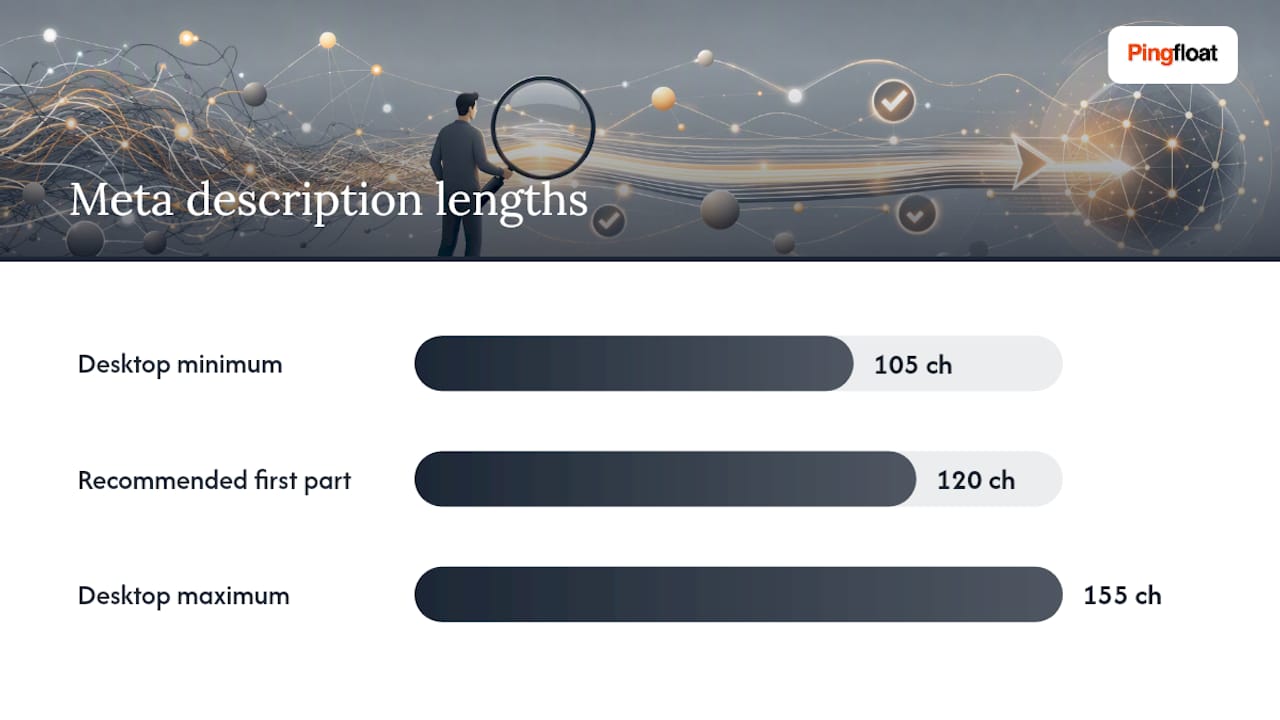
Google displays roughly between 105 and 155 characters on desktop, while mobile search often truncates descriptions more aggressively. Write your strongest sentence into the first 120 characters and treat everything after as a bonus for desktop readers. Front loading matters because mobile snippets often get truncated earlier than most writers expect.
A structure that works across almost any page type:
- Feature: name the specific thing the page offers.
- Benefit: say what the reader gets from it.
- Call to action: give them a reason to click now rather than scroll past.
Example: "Free website uptime monitor with instant email alerts. Check response times and get notified the moment your site goes down." That's feature, benefit, urgency, in under 130 characters.
Google rewrites meta descriptions on a large share of search results when it decides the existing one doesn't match the query well or reads too generically. Reduce the odds by matching description content closely to what the page actually delivers, avoiding boilerplate copy repeated across pages, and keeping each description specific to that URL's content. A tool like AmmarAI's meta description generator can speed up first drafts across a large batch of pages, though every generated line still needs a human check against the actual page content before it ships.
Robots, Canonical, and Indexing Controls: Keep the Right Pages Visible
Google's supported meta tags documentation lays out exactly which robots values it honors, and misreading this is one of the fastest ways to disappear from search results by accident.
- Know the common robots values.
noindexremoves a page from results entirely.nofollowtells crawlers not to pass link value through outbound links on that page.nosnippetblocks Google from showing a text snippet or preview.max-snippet:-1allows an unlimited snippet length, while a specific number caps it. - Use absolute URLs in canonical tags. A relative canonical path can get misinterpreted during crawling, especially on sites with multiple subdomains or staging environments. Always write the full
https://URL. - Never combine noindex with a robots.txt block on the same page. If robots.txt blocks a URL, crawlers never see the
noindextag in the first place, because they never fetch the page. The result is a page that stays indexed with old cached data indefinitely. Remove pages from the index by allowing the crawl and lettingnoindexdo its job, then block via robots.txt only after it's confirmed dropped. - Reserve noindex for pages with no search value (thank-you pages, internal search results, filtered duplicates) and use canonical tags for pages that are legitimately similar but should consolidate ranking signals into one URL.
Open Graph, Twitter Cards, and Schema: Winning the Preview
Open Graph tags control how a page appears when shared on Facebook, LinkedIn, and most other platforms. The core set is og:title, og:description, og:image, and og:url, and the image should be sized at 1200×630 pixels to avoid awkward cropping across platforms.
Twitter Cards work almost identically, but with one shortcut worth knowing: Twitter falls back to Open Graph tags automatically when Twitter-specific tags (twitter:card, twitter:title) are missing, according to a meta tags cheat sheet from ValidateHTML. That means a smaller site can skip building a full duplicate Twitter tag set and still get a clean preview, as long as Open Graph is solid.
Schema markup (JSON-LD) is a different animal entirely. It's not a meta tag, but it lives in the same <head> and serves a related purpose: helping search engines understand page content well enough to generate rich results. It's not a direct ranking signal, but Search Engine Land notes it improves how a result looks in the SERP, which indirectly lifts CTR.
| Schema type | Common use case | Result it can trigger |
|---|---|---|
| FAQPage | Pages answering multiple questions | Expandable FAQ snippet in results |
| Article | Blog posts, news content | Byline, date, and headline display |
| Product | E-commerce listings | Price, availability, review stars |
Validate every JSON-LD block before deployment. A single missing comma breaks the entire schema silently, and you won't know until rich results stop appearing weeks later.
How to Implement Meta Tags Without Breaking Your Head Section
Static HTML implementation is straightforward once you know the order that matters:
<meta charset="UTF-8">goes first, within the opening lines of<head>, ahead of any long inline scripts or comments.<title>Your Page Title</title>follows.<meta name="description" content="Your description here.">and<meta name="viewport" content="width=device-width, initial-scale=1.0">come next.<link rel="canonical" href="https://example.com/page">closes out the core set.
React and Next.js sites cause a specific, recurring problem: if meta tags are injected client side with JavaScript, some crawlers render them fine, but others (and some social-media preview bots) fetch the raw HTML and never execute the script. The fix is server-side rendering, or a head-management helper that guarantees tags are present in the initial HTML response, not just after hydration.
Testing takes three quick steps: view the page source (not the rendered DOM) to confirm tags are actually in the raw HTML, run curl against the URL to see exactly what a crawler receives with no JavaScript executed, and run the page through a meta tag checker to catch anything a manual read misses, including malformed attributes and truncated content.
The Meta Tag Mistakes That Quietly Kill Rankings
Most sites don't have one big meta tag problem. They have five small ones stacked across thousands of pages, and each one alone looks minor.
- Duplicate titles or descriptions across category or filter pages, usually from a CMS template that never got a unique-content rule applied.
- Rogue noindex tags left over from a staging deployment or a plugin default that nobody remembered to reverse.
- Incorrect or missing canonicals, especially relative paths that resolve differently across HTTP and HTTPS versions of a site.
- Meta refresh redirects used instead of proper server-side redirects. Google's own documentation confirms meta refresh is supported but discourages it; a real 301 redirect passes signals more cleanly and loads faster.
- Leftover meta keywords tags, a holdover from the 1990s that Backlinko's meta tags guide confirms Google has ignored for ranking purposes for years.
Triage by traffic first: fix the highest-impression pages today, then work down the list. A duplicate meta tag reference walks through exactly how these collisions happen on templated sites and how to resolve them without breaking the pages that already rank fine.
Pro Tip: Before touching a single tag, export a list of every indexed URL from Search Console's coverage report. Cross-reference it against your CMS's actual page list. Pages that show up in one but not the other are usually where the worst problems hide.
The Audit Workflow: Crawl, Validate, Fix, Monitor
A meta tag audit that skips straight to fixing without measuring first is guesswork with extra steps. Run it as four stages instead:
- Crawl the full site (or a representative sample on very large sites) to pull every title, description, robots directive, and canonical into one spreadsheet.
- Validate flagged pages with an HTML validator, a schema checker, and an Open Graph checker to confirm tags aren't just present but syntactically correct.
- Fix the highest-traffic offenders first, based on impressions and clicks from Search Console, not alphabetical URL order.
- Monitor CTR, impressions, and index coverage in Search Console for two to four weeks after each batch of fixes to confirm the change actually moved the numbers.
Server log analysis adds a layer most audits skip: comparing which URLs Googlebot actually requests against which ones you assume it crawls tells you whether your canonical and robots setup is working as intended, or quietly being ignored.
Practitioner Perspective: When Meta Tag Fixes Actually Move the Needle
Meta tag work earns its keep fastest on pages that already rank, get real impressions, but convert those impressions into clicks at a rate lower than similar pages nearby. That gap is almost always a title or description problem, and it's fixable in an afternoon with results visible in Search Console within a couple of weeks.
Where meta tags stop being the priority: sites with crawlability failures, thin or duplicate content, or broken internal linking. Rewriting titles on a section of the site Google barely visits is effort spent in the wrong place. A short, prioritized audit beats a full rewrite when time is limited, because it forces you to fix the pages with the most to gain instead of touching everything evenly. Treat meta tags as an iterative pass, not a one-time project. Revisit the highest-impression pages every quarter, because search intent and competitor snippets both shift.
— Andreas
Validate Your Fixes Before You Ship Them
Fixing meta tags by eye across a multi-page site means missing something. Pingfloat's meta tag checker scans a page or a full crawl for missing titles, duplicate descriptions, and malformed robots directives in one pass, so the audit workflow above takes minutes instead of a full afternoon of manual view-source checks.

Pair it with the HTML validator to confirm your charset and viewport tags sit exactly where they need to in the document head, and the Open Graph checker to preview exactly how a page will look when someone shares it on social media before it goes live. All three tools are free, which matters if you're auditing a large site without a dedicated SEO budget. The workflow is simple: scan, fix the flagged issues, then re-validate to confirm nothing broke in the process. Start with the meta tag checker on your highest-traffic page right now and see what it flags.
Where to Verify the Rules Yourself
For anything you want to double-check against the primary source, MDN's meta element documentation covers every valid attribute, and Google's crawling and indexing docs list exactly which directives it honors and which it ignores. Both are free, current, and worth bookmarking alongside your validator of choice.
Sources
- Meta tags and attributes that Google supports
- Search Engine Land: Meta tags guide
- Backlinko: Meta tags guide
FAQ
What Are Meta Tags for SEO?
Meta tags are HTML elements in a page's <head> that describe the page to search engines and browsers, controlling indexing behavior, snippet appearance, and rendering rather than the visible page content itself.
What Are the Best Meta Tags for SEO?
The title tag, meta description, meta robots, canonical link, and viewport tag cover the highest-impact work; the title and canonical carry the most weight for rankings and indexing, while description and Open Graph tags drive click-through rate.
What Are Examples of Meta Tags?
Common examples include <title>, <meta name="description">, <meta name="robots" content="index, follow">, <meta charset="UTF-8">, <meta name="viewport">, and social tags like <meta property="og:title">.
Is the Meta Keywords Tag Important for SEO?
No. Google confirmed years ago that it does not use the meta keywords tag for ranking, so modern SEO work should focus on title, description, robots, canonical, and schema instead.
What's the Ideal Meta Description Length in 2026?
Write your key message into the first 120 characters, since mobile search truncates snippets earlier than desktop, and let the full description run up to roughly 155 characters for desktop display.