
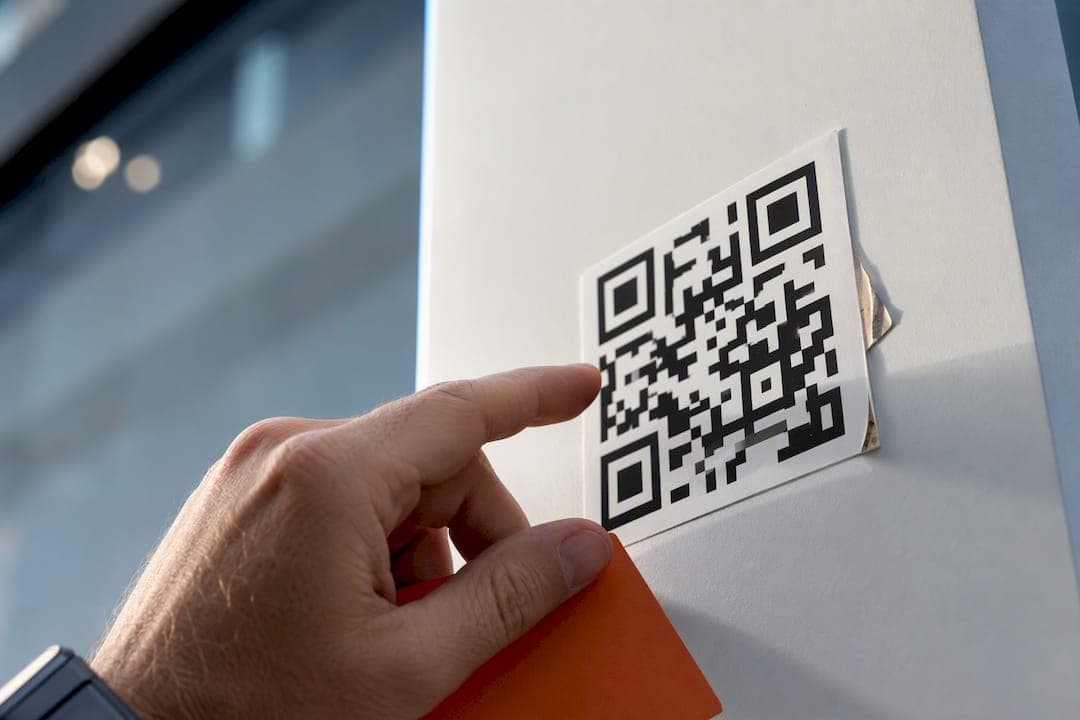
Real qr code security comes down to six enforceable platform controls, not user warnings: URL validation against threat feeds, HTTPS/TLS enforcement, redirect chain auditing, rate limiting, tamper-evident audit logs, and admin MFA. Every one of these has to run twice, once at creation and again on every edit, because a clean destination today can be swapped for a malicious one tomorrow without regenerating the code. Tools offering QR code generators exist precisely to give development teams that kind of enforced hygiene rather than optional best practices.
TL;DR:
- Validation of QR code destinations must occur both at creation and on every edit to prevent linking to malicious sites later.
- Implement TLS checks, redirect chain audits, and session hardening measures to prevent hijacking and redirect-based attacks.
- Generate QR codes server-side, require header-based authentication, stream images in memory, and serve through short-lived tokens for secure creation.
- Regularly expire or rotate high-value codes, and store scan data with anonymization techniques like hashing to protect user privacy.
- Maintain tamper-evident, append-only audit logs and enforce strict workspace security measures, including MFA, session timeouts, and controlled privilege roles.
Table of Contents
- Core Security Controls for QR Code Management
- How Do You Harden the QR Generation Pipeline?
- Deployment Patterns That Work in Production
- Privacy-Aware Tracking for QR Scan Data
- Audit Logging and Compliance Readiness
- What to Do When a QR Code or Admin Account Is Compromised
- When Should Dynamic QR Codes Expire or Rotate?
- Do Digital Signatures Actually Verify QR Code Authenticity?
- Should You Warn Users About Suspicious QR Codes?
- Threat Modeling for QR Code Attack Surfaces
- Secure Storage and Encryption for QR Code Data
- Why Enforcement Beats Feature Checklists
- How Pingfloat Supports Secure QR Code Practices
- Sources
Core Security Controls for QR Code Management
Most QR platforms validate a destination once, at creation, and never look at it again. That's the gap attackers exploit: edit the target URL after the code ships, and the printed or embedded code now points somewhere dangerous with zero visual change.
URL validation needs to happen in layers. Check the format and scheme first (reject anything that isn't https://), then run the domain against threat-intelligence feeds, then screen for lookalike domains using character substitution or homoglyph tricks. This has to fire on creation and on every subsequent edit, since enforcing allowlist checks as part of the save transaction is what stops post-creation retargeting.
TLS enforcement means more than blocking http://. Verify the certificate chain, confirm the common name matches the destination, and flag near-expiry certificates before they lapse mid-campaign. A free SSL checker makes this a five-second lookup instead of a manual OpenSSL command.
Redirect chain auditing matters because attackers rarely point a QR code straight at malware. They chain redirects through two or three intermediate hosts, and domain-shadowing through multi-hop redirects slips past systems that only check the first URL.
Common implementation pitfalls:
- Validating only at creation, never on edit
- Trusting client-side redirect resolution instead of tracing hops server-side
- Rate-limiting generation but not redirect resolution or destination updates
- Skipping session hardening (missing HttpOnly, SameSite, or Secure cookie flags) on admin dashboards
- Granting broad admin roles instead of scoped RBAC permissions
Pro Tip: Cache destination validation results for a short time interval of about half a minute to one minute instead of checking on every scan. This keeps redirect latency low while still closing the window an attacker would need to hijack a code in real time.
How Do You Harden the QR Generation Pipeline?
A secure generation endpoint is mostly about what never touches the browser. Here's the build order that avoids the common leaks:
- Generate server-side, proxy everything. The browser never talks directly to a QR rendering service with a live API key. All requests route through your own backend, which holds the credentials.
- Require header-based authentication. Accept
X-Api-Keyin request headers only, and explicitly reject any endpoint that still accepts a key as a GET query parameter. Query strings end up in logs, browser history, and referrer headers. - Render images in memory. Generate the QR bitmap or SVG, stream it to the response, and discard it. No temp files on disk, no cached copies that outlive the request. Pair this with
Cache-Control: no-storeheaders. - Rate-limit every endpoint separately. Generation, redirect resolution, and destination-update endpoints each need their own throttle. A reasonable starting point is to implement a fixed request ceiling per API key over a rolling window, configured independently per endpoint rather than one global limit.
- Whitelist inputs, sanitize outputs. Restrict accepted destination formats and QR types explicitly. Escape SVG output to prevent injected markup, and sanitize vCard or Wi-Fi payload fields since these embed structured data that gets parsed by the scanning device.
- Tokenize downloads. Serve generated images through short-lived, single-use download tokens instead of permanent static URLs.
Scan-anomaly monitoring deserves a line item here too: flag any code whose scan volume jumps sharply past its own rolling baseline, since a sudden spike often means the code was reprinted somewhere the owner didn't intend, or is being probed by an automated scanner.
Deployment Patterns That Work in Production
Dashboard hardening is where most teams cut corners, because it feels like internal tooling rather than a public attack surface. It isn't. Anyone who compromises an admin session can retarget every live QR code your organization has issued.
A workable baseline includes CSRF tokens on every state-changing form, idle session timeouts of a moderate duration, typically under an hour, and a forced re-authentication step before high-impact actions like bulk destination edits or API key regeneration. Cookie flags matter as much as the auth logic itself: HttpOnly, SameSite, and Secure flags should be non-negotiable defaults, not configuration options someone forgets to enable.
The Live Console pattern, where the frontend never receives the raw API key and instead calls a server-side proxy that injects it, is one of the cleanest ways to keep credentials out of browser HTML entirely.
A dynamic QR platform is only as secure as its lifecycle controls. The ability to disable a code instantly, soft-delete it into a recoverable trash state, and redirect disabled codes to a controlled landing page (rather than a dead link or, worse, a default error page an attacker could exploit) separates a real management platform from a static image generator.
Configuration variables worth setting explicitly rather than trusting to defaults: an API throttle limit and window, a session idle timeout, and a disabled-code redirect target. Each one closes a specific, known gap.
Privacy-Aware Tracking for QR Scan Data
Scan analytics are useful for spotting anomalies and measuring reach, but raw IP logging turns a marketing tool into a compliance liability. The fix isn't to skip tracking. It's to store less.
- Hash incoming IPs with a per-platform salt at ingest time, using something like HMAC-SHA-256 so raw IPs never reach disk.
- Store a truncated hash prefix for coarse geo mapping instead of a full reversible address.
- Resolve location to country or region level, never GPS coordinates, and account for the fact that Private Relay and corporate proxies will systematically shift apparent geography.
- Use a persistent cookie-based visitor ID with a stated retention window, and offer an opt-out that stops new writes without breaking redirect functionality.
- Filter bot traffic using user-agent signatures so scan counts reflect actual human scans rather than crawler noise.
Pro Tip: If you're logging UTM parameters alongside scan events, strip them before storage if they contain anything resembling PII. Marketing teams sometimes append email addresses or customer IDs to UTM strings without realizing analytics pipelines will store them indefinitely.
Audit Logging and Compliance Readiness
Enterprise buyers ask for two things almost every time: proof that logs can't be quietly edited, and an export format their compliance tooling can ingest without custom parsing.
- Keep append-only, tamper-evident logs for every state change: creation, edits, destination swaps, deletions, and admin permission changes.
- Record actor identity, timestamp, prior value, new value, and IP origin for each logged event, not just a generic "updated" entry.
- Export logs in structured JSON or CSV, and retain them for 12 to 24 months depending on your industry's audit cycle.
- Support domain allowlists at the workspace level so no individual member can point a code at an unapproved destination.
- Offer SSO for admin accounts and enforce workspace-wide policies (MFA, session limits) rather than leaving them as per-user toggles.
None of this is exotic. It's the same audit posture ISO 27001 and SOC 2 assessors already expect from any system that handles user-facing redirects, applied to a QR platform instead of a generic web app.
What to Do When a QR Code or Admin Account Is Compromised
- Contain immediately. Pause the affected QR code or repoint it to a neutral incident landing page. Rotate the API key tied to the account and force a password reset. Revoke every active admin session, not just the suspected one.
- Investigate the scope. Export the tamper-evident audit log for the affected code and account, then trace the full redirect chain history to identify exactly when the destination changed and who or what triggered it.
- Identify the entry point. Cross-reference the edit timestamp against admin login logs. A single edited destination is usually easier to trace than a batch compromise, where an attacker with dashboard access retargets several codes in one session.
- Remediate and recover. Rotate or reissue affected codes rather than reusing the same short code once it's been publicly associated with a bad destination. Notify stakeholders whose campaigns or print materials used the compromised code.
- Schedule a follow-up audit. Review whether MFA was enforced on the compromised account, whether rate limits caught the anomaly early, and whether the incident landing page redirect worked as intended.
When Should Dynamic QR Codes Expire or Rotate?
A QR code without an expiration policy is a permanent, unmonitored liability. Print a code on packaging or signage, and it can stay scannable for years after the campaign, product, or event it pointed to is gone.
Set an explicit expiry date at creation for any code tied to a time-bound campaign, event, or limited product run. Once expired, redirect scans to a controlled landing page rather than letting the link go dead, since a broken QR code trains users to distrust the format generally.
Rotation policy matters separately from expiry. High-value codes, ones printed on physical assets that are expensive or slow to replace, such as building signage, vehicle wraps, or product packaging, should have their underlying destination reviewed on a fixed schedule (quarterly is reasonable) even if the code itself never expires. This catches drift: a destination that was safe and current at launch but now points to a decommissioned page, an expired promotion, or worse, a domain that lapsed and got re-registered by someone else.
Static codes, the kind with the destination baked directly into the pixel pattern, can't be rotated at all. That's the core argument for dynamic codes in anything beyond a one-time personal use case: the short code stays printed and permanent, while the destination underneath stays editable and auditable. Build expiry and rotation into your platform's data model from day one. Retrofitting it onto codes already in the field means tracking down every physical instance, which is rarely realistic.
Do Digital Signatures Actually Verify QR Code Authenticity?
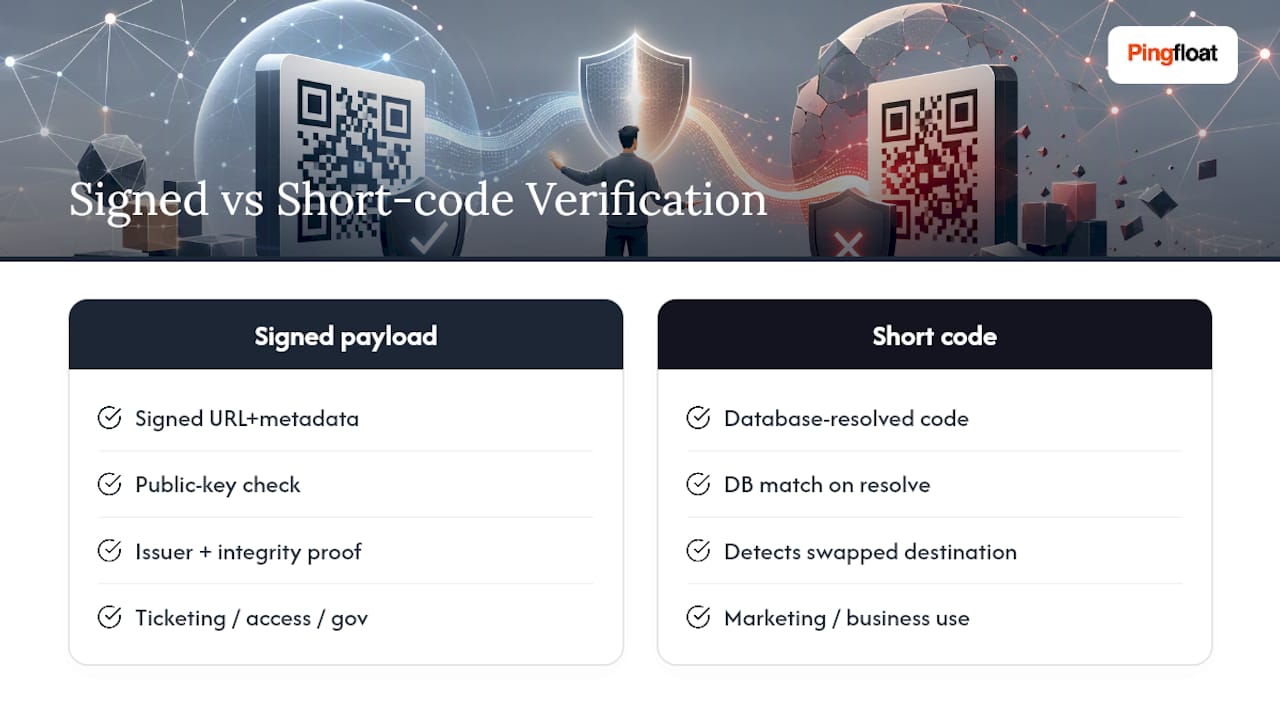
Signing the payload inside a QR code, rather than just trusting whatever URL it decodes to, adds a verification layer that most platforms skip entirely. The mechanism is straightforward: the platform signs the destination URL and metadata with a private key at generation time, and the verifying party (a scanning app, a checkpoint system, or a backend service) checks that signature against the public key before trusting the payload.
This matters most in contexts where the code authenticates something beyond a simple link: ticketing, access badges, supply chain tracking, or government identity documents. A signed payload lets the verifier confirm the code was issued by the claimed authority and hasn't been altered since signing, even if the physical code itself was reprinted or copied.
For general marketing and business use, full cryptographic signing is often more infrastructure than the use case justifies. What's worth adopting from the same principle is simpler: verify that a scanned code's destination matches what your own system generated, by checking the short code against your database on every resolution rather than trusting whatever is embedded in the printed pattern. That's a lighter-weight authenticity check, but it accomplishes the same goal, confirming the code hasn't been swapped for a different destination since it was issued.
Where signature verification earns its complexity is ticketing and access control, where a forged or duplicated code has direct financial or physical-security consequences.
Should You Warn Users About Suspicious QR Codes?
End-user warnings are a secondary layer, not a substitute for the platform controls that prevent a malicious destination from existing in the first place. That said, a well-timed warning does catch cases where a legitimate code gets physically tampered with after printing (a sticker placed over a real code, for instance).
A useful pattern is an interstitial confirmation page for any redirect the platform's own threat-feed check flags as newly registered, previously reported, or mismatched against the domain the code owner originally configured. Show the actual destination URL before redirecting rather than resolving silently, so a user has a chance to notice something's wrong before they land on a spoofed login page.
This only works if it's rare. An interstitial on every single scan trains users to click through without reading, the same fatigue problem that plagues cookie consent banners. Reserve the warning for codes that actually trip a validation flag, and keep the platform-level checks doing the bulk of the work upstream.
Threat Modeling for QR Code Attack Surfaces
QR codes introduce an attack surface that's easy to underestimate because the code itself looks static and harmless. The actual risk concentrates in three places: the generation endpoint, the redirect resolution layer, and the admin interface that controls both.
At the generation endpoint, the threats are injection through malformed input (a destination field crafted to break output sanitization) and API key exposure if generation happens client-side. At the redirect layer, the threat is destination hijacking through compromised credentials or an unvalidated edit path, plus multi-hop redirect chains that hide a malicious final destination behind several legitimate-looking intermediate hops. At the admin interface, it's credential compromise, session hijacking, and privilege escalation from a low-permission account to one that can edit any code in the workspace.
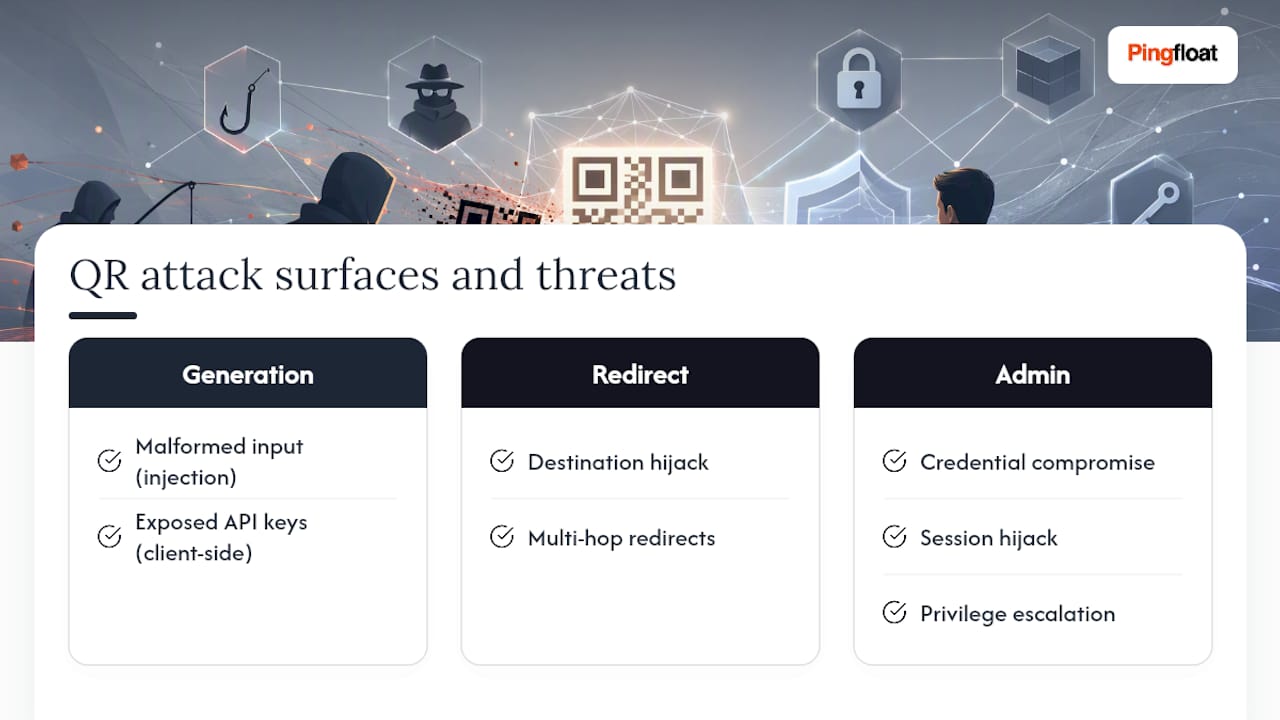
Mapping these three surfaces against your specific implementation, rather than applying a generic checklist, tells you where to spend engineering time first. A platform issuing codes for internal building access has a very different risk profile than one issuing codes for a retail loyalty campaign, even though both use the same underlying technology.
Secure Storage and Encryption for QR Code Data
Destination URLs, API keys, and any embedded payload data (vCard fields, Wi-Fi credentials, payment references) need to be encrypted at rest, not just protected in transit. Database-level encryption handles the storage layer, but secrets management deserves its own separate system: API keys and signing keys belong in a dedicated secrets manager, never in application config files or environment variables checked into version control.
For payload data embedded directly in the QR code (as opposed to a redirect target), treat it the same way you'd treat any user-submitted data field: validate the type and length before storage, and encrypt anything sensitive, like a Wi-Fi password embedded in a Wi-Fi QR type, using the same standard you'd apply to a password field anywhere else in your system.
Backup and export processes need the same scrutiny as the primary database. A tamper-evident audit log that's beautifully encrypted in production but exported unencrypted for a quarterly compliance review has a gap that auditors increasingly know to check for. Key rotation policy should cover signing keys and API keys on a defined schedule, not just when a breach forces the issue.
Why Enforcement Beats Feature Checklists
Most QR security advice reads like a shopping list: add this control, enable that toggle. What actually reduces incidents is enforcement at the workspace level, not the availability of a feature someone can opt into and forget.
Teams that treat every QR code as a first-class, time-bound resource, with an owner, an expiry date, and a scheduled review, catch problems weeks before teams relying on ad-hoc fixes even notice something's wrong. A quarterly fifteen-minute audit of active codes finds more real issues than any single security feature added in isolation. The platform matters less than whether someone is actually accountable for what it's pointing to.
— Andreas
How Pingfloat Supports Secure QR Code Practices
Pingfloat's free suite gives you the verification layer that sits underneath everything covered here. The QR code generator supports managed, editable destinations instead of locking a URL into the printed pattern permanently, so you can rotate or disable a code without reprinting it.

Before you point any code at a production domain, run it through the SSL checker to confirm the certificate chain is valid and won't lapse mid-campaign. The response headers inspector checks whether your landing page is actually sending the cookie flags and cache-control headers this article recommends, rather than assuming your framework's defaults are already correct. All three tools are free to use directly at Pingfloat, no account required for a quick check before you commit a QR code to print.
Sources
- qr-track (GitHub) — example self-hosted QR management
- GBHackers: QR codes attack analysis
- QRCodeFYI: Secure QR generation guide