

SPF, DKIM, and DMARC are the three DNS-based controls that stop attackers from spoofing your domain and tell mailbox providers your mail is legitimate. SPF authorizes which servers can send for your domain, DKIM cryptographically signs your messages, and DMARC ties both together and tells receivers what to do when a message fails. Start by publishing SPF and DKIM, then add DMARC with p=none and a reporting address to watch traffic before you enforce anything.
TL;DR:
- Most failures stem from having multiple SPF records or exceeding the 10 DNS lookup limit, which causes validation errors or unclear results.
- Proper DKIM setup requires publishing a 2048-bit key and ensuring the selector matches the signing server to avoid signature failures.
- Moving from monitoring to enforcement should be gradual, starting with
p=noneand slow percentage increases to prevent legitimate mail disruptions.- Regular DNS verification is crucial after any change to prevent silent breakage of SPF, DKIM, or DMARC, especially during platform migrations or DNS edits.
Table of Contents
- What Do SPF, DKIM, and DMARC Actually Check?
- How Do SPF, DKIM, and DMARC Work Together?
- How Do You Check SPF, DKIM, and DMARC Right Now?
- How Do You Set Up SPF, DKIM, and DMARC Step by Step?
- When Should You Move DMARC From Monitoring to Reject?
- What Are the Most Common SPF, DKIM, and DMARC Mistakes?
- How Do You Rotate DKIM Keys Safely?
- How Do SPF, DKIM, and DMARC Affect Deliverability?
- How Do You Read DMARC Aggregate and Forensic Reports?
- How Do Third-Party Email Services Fit Into This?
- How Do BIMI and ARC Compare to SPF, DKIM, and DMARC?
- Pingfloat's Take: Treat DNS as the Source of Truth
- Sources
- FAQ
What Do SPF, DKIM, and DMARC Actually Check?
Each protocol answers a different question, and understanding the split matters before you touch DNS.
SPF checks the envelope sender, the address used in the SMTP "MAIL FROM" and HELO exchange, not the From header a person sees in their inbox. A domain publishes a single DNS TXT record starting with v=spf1, followed by mechanisms like include:, ip4:, ip6:, a, and mx that list authorized senders. Two rules trip people up constantly: you can only have one SPF TXT record per domain, and evaluation stops after 10 DNS lookups, per RFC 7208. Each include: you add toward a third-party sender consumes part of that budget.
DKIM works differently. Your outbound mail server signs each message with a private key, and the receiving server fetches the matching public key from a DNS TXT record at selector._domainkey.yourdomain.com. The selector is just a label your provider assigns (Google might use google, Mailchimp might use k1), so a domain can run multiple DKIM keys for multiple senders simultaneously. Use 2048-bit keys where your provider supports them; 1024-bit still works but offers a thinner security margin.
DMARC lives at _dmarc.yourdomain.com as a TXT record and layers policy on top of both. Tags like p=none, p=quarantine, and p=reject tell receivers what to do on failure, while aspf and adkim set alignment strictness, and rua= designates where aggregate reports get sent, per RFC 9989.
How Do SPF, DKIM, and DMARC Work Together?
DMARC doesn't run its own checks. It reads the results SPF and DKIM already produced and applies one rule: a message passes DMARC if either SPF or DKIM authenticates and that authenticated identifier aligns with the visible From domain. Aligning on just one is enough. This is why relying on SPF alone is risky, and why pairing SPF with DKIM gives you a real safety net.
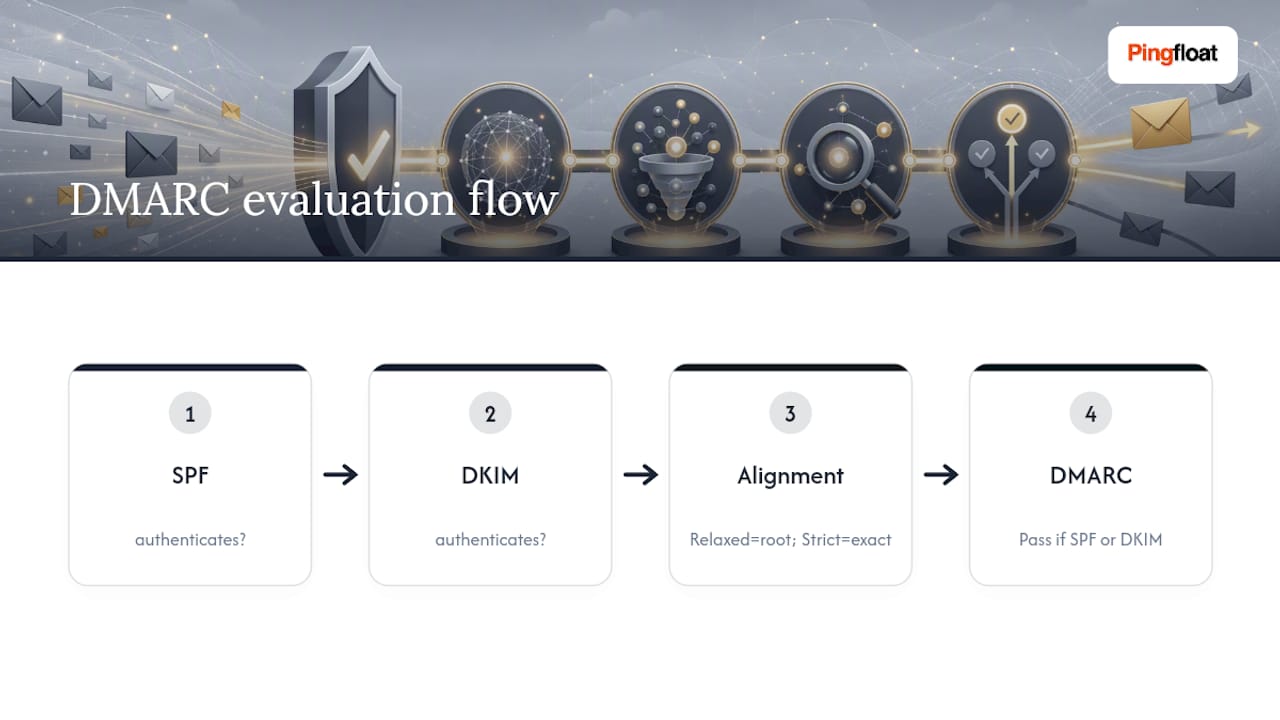
Alignment comes in two flavors. Relaxed alignment (the default most organizations use) accepts a matching root domain, so mail.yourdomain.com aligns fine with yourdomain.com. Strict alignment demands an exact match. Start relaxed; strict alignment causes more false failures than it prevents.
Forwarding and mailing lists are where SPF typically breaks, because the forwarding server becomes the new envelope sender and it's rarely on your SPF record. DKIM usually survives forwarding since the signature travels with the message body and headers. This is exactly why DMARC's "either/or" pass logic exists, and it's also why ARC (Authenticated Received Chain) has become a practical patch for legitimate forwarders and mailing lists that would otherwise break DKIM signatures in transit.
How Do You Check SPF, DKIM, and DMARC Right Now?
You can verify all three records in a few minutes without installing anything. Command-line lookups give you the ground truth; header inspection tells you what actually happened on a real message.
- SPF: run
dig TXT yourdomain.comand look for the string starting withv=spf1. - DKIM: run
dig TXT selector._domainkey.yourdomain.com, swapping in your actual selector, and confirm av=DKIM1record with a public key appears. - DMARC: run
dig TXT _dmarc.yourdomain.comand confirm the policy and reporting tags are present. - Headers: open a received message's raw source (Gmail's "Show original" works well) and read the
Authentication-Resultsline forspf=,dkim=, anddmarc=status, as detailed in Linuxize's authentication walkthrough. - Free checkers: tools like MailSlurp's email auth checker probe roughly 20 common DKIM selectors automatically and return all three results in one report, useful when you don't know which selector a provider used.
For a real-world stress test, send an actual message through a mail-tester style service rather than trusting DNS lookups alone. Records can look perfect and still fail if a sending IP isn't actually covered.
How Do You Set Up SPF, DKIM, and DMARC Step by Step?
Skipping the inventory step is the single most common setup mistake. Before you write a single record, list every service that sends mail as your domain: your email provider, your CRM, your helpdesk, your marketing platform, any transactional email API. Missing one here is what causes legitimate mail to fail once you enforce DMARC later.
- Inventory every sending source. Write down each platform and whether it needs an SPF include, its own DKIM selector, or both.
- Publish a conservative SPF record. Something like
v=spf1 include:exampleservice.com include:anotherservice.com ~allcovers known senders and soft-fails everything else while you're still discovering gaps. - Enable DKIM on every sender. Each platform generates its own key pair; publish the public half as a TXT record at its assigned selector, in the format
v=DKIM1; k=rsa; p=[public key]. Use 2048-bit keys and rotate them periodically. - Publish DMARC in monitoring mode. A starting record looks like:
v=DMARC1; p=none; rua=mailto:dmarc-reports@yourdomain.com; pct=100. This tells receivers to do nothing punitive yet, just report back. - Monitor reports for two to four weeks, then move toward enforcement once every legitimate sender shows up clean.
Pro Tip: Keep SPF on a soft fail (~all) rather than a hard fail (-all) while you're still discovering senders. A hard fail on an incomplete record can silently drop mail from a service you forgot to inventory; a soft fail flags the gap without blocking delivery, per practitioner guidance from Edos.
When Should You Move DMARC From Monitoring to Reject?
Jumping straight from p=none to p=reject is how well-intentioned teams knock out their own newsletter or invoicing system. Microsoft's guidance and most vendor playbooks recommend a gradual ramp instead.
- Weeks 1 to 4: stay at
p=none. Collect aggregate reports and confirm every legitimate sending source is passing SPF or DKIM with alignment. - Move to
p=quarantinewith a low percentage tag (pct=10orpct=25), confirm no critical service, like billing or password resets, shows failures in reports, then ramp the percentage upward over a few weeks. - Reach
p=quarantine; pct=100, hold there for another reporting cycle, then shift top=rejectonce reports show a clean pass rate across every known sender.
If legitimate mail starts bouncing after you tighten enforcement, don't panic and roll everything back. Check which specific sender failed in the aggregate report, add a scoped SPF include or fix the missing DKIM selector for that one service, and re-verify before ramping further.
What Are the Most Common SPF, DKIM, and DMARC Mistakes?
Most authentication failures trace back to a handful of repeat offenders.
- Two SPF TXT records on one domain. DNS treats this as invalid; merge them into a single
v=spf1string with combined mechanisms. - Exceeding the 10-lookup limit. Each nested
include:counts. Flatten includes or drop unused ones rather than stacking third-party ranges endlessly. - DKIM signature missing entirely. Usually means the sending platform's DKIM feature was never toggled on, or the selector published in DNS doesn't match what the server is actually signing with.
- Reading the wrong identity in a failure. The
Authentication-Resultsheader separatessmtp.mailfrom(the SPF identity) fromheader.from(what the recipient sees) and the DKIMd=domain; a DMARC failure means neither aligned withheader.from, even if SPF or DKIM individually passed elsewhere. - Forwarding breaks SPF. Sender Rewriting Scheme (SRS) on the forwarding server, leaning on DKIM's forward-resilience, or asking a third party to configure a custom return path are the three practical workarounds.
How Do You Rotate DKIM Keys Safely?
DKIM keys aren't a set-it-and-forget-it record. A private key that never changes is a growing liability, especially for high-volume senders where a compromised key could sign spoofed mail indefinitely without detection.
Rotate keys on a fixed schedule rather than waiting for a reason. Every six to twelve months is a reasonable default for most organizations; higher-risk or high-volume senders sometimes rotate quarterly. The safest rotation method uses two selectors at once: publish a new key under a fresh selector (say dkim2 instead of dkim1) while the old one is still active, switch your sending infrastructure to sign with the new key, confirm mail is passing DKIM under the new selector for a few days, then remove the old selector's DNS record.

Never delete the old selector before confirming the switch worked. If your mail server is still signing with the retired key after you pull its public record from DNS, every message it sends will fail DKIM instantly.
Key length matters too. Use 2048-bit RSA keys wherever your provider allows it; 1024-bit keys are still technically valid but offer a thinner margin against brute-force attacks, and some providers have started deprecating them outright. If you manage your own mail server rather than relying on a platform's built-in signing, document which key is active, its creation date, and its selector name somewhere outside DNS. Losing track of an active selector is a common reason old, forgotten DKIM records linger for years after a platform migration.
How Do SPF, DKIM, and DMARC Affect Deliverability?
Mailbox providers use authentication status as one of the strongest signals in deciding whether a message lands in the inbox, the spam folder, or gets dropped outright. Major providers now expect SPF and DKIM as a baseline for basic senders, and DMARC specifically for anyone sending in bulk.
The relationship compounds over time. A domain with consistent SPF and DKIM passes builds a stronger sending reputation with providers like Gmail and Outlook, which in turn makes future messages more likely to land in the inbox. A domain with no authentication, or inconsistent authentication where some sending sources pass and others fail, sends a mixed signal that providers increasingly interpret as risk. That risk shows up as filtering, not outright blocking. A message doesn't have to fail completely to get deprioritized. Marginal signals, like SPF passing but not aligning with DMARC, still ding your standing over time even when individual messages technically go through.
There's also a spoofing angle that ties directly back to your own brand. Every phishing email successfully sent using your domain, without any authentication stopping it, damages the reputation real recipients associate with your name, independent of anything you actually sent. The FBI's Internet Crime Complaint Center has repeatedly flagged domain impersonation as a persistent driver of successful phishing, which is precisely the failure mode DMARC enforcement is built to close off. Getting SPF, DKIM, and DMARC configured correctly isn't just a deliverability checkbox. It's what determines whether an attacker can send convincing fraud mail as you at all.
How Do You Read DMARC Aggregate and Forensic Reports?
DMARC aggregate reports (sent to the address in your rua= tag) arrive as XML files, typically daily, from every major receiver that saw mail claiming to be from your domain. Each report breaks traffic down by sending IP, showing whether SPF passed, whether DKIM passed, and whether either aligned with your From domain. This is the single most useful diagnostic tool in the entire setup process, because it surfaces sending sources you may not have known existed, like a forgotten marketing tool or a shadow IT platform someone signed up for two years ago.
Raw XML is unreadable at scale, so most teams run reports through a parser that converts them into a readable table or dashboard. Look specifically for IP addresses generating volume that don't match any service on your inventory list; those are either legitimate senders you forgot to authorize, or genuine spoofing attempts worth investigating.
Forensic reports (ruf=) work differently. Instead of daily summaries, they send a copy of an individual failing message, or a redacted version of one, in near real time. Many major providers no longer send forensic reports due to privacy concerns, so don't build your monitoring plan around expecting them. Aggregate reports are the reliable, always-available signal. Check them weekly during initial rollout, then monthly once you've reached p=reject and traffic has stabilized, watching for any new sending IP that suddenly appears without authentication.
How Do Third-Party Email Services Fit Into This?
Nearly every organization sends mail through more than just its primary email host. Marketing platforms, CRM tools, transactional email APIs, helpdesk software, and payroll systems often all send as your domain, and each one needs its own SPF include or its own DKIM selector, sometimes both.
The integration pattern varies by service. Some third-party platforms hand you a ready-made SPF include string and a DKIM selector to publish, no extra configuration needed. Others require you to enable "custom return path" or "branded links" settings inside their dashboard before DKIM signing actually activates. A depressingly common failure mode: a marketing platform gets connected, sends mail successfully for months using its own default domain for authentication, and only breaks DMARC alignment once someone finally tightens the policy to quarantine or reject, because nobody realized the platform was never actually signing with your domain's alignment in mind.
This is exactly why the inventory step in setup isn't optional busywork. Every third-party service is a potential blind spot, and DMARC aggregate reports are how you catch the ones you missed the first time. When adding a new email vendor going forward, ask directly whether it supports DKIM signing under your domain and whether its default SPF include is documented, before you connect it to production sending.
How Do BIMI and ARC Compare to SPF, DKIM, and DMARC?
BIMI and ARC solve different problems than SPF, DKIM, and DMARC, and neither replaces the core three.
BIMI (Brand Indicators for Message Identification) lets your logo display next to your emails in supporting inboxes like Gmail and Yahoo. It's a visibility and trust feature, not an authentication mechanism, and it has a hard prerequisite: DMARC must already be enforced at p=quarantine or p=reject before BIMI will work at all. Most implementations also require a Verified Mark Certificate, an added cost most casual senders skip. Think of BIMI as a reward for having already done the DMARC enforcement work, not a shortcut around it.
ARC (Authenticated Received Chain) solves the forwarding problem directly. When a mailing list or forwarding service modifies a message in transit, it can break the original DKIM signature and cause SPF to fail because the envelope sender changed. ARC lets each intermediary server add a signed record confirming the message passed authentication at that hop, letting the final receiving server trust the chain even though the original signatures no longer validate cleanly. It's a patch for a known weak point, not a replacement for SPF, DKIM, or DMARC.
Neither BIMI nor ARC does anything useful without SPF, DKIM, and DMARC already working underneath them.
Pingfloat's Take: Treat DNS as the Source of Truth
DNS is where every email authentication decision actually lives, which means DNS is also where things quietly break. A registrar migration, a new mail platform, or someone "cleaning up" old TXT records can silently invalidate SPF, DKIM, or DMARC without a single error message appearing anywhere obvious.
The practical fix is treating an authentication check as a routine part of infrastructure hygiene, not a one-time setup task. Any time you touch DNS, whether that's adding a new sending platform, migrating registrars, or updating an unrelated record, re-verify SPF, DKIM, and DMARC the same day. Pingfloat's NS record reference is worth bookmarking if you need a refresher on how DNS delegation actually works before you start editing zone files, and the Response Headers Inspector is a useful companion check for confirming your broader server configuration hasn't drifted alongside your DNS changes. Pair that habit with a website uptime monitor so DNS-related outages get caught before they turn into a support ticket.
— Andreas
Sources
For protocol specifics, go straight to RFC 7208 for SPF and RFC 9989 for DMARC. For vendor-specific rollout behavior, Microsoft's email authentication overview covers enterprise nuances well. For hands-on verification, keep Linuxize's walkthrough and a combined checker like MailSlurp handy for quick audits.
- RFC 9989 - DMARC (Domain-based Message Authentication, Reporting, and Conformance)
- Email authentication overview (Microsoft Defender for Office 365)
- SPF, DKIM and DMARC: Setup Guide | Proofpoint US
- Email Authentication Explained: SPF, DKIM, and DMARC | Linuxize
FAQ
What Is SPF, DKIM, and DMARC?
SPF, DKIM, and DMARC are three DNS-based email authentication methods that work together to stop domain spoofing. SPF authorizes which servers can send mail for a domain, DKIM signs messages with a cryptographic key to prove they weren't altered, and DMARC ties both together by checking alignment with the visible From address and telling receivers what to do on failure.
How Do I Check SPF, DKIM, and DMARC?
Run dig TXT yourdomain.com for SPF, dig TXT selector._domainkey.yourdomain.com for DKIM, and dig TXT _dmarc.yourdomain.com for DMARC to see your published records directly. To confirm a real message passed, open its raw headers (Gmail's "Show original" works) and check the Authentication-Results line for spf=, dkim=, and dmarc= status.
How Do I Set Up SPF, DKIM, and DMARC?
Inventory every service that sends mail as your domain first, then publish a single SPF TXT record covering all of them, enable DKIM signing on each sending platform, and finally add a DMARC record at _dmarc.yourdomain.com starting with p=none to monitor traffic before enforcing anything. Move to quarantine and eventually reject only after reports confirm every legitimate sender authenticates cleanly.
Does DMARC Need Both SPF and DKIM?
DMARC needs at least one of them to pass and align with the visible From domain, not necessarily both at once on every message. In practice, configuring both SPF and DKIM gives you redundancy, since SPF often fails on forwarded mail while DKIM tends to survive it.