

Use long, unique passphrases stored in a password manager, and turn on phishing-resistant multifactor authentication for anything that matters. Screen every new password against a breached-password blocklist, replace factory default credentials immediately, and stop forcing routine password changes unless there's evidence of a breach. This is what NIST and CISA both recommend, and it's a real departure from the password rules most of us grew up following.
TL;DR:
- Passwords should be at least 15 to 16 characters long, with passphrases of four to seven unrelated words being the most effective.
- Reusing passwords across multiple sites significantly increases the risk of credential stuffing attacks and account compromises.
- Organizations should screen new passwords against a breach list, avoid regular forced changes, and only require resets after confirmed breaches.
- Multi-factor authentication, especially using hardware keys or authenticator apps, greatly enhances security on high-value and admin accounts.
- Using password managers and creating unique, memorable passphrases provides a practical method for individuals to maintain strong, usable passwords.
Table of Contents
- What Makes a Password Strong: Length, Passphrases, and Uniqueness
- What a Password Policy Should Look Like for Organizations
- How to Create a Strong Password You'll Actually Remember
- Why NIST and CISA Moved Away from Complexity Rules
- Rolling Out Strong Password Guidelines on a Real Team
- Pingfloat's Free Tools for Putting These Guidelines into Practice
- Where to Read the Original Guidance
- Sources
What Makes a Password Strong: Length, Passphrases, and Uniqueness
Length beats complexity, full stop. NIST's current guidance recommends a minimum of 15 characters for passwords used as a single factor, while CISA sets the bar at 16 characters or a passphrase built from four to seven unrelated words. Every extra character multiplies the number of guesses an attacker's software has to run through, which is why "Tr0ub4dor&3" style substitution tricks, once considered clever, add far less protection than just typing more characters.
Passphrases solve the problem of length feeling like a burden. A string like "harbor cactus violin thunder" is longer than most "complex" 10-character passwords and dramatically easier to recall, because your brain stores words, not arbitrary character strings.
Uniqueness matters as much as length. When one site gets breached, attackers immediately test that same email-and-password combination against banks, email providers, and shopping accounts. This is called credential stuffing, and it's the reason a single reused password can cascade into a dozen compromised accounts.
- Length first: 15 to 16 characters minimum, longer where the account allows it.
- Passphrases over passwords: four to seven random words beat an eight-character jumble of symbols.
- One password, one account: no exceptions, no shared logins across services.
- Composition rules matter less now: NIST no longer recommends mandatory mixes of symbols, numbers, and capital letters as a primary defense.
Every extra character in a password roughly doubles the computing time needed to crack it by brute force, which is the mathematical reason length has become the dominant factor in modern password guidance rather than an arbitrary preference.
Some sites still require a symbol or number, and that's fine to comply with. The nuance is that composition rules alone don't stop attackers, and they never should carry more weight than length and uniqueness.
What a Password Policy Should Look Like for Organizations
A password policy built on outdated assumptions creates more risk than it removes. Here's the sequence that reflects where the evidence actually points:
- Set a generous minimum length and permit passphrases up to 64 characters, rather than capping users at 12 or 16.
- Screen every new password at creation against a blocklist of known breached credentials, so employees can't accidentally reuse "Password123!" or a password already exposed in a prior leak.
- Drop mandatory periodic rotation. Force a change only when there's evidence of compromise, not on a 90-day calendar. Microsoft's own guidance warns that forced rotation pushes people toward predictable patterns like incrementing a number at the end of the same base word.
- Require phishing-resistant MFA on admin accounts, finance systems, and anything with elevated access. Authenticator apps and hardware security keys hold up far better than SMS codes, which can be intercepted or SIM-swapped.
- Provide a company-managed password manager and evaluate single sign-on or identity and access management to cut down how many passwords staff need to remember in the first place.
- Change every default credential on routers, cameras, and admin panels before deployment. Factory passwords are public knowledge and the first thing an attacker tries.
- Back it with technical controls: rate limiting on login attempts, account lockout after repeated failures, and passwords stored using modern salted hashing rather than anything reversible.
Pro Tip: Keep your blocklist small and current rather than massive and stale. A tight list of the most commonly breached passwords, refreshed regularly, blocks more real attacks with less user friction than a bloated list nobody maintains. This approach is backed by research on password policy evidence, which found that blocklist screening consistently outperforms strict composition mandates at stopping credential stuffing.
How to Create a Strong Password You'll Actually Remember
The honest answer for most people is: let software do it. A password manager generates a long, random string for every account and remembers it so you don't have to, which removes the single biggest reason people reuse passwords in the first place. Protect the manager itself with MFA, because it's now the one login that matters most.
When you need to create something memorable by hand, the four-to-seven word method works well. Pick words that have no connection to each other and none to your personal life. "River, umbrella, forklift, cinnamon" is far stronger than a pet's name with a birth year tacked on, because there's no logical thread an attacker or algorithm can guess toward.
Never store passwords in a plain text file, a sticky note, or an unencrypted spreadsheet. If you write a master passphrase down at all, keep it in a physically secure location separate from your devices, treated the way you'd treat a spare house key.
Where a passkey option exists, take it. Passkeys replace the password entirely with cryptographic keys tied to your device, which NIST notes removes phishing risk almost completely since there's no shared secret to steal.
| Pattern | Example structure | Verdict |
|---|---|---|
| Weak | Short word plus a number ("Summer") | Cracked in seconds, widely reused |
| Acceptable | 12 random characters with mixed case | Better, but still hard to remember |
| Strong | 4 to 7 unrelated words as a passphrase, or manager-generated string | Long, unique, and resistant to guessing |
Why NIST and CISA Moved Away from Complexity Rules
The shift toward length over complexity isn't a trend. It's a response to years of breach data showing that the old rules failed on their own terms. NIST's SP 800-63B now treats length as the primary strength factor, permits passphrases with spaces, and requires screening against breached-password lists instead of demanding arbitrary symbol mixes.
Large-scale breach analyses show that a significant share of stolen passwords fully complied with legacy composition rules, meeting every requirement for symbols and capitalization, yet were still stolen through phishing or malware rather than brute force.
That single finding, drawn from empirical breach research, undercuts the entire premise of complexity mandates. If a rule-compliant password gets phished anyway, the rule wasn't the thing protecting the account. Multifactor authentication was doing that job, or should have been.
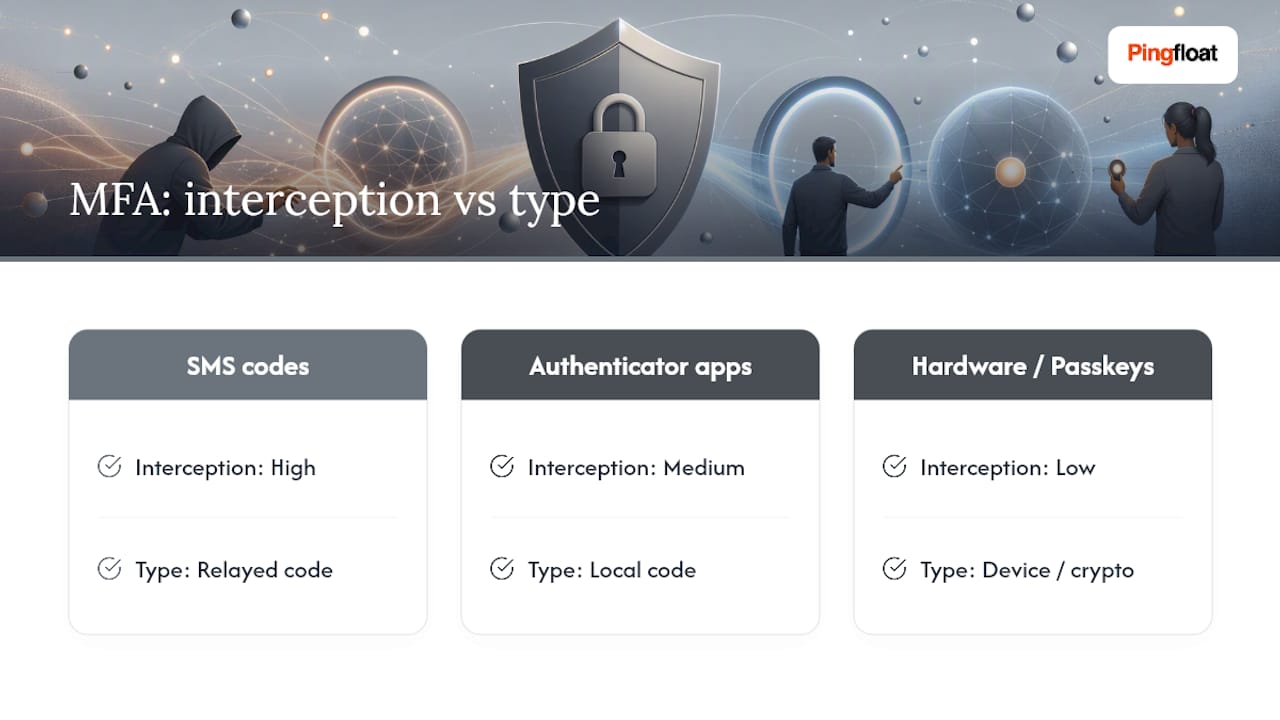
Not all MFA is equal, either. SMS codes are better than nothing but vulnerable to interception. Authenticator apps close that gap, and hardware keys or passkeys close it further still by tying authentication to a physical device or cryptographic credential rather than a code that can be relayed.
Rolling Out Strong Password Guidelines on a Real Team
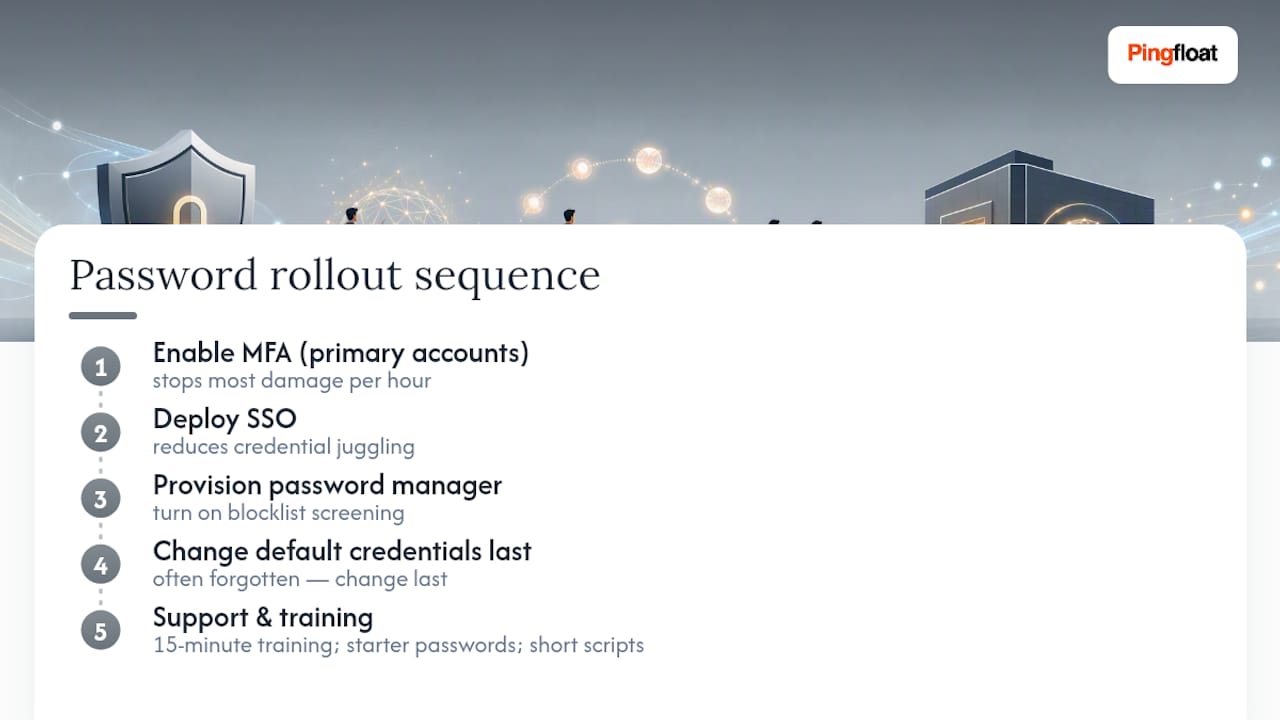
Sequencing matters more than most rollout plans admit. Start with MFA on primary accounts, since that single control stops the most damage per hour invested. Layer in SSO next so people juggle fewer credentials overall, then provision a company password manager and turn on blocklist screening for new passwords. Default credentials get changed last only because they're often forgotten, not because they matter less.
Resistance shows up fastest around MFA setup and manager adoption. A 15-minute training session beats a policy memo every time, and handing new hires a pre-generated starter password removes the awkward first-day moment where someone picks something weak just to get logged in. Keep help-desk scripts short: most password reset calls trace back to the same two or three confusions.
— Andreas
Pingfloat's Free Tools for Putting These Guidelines into Practice
You don't need enterprise software to start acting on any of this today. Pingfloat's Random Password Generator produces long, high-entropy passwords and passphrases on the spot, which makes it useful for generating onboarding credentials or test strings while you're rolling out a new policy.

If you're also reviewing how credentials get stored, Pingfloat's Hash Generator lets you inspect MD5, SHA-1, SHA-256, and SHA-512 output while your team discusses hashing and salting practices at a technical level. And since password policy work usually overlaps with a broader security check, the SSL Checker is worth running against any login page you're hardening, confirming the certificate is valid before you ask users to trust it with a new passphrase. None of these tools replace a dedicated password manager or an identity provider. They're the free utilities that sit alongside that stack, ready whenever you need a quick answer without spinning up new software. Start with the password generator, see what a real 16-character passphrase looks like, and go from there.
Where to Read the Original Guidance
For policy language, read NIST SP 800-63B directly. For plain-language user advice, CISA's guide is the clearer starting point. For enterprise deployment specifics, see Microsoft's password policy recommendations, and for authentication hardening beyond passwords, MimicTyper's session security notes cover advanced patterns worth knowing.
Sources
- Use strong passwords | CISA
- Strength of passwords (NIST SP 800-63B appendix)
- Password policy recommendations | Microsoft
- Password Policies: What the Evidence Says (Length, Complexity, Rotation) | SecurityScientist