

Run these checks first: enforce HTTPS/TLS everywhere, lock down authentication and access control, validate every input, ship the right security headers, scan your dependencies, and confirm logging catches what matters. Miss any one of these, and the rest of your defenses are decorative.
Here's the priority order for a team starting today:
- HTTPS and TLS: Run an SSL scan, confirm auto renewal, check HSTS is live.
- Auth and access control: Verify MFA works, test role permissions, rate limit login endpoints.
- Input validation: Confirm parameterized queries and output encoding across every form and API.
- Security headers: Check CSP, X-Content-Type-Options, and frame-ancestors are actually deployed, not just planned.
- Dependencies: Run a software composition analysis (SCA) scan and check for known CVEs in your lockfile.
- Logging and testing: Confirm auth events are logged and a SAST/DAST pass runs in CI.
Assign one owner per category. If a scan turns up an actively exploited vulnerability or evidence of a breach, stop the checklist and move straight to incident response or an emergency pentest.
Key Takeaways
Web security works when TLS, access control, input validation, headers, dependency scanning, and logging are enforced together and tested on a recurring cadence, not treated as a one-time setup task.
| Point | Details |
|---|---|
| Start with transport security | Enforce HTTPS sitewide, automate certificate renewal, and confirm HSTS is active with an SSL checker. |
| Harden authentication first | Require MFA or passkeys, enforce least-privilege RBAC, and rate limit login endpoints. |
| Validate every input | Use parameterized queries, encode output by context, and sanitize any accepted HTML. |
| Deploy a restrictive CSP | Use nonces or hashes instead of domain whitelists, and roll out changes in report-only mode first. |
| Test on a schedule | Run SAST and SCA in CI, DAST against staging, and schedule pentests annually or after major changes. |
| Verify configuration with Pingfloat | Use Pingfloat's free SSL Checker, Response Headers Inspector, and Uptime Monitor to confirm fixes actually deployed. |
Table of Contents
- Scoping Your Web Security Checklist: Information Gathering and Threat Modeling
- Enforcing HTTPS, TLS, and Automated Certificate Renewal
- Locking Down Authentication and Access Control
- Preventing XSS and Injection Through Input Validation
- Deploying Security Headers and a Content Security Policy That Works
- Hardening Configuration and Deployment
- Securing Your Software Supply Chain and CI/CD Pipeline
- Building Logging, Monitoring, and an Incident Response Plan
- Running SAST, DAST, and Regular Penetration Tests
- Verifying Your Checklist Fast with Pingfloat's Free Tools
- Backup and Recovery Strategies That Survive an Actual Incident
- Data Privacy and Compliance: GDPR, CCPA, and Data Minimization
- Secure Coding Practices and Ongoing Developer Training
- API Security: Rate Limiting, Authentication, and Input Validation
- Network Security Basics: Firewalls, Segmentation, and VPNs
- Physical Security for Servers and Data Centers
- Author Perspective: Security Is a Cadence, Not a Checklist
- Verify Your Checklist in Minutes, Not Days
- Sources
Scoping Your Web Security Checklist: Information Gathering and Threat Modeling
A generic checklist applied to the wrong attack surface wastes time. Before you touch a single header or config file, know what you're actually protecting.
- Inventory everything internet-facing. List subdomains, forgotten staging environments, third-party scripts, admin panels, and any API endpoint that accepts external input. Old marketing subdomains and abandoned admin login pages are two of the most common entry points attackers find first.
- Map data flows to risk categories. Trace where sensitive data (credentials, payment info, personal records) enters, moves, and rests. Tag each flow against the relevant OWASP Top 10 category, whether that's broken access control, injection, or cryptographic failure.
- Build a lightweight threat model. You don't need a formal STRIDE workshop. A single page listing your top five realistic attack scenarios, ranked by likelihood and impact, tells you which checklist items to run first and which can wait.
This scoping step is what turns a generic checklist into one tailored to your actual exposure.
Enforcing HTTPS, TLS, and Automated Certificate Renewal
Every unencrypted endpoint on your site is a liability, including internal redirects, subdomains, and API responses that developers assume nobody checks. Serve everything over HTTPS, with no exceptions.
- Redirect all HTTP traffic to HTTPS at the server or load balancer level, not just on your homepage.
- Support TLS 1.3 and keep TLS 1.2 as your floor. Disable TLS 1.0, TLS 1.1, and any cipher suite using RC4 or CBC mode with known weaknesses.
- Enable HSTS with a long max-age, and add
includeSubDomainsonce you've confirmed every subdomain actually supports HTTPS. - Automate certificate issuance and renewal through ACME or a managed provider instead of relying on someone remembering a calendar reminder.
Certificate expiry remains one of the more common causes of unplanned outages, and it's entirely preventable with automation and multiple alert channels watching renewal status.
Verify your setup with an SSL Checker that validates the full certificate chain, confirms cipher negotiation, and checks whether HSTS headers are actually present in the response, not just configured somewhere in a file nobody deployed.
Pro Tip: Test your HSTS preload eligibility before submitting to the preload list. Once a domain is preloaded, removing it can take months across major browsers, so get the configuration right first.
Locking Down Authentication and Access Control
Weak authentication is still the fastest way into most applications, and password-only login is no longer defensible for anything handling sensitive data.
- Support passkeys where your stack allows it, and fall back to TOTP or WebAuthn rather than SMS codes, which remain vulnerable to SIM swapping.
- Test authorization on every API endpoint and UI route, not just the ones with obvious admin functionality. Broken object-level authorization is a recurring finding in OWASP's testing framework, and it hides in endpoints developers assume are internal.
- Map roles explicitly. A user with "editor" permissions should never be able to reach an endpoint scoped for "admin," even by guessing a URL.
- Rate limit login, password reset, and account recovery endpoints. Credential stuffing attacks rely on volume, and a simple rate limit blunts most of them.
- Check cookies for
Secure,HttpOnly, andSameSiteattributes, and keep session lifetimes short enough that a stolen token expires before it's useful.
If your app issues JWTs, inspect a live token with a JWT Decoder to confirm you're not leaking sensitive claims or using an algorithm like none that skips signature verification entirely.
Preventing XSS and Injection Through Input Validation
Most injection vulnerabilities trace back to one habit: trusting data that came from outside your application boundary.
- Validate every input server-side, regardless of what client-side JavaScript already checked. Client validation is a user experience feature, not a security control.
- Use parameterized queries or ORM bindings for all database access. String concatenation into a SQL query is still how a surprising number of breaches start.
- Encode output based on context. HTML, HTML attributes, URLs, and inline JavaScript each require different encoding, and using the wrong one is a common source of cross-site scripting (XSS) bypasses.
- If you must accept raw HTML from users, sanitize it through a maintained library like DOMPurify rather than writing your own filter. Homegrown sanitizers miss edge cases that attackers find quickly.
- Run dynamic application security testing (DAST) against staging with payloads designed to exercise injection paths, and back it with unit tests that assert your validation actually rejects malicious input.
A quick manual check with the HTML Validator can also surface malformed markup that sometimes signals an injection point developers overlooked.
Deploying Security Headers and a Content Security Policy That Works
Headers are cheap to add and expensive to get wrong, which is why so many sites either skip them or deploy a CSP so permissive it does nothing.
- Add
Content-Security-Policyusing nonces or hashes rather than broad domain whitelists. MDN's guidance is direct on this: a nonce-based policy survives a compromised third-party script host far better than a whitelist that trusts an entire domain. - Set
X-Content-Type-Options: nosniffto stop browsers from guessing content types in ways that enable attacks. - Add
Referrer-Policyto control what leaks in outbound requests, andPermissions-Policyto disable browser features (camera, geolocation, microphone) your app doesn't use. - Set
frame-ancestorsto prevent clickjacking through iframe embedding. - Use Subresource Integrity (SRI) hashes on every third-party script tag you load from a CDN.
Roll out a new CSP in report-only mode first, watching report-uri or report-to data for a few days before you switch to enforcement. Skipping this step is how teams break checkout flows and analytics scripts on launch day.
Pro Tip: Check your live headers with the Response Headers Inspector before and after a CSP rollout. It's the fastest way to confirm what's actually being sent, versus what you think your server config is sending.
Hardening Configuration and Deployment
Default settings are built for ease of setup, not production security, and plenty of breaches trace back to a config nobody bothered to change after launch.
- Remove default admin credentials and sample accounts the moment a platform is installed.
- Disable debug modes and verbose error pages in production. Stack traces handed to an attacker are a reconnaissance gift.
- Hide server and framework version strings in response headers; version disclosure tells attackers exactly which known exploits to try.
- Restrict admin consoles and CI dashboards to a VPN or an allowlisted IP range instead of leaving them open to the public internet.
- Store secrets in a dedicated vault, not environment files committed to a repository, and run secret scanning as part of your CI pipeline.
- Disable directory listing and shut down any service or port you're not actively using.
NIST's National Checklist Program maintains configuration baselines for common platforms, and cross-referencing your setup against one is a fast way to catch settings you didn't know were exposed.
Securing Your Software Supply Chain and CI/CD Pipeline
The libraries you didn't write are often the ones that get you breached, since most teams audit their own code far more carefully than the packages they import.
- Run software composition analysis (SCA) in your CI pipeline and fail builds automatically when a dependency carries a high-severity vulnerability, based on your risk tolerance.
- Pin dependency versions and commit lockfiles. Monitor security advisories continuously, and treat critical patches as hotfixes that skip your normal release cadence rather than waiting for the next sprint.
- Protect your CI/CD credentials as aggressively as production secrets. A compromised build pipeline can inject malicious code before it ever reaches your servers.
Scanning should cover transitive dependencies too, not just the packages listed directly in your manifest, since a vulnerable sub-dependency three levels deep is just as exploitable as one you imported directly. Signing production artifacts adds one more check that what deployed is what you actually built.
Building Logging, Monitoring, and an Incident Response Plan
You can't respond to an incident you never noticed. Logging that exists but nobody watches is functionally the same as no logging at all.
- Log authentication events, permission changes, and unusual error patterns with enough context (timestamp, source IP, user ID) to actually investigate later.
- Keep sensitive data like passwords and full payment details out of logs, and protect log storage against tampering by centralizing it somewhere separate from your application servers.
- Set alerts for anomalies: repeated failed logins, sudden traffic spikes, or requests hitting endpoints that shouldn't exist.
- Publish a
.well-known/security.txtfile so researchers have a clear channel to report vulnerabilities instead of posting them publicly out of frustration.
Practice your incident response playbook before you need it. SANS's practitioner guidance treats incident response as a rehearsed skill, not a document that sits untouched until a crisis.
Pro Tip: Connect uptime alerts to your incident channel directly. A Website Uptime Monitor that pages your team the moment a site goes dark often catches an active attack faster than log review does.

Running SAST, DAST, and Regular Penetration Tests
A checklist without active testing is a wish list. Automated and manual testing catch different classes of problems, and you need both.
- Integrate static application security testing (SAST) into your CI pipeline so vulnerable patterns get flagged before code merges, not after it ships.
- Run DAST against a staging environment that mirrors production configuration, and schedule third-party penetration tests annually or after any major architectural change.
- Map every finding to the OWASP Top 10, assign a remediation owner, and set a service-level agreement (SLA) based on severity, not convenience.
- Automate regression tests for every vulnerability you fix, so a future refactor doesn't silently reintroduce the same bug.
Combining automated scans with periodic manual pentests, as the OWASP Web Security Testing Guide recommends, builds a workflow that catches both the obvious misconfigurations and the subtler logic flaws automated tools tend to miss.
Verifying Your Checklist Fast with Pingfloat's Free Tools
Running through this checklist manually across a dozen services gets tedious fast. Pingfloat's free tools handle the verification layer so you can spend your time fixing what's broken instead of hunting for it.
- Check TLS configuration and certificate chains with the SSL Checker in seconds, no command line required.
- Paste any URL into the Response Headers Inspector to confirm your CSP, HSTS, and nosniff headers are actually live in production, not just staged in a config file.
- Run markup through the HTML Validator to catch malformed structure that sometimes masks injection risk.
- Set up the Website Uptime Monitor to alert you the moment a service drops, which matters as much for detecting an attack as for catching a server crash.
Pro Tip: These tools verify configuration; they don't fix it. A missing CSP header shows up instantly in the Response Headers Inspector, but closing that gap still means editing server config or middleware yourself.
Backup and Recovery Strategies That Survive an Actual Incident
A security checklist that ignores recovery is only half the job. Ransomware, accidental deletion, and corrupted deployments all end the same way: you need a clean copy of your data, and you need it fast.
Back up on a schedule that matches how much data loss you can tolerate. A high-transaction e-commerce database might need continuous or hourly backups, while a mostly static marketing site can survive on daily snapshots. Store backups somewhere physically and logically separate from your production environment. A backup sitting on the same server it's protecting is not a backup, it's a false sense of security.
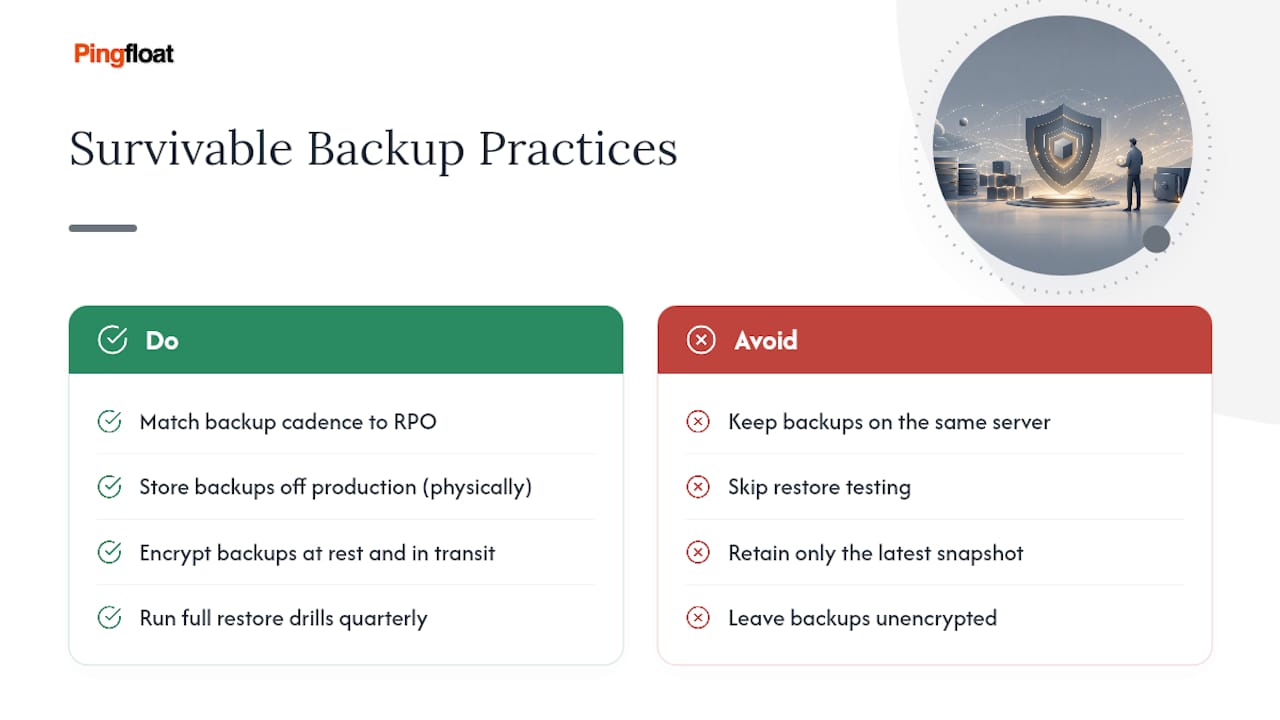
Encrypt backups at rest and in transit, especially if they contain customer data. An attacker who compromises your primary database and finds your unencrypted backup sitting right next to it has simply doubled their haul.
The step most teams skip is testing the restore. A backup you've never restored is a theory, not a plan. Run a full recovery drill at least quarterly, ideally onto an isolated environment, and time how long it actually takes. That number, not your backup schedule, is what determines your real recovery time objective.
Version your backups too, not just your latest snapshot. If ransomware sits undetected for two weeks before triggering, your most recent backup might already be encrypted along with everything else. Retaining several weeks of point-in-time backups gives you somewhere clean to roll back to.
Data Privacy and Compliance: GDPR, CCPA, and Data Minimization
Security and privacy overlap, but they're not the same discipline, and a checklist focused purely on breach prevention can still leave you noncompliant.
Data minimization is the principle that should drive most of your architecture decisions here: collect only what you need, retain it only as long as you need it, and delete it when you don't. Every field you store that you don't actually use is a liability with no offsetting benefit. It's an easy audit: pull your database schema and ask, for each column of personal data, what breaks if this field didn't exist.
If you serve users in the European Union, the General Data Protection Regulation (GDPR) requires a documented legal basis for processing personal data, mechanisms for users to request deletion or export their data, and breach notification within 72 hours of discovery for most cases. If you serve California residents, the California Consumer Privacy Act (CCPA) grants similar rights around access, deletion, and opting out of data sales, with different thresholds for which businesses it applies to. These frameworks are not interchangeable, and a compliance posture built for one doesn't automatically satisfy the other. Confirm your actual obligations with counsel or a compliance specialist rather than assuming a generic privacy policy covers both.
Handle data securely in practice, not just on paper: encrypt personal data at rest, restrict internal access on a need-to-know basis, and log who accessed sensitive records and when. Regulators increasingly look for evidence of process, not just a policy document nobody follows.
Secure Coding Practices and Ongoing Developer Training
The best checklist in the world doesn't help if the code being written today ignores it. Security has to live in how your team writes code, not just in a quarterly review.
Adopt a documented coding standard that addresses your stack's specific risk areas: safe database access patterns, approved encoding functions, and banned practices like string-concatenated queries or eval() on user input. A standard that exists but isn't enforced through code review or linting rules is just a suggestion.
Bake security checks into code review itself. A reviewer who knows to ask "where does this input get validated?" catches far more than a review focused purely on logic and style. Some teams add a lightweight security checklist to their pull request template, forcing the question rather than hoping someone remembers.
Training matters more than most teams budget for it. Developers who've never seen a real SQL injection exploit tend to underestimate how trivial it is to execute. A short, recurring session walking through actual vulnerabilities found in your own codebase, or a public disclosure from a comparable company, tends to stick far better than generic slideware.
Treat this as continuous, not a one-time onboarding module. New frameworks introduce new footguns, and a coding standard written two years ago may already be missing guidance for patterns your team uses today.
API Security: Rate Limiting, Authentication, and Input Validation
APIs get attacked differently than web pages, largely because they lack the visual cues that make some attacks obvious to a human reviewer. An API is often the most direct path to your database, and it deserves its own pass through this checklist, not an assumption that your general web protections cover it.
Authenticate every API endpoint, including internal ones. "Internal" APIs get exposed accidentally more often than teams expect, through misconfigured load balancers, forgotten firewall rules, or a mobile app that ships an API key in its binary. Use OAuth 2.0 or a similarly vetted standard rather than a custom authentication scheme built for a deadline.
Rate limit at the API level specifically, not just at your login page. A public API without rate limiting is an open invitation for scraping, credential stuffing, or a denial-of-service attempt disguised as normal traffic. Set limits per API key or per authenticated user, not just per IP address, since a determined attacker will rotate IPs long before they rotate accounts.
Validate every input parameter server-side, including ones you assume your own frontend controls. An API endpoint has no idea whether the request came from your app or from someone reading your JavaScript bundle and crafting requests directly. Version your API deliberately, and deprecate old versions on a schedule. An abandoned v1 endpoint still running in production, with none of your current security patches applied, is a common way attackers find their way in.
Network Security Basics: Firewalls, Segmentation, and VPNs
Application-layer defenses matter less if the network underneath is wide open. Network security is the layer most web-focused teams underinvest in, partly because it feels like someone else's job.
A properly configured firewall should default to denying traffic and explicitly allow only the ports and protocols your application actually needs. Plenty of breaches trace back to a database port left open to the public internet because it was convenient during initial setup and nobody closed it afterward.
Segment your network so a compromise in one area doesn't hand an attacker the whole environment. Your public web servers, application layer, and database should sit in separate network zones with controlled traffic between them. If an attacker compromises your web server, segmentation is what stops them from walking straight into your database without another exploit.
Require a VPN or a zero-trust access solution for any administrative access to production infrastructure. SSH ports and admin panels exposed directly to the public internet are a persistent target for automated scanning, and there's rarely a good reason to expose them that way when a VPN adds only a small amount of friction.
Physical Security for Servers and Data Centers
It's easy to treat physical security as irrelevant once everything runs in the cloud, but it still matters, whether you're evaluating a colocation facility or choosing a cloud provider whose physical controls you're trusting by default.
If you manage your own hardware, restrict physical data center access through badge systems, biometric checks, and visitor logs, and keep server racks in locked cabinets rather than an open room. Environmental controls matter too: fire suppression systems, redundant power, and climate control protect against outages that have nothing to do with hackers.
If you use a cloud provider, physical security is largely their responsibility, but it's still worth confirming what certifications they hold. Standards like SOC 2 or ISO 27001 typically include physical security audits as part of their scope, and a provider's compliance documentation should be available on request.
Author Perspective: Security Is a Cadence, Not a Checklist
The mistake I see most often isn't skipping a checklist item, it's treating the checklist as a one-time event. Security decays. A header configured correctly today can silently break after a framework upgrade six months from now.
Build a cadence instead: daily uptime and alert monitoring, weekly dependency and header scans, monthly triage of findings, and quarterly penetration tests for anything handling sensitive data. Bake the automated checks into CI so they run on every deploy, not just when someone remembers. Security that lives outside your delivery pipeline is security that gets skipped the week a deadline slips.
— Andreas
Verify Your Checklist in Minutes, Not Days
Working through this checklist manually, service by service, eats an afternoon before you've fixed a single thing. Pingfloat gives you the verification layer for free, so the time you spend goes toward fixing issues instead of hunting for them.

Start with the SSL Checker to confirm your certificate chain and cipher configuration are actually correct in production, not just in your deployment notes. Pair it with the Response Headers Inspector to see exactly which security headers your server is sending right now, and the Website Uptime Monitor to catch outages or attacks the moment they start. Every tool in the suite is free to use, with no account required to run a scan. Head to Pingfloat and run your first check today.