

Website downtime alerts are automated notices telling you a site or service has stopped responding correctly, sent by a monitoring system that checks your endpoints on a schedule. The setup worth running is multi-location HTTP/HTTPS checks paired with push or SMS, a webhook, and a public status page. Keep that alerting system independent of your own infrastructure, so it still reaches you when your servers can't.
TL;DR:
- Using multi-region checks with confirmation logic helps filter out regional or network-related false positives before alerting your team.
- Combining HTTP/HTTPS, DNS, SSL, and content checks ensures comprehensive monitoring that catches failures at different system levels.
- Relying on independent alert channels like push notifications, SMS, and webhooks with automated escalation prevents missed alerts during infrastructure outages.
- Setting thresholds based on failure confirmation and performance metrics reduces alert fatigue and improves response accuracy.
- Testing your entire alerting chain regularly and documenting rules enhances reliability and prevents missed or false alarms during critical incidents.
Table of Contents
- What Types of Checks Actually Trigger a Downtime Alert?
- How Do Check Frequency and Confirmation Logic Affect Alert Accuracy?
- Which Alert Channels and Escalation Paths Actually Work?
- What Thresholds Should You Actually Alert On?
- How Do Status Pages and Integrations Fit Into an Alert Strategy?
- How Do You Tell a Real Outage From a False Alarm?
- What's the Practical Setup Checklist for Reliable Alerts?
- How Much Should You Expect to Pay for Downtime Alerts?
- How Do You Actually Choose a Downtime Alert Service?
- What Are the Setup and Configuration Best Practices?
- What Red Flags Should Make You Walk Away From a Provider?
- Why Alert Independence Is the Part Everyone Underrates
- Get Your Alerts Running in Minutes With Pingfloat
- Sources
What Types of Checks Actually Trigger a Downtime Alert?
Not every check watches for the same failure, and picking the wrong one is how teams miss real outages while drowning in noise from irrelevant ones.
- HTTP/HTTPS checks hit a URL and grade the response by status code. A 2xx means healthy, a 3xx is usually a redirect worth tracking separately, and a 4xx or 5xx should trigger an alert. Reading these codes correctly matters enough that keeping an HTTP status code reference handy saves real diagnostic time.
- Ping and port checks confirm basic network reachability, catching firewall misconfigurations or a server that's fallen off the network entirely, before you even get to the HTTP layer.
- DNS monitoring flags name resolution failures. A misconfigured record or an expired domain can take a site offline even though the server itself runs fine.
- SSL/certificate checks catch expired or misconfigured certificates before browsers start throwing warnings at your visitors. An SSL checker run on a schedule catches this days ahead of expiry, not the morning after.
- Content or keyword checks verify a specific string appears on the page, catching cases where a server returns 200 OK but displays an error page or empty cart. Pure uptime checks miss this every time.
How Do Check Frequency and Confirmation Logic Affect Alert Accuracy?
The interval you pick, and how strictly you confirm a failure before paging someone, decides whether your alerts are trustworthy or just noise.
- Match frequency to how much downtime costs you. A 30 second interval catches problems fast but costs more and can flag brief network blips as outages. A 60 second interval is the common middle ground for most business sites. A 5 minute interval works fine for low-traffic or informational pages where a short gap barely matters.
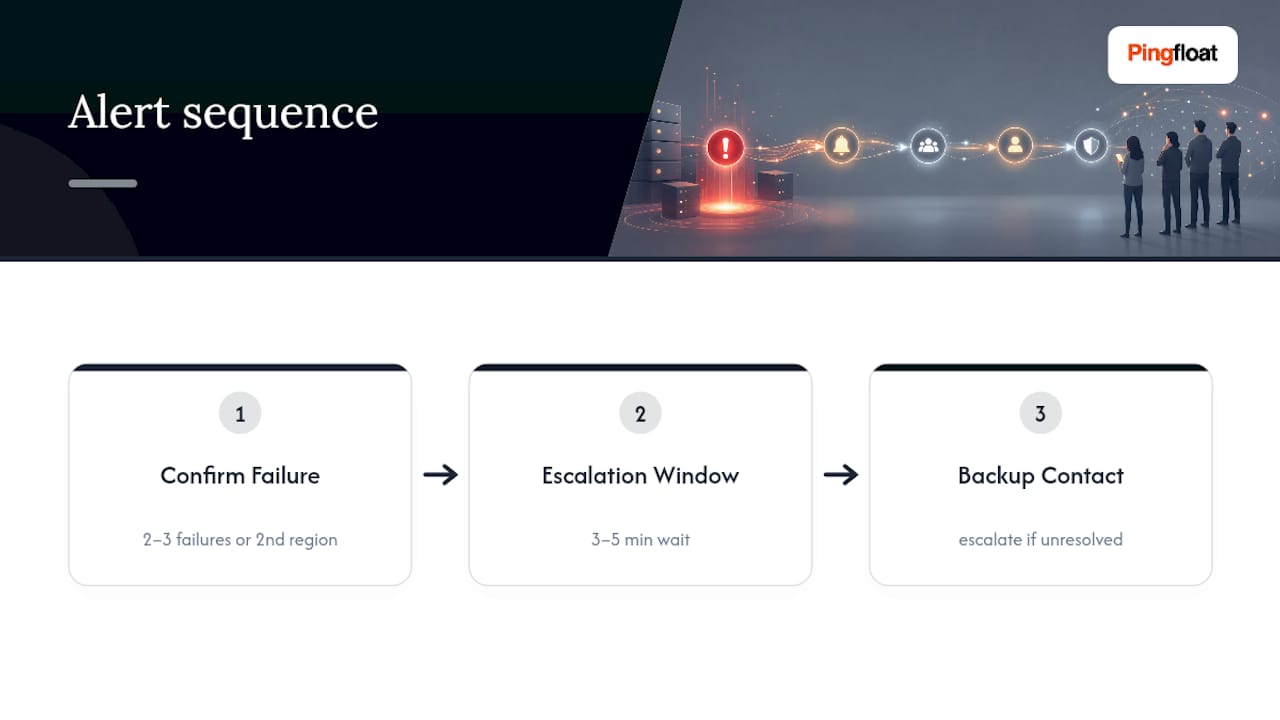
- Require confirmation before alerting. Best practice calls for confirming a failure from a different monitoring location or waiting for two to three consecutive failed checks before paging anyone, with an automatic escalation if the primary on-call doesn't acknowledge within a short window, often three to five minutes.
- Separate degraded performance from total outage. A site answering requests slowly is a different problem than one returning nothing at all, and your alert rules should treat them differently rather than lumping every anomaly into one generic "down" notice.
Which Alert Channels and Escalation Paths Actually Work?
Email-only alerting is a trap. If your mail server, your inbox provider, or your own network is part of the outage, email is exactly the channel that fails you at the worst possible moment. A dedicated notification system built independently of the infrastructure it monitors, using multiple channels with automatic escalation, is the safer standard.
A workable channel mix usually includes:
- Push notifications for immediate, low-friction alerts to whoever's on-call.
- SMS or voice calls for anything after hours, since push notifications get missed when a phone is on silent.
- Webhooks feeding into on-call tools like PagerDuty, so incidents create tickets and trigger escalation policies automatically.
- Slack or Teams messages for team-wide visibility without paging every individual.
Escalation windows matter as much as the channels themselves. If the first responder doesn't acknowledge within a set window, the system should automatically retry and then escalate to a backup contact. Keep the technical alert (status code, response time, failing region) separate from the plain-language update you send to stakeholders who don't need to see raw diagnostic output.
Pro Tip: Set a shorter escalation window for your checkout or payment endpoints than for a marketing page. A five minute gap on checkout can cost real revenue; the same gap on your blog rarely matters.
What Thresholds Should You Actually Alert On?
Alert fatigue kills fast response, because a team that's been paged twenty times for nothing stops trusting the system on the twenty first, real, incident.
- Set availability alerts on confirmed failures, not single failed checks, and treat any 5xx response as an immediate flag.
- Set performance alerts on meaningful latency jumps rather than one slow request. Pairing frequent synthetic checks with real-user monitoring and alerting on p95 or p99 latency spikes catches genuine degradation without flagging every random slow request.
- Tune sensitivity by page type. A checkout endpoint deserves tighter thresholds than a static marketing page, since the cost of missing a checkout failure is much higher.
- Group and suppress repeat alerts for the same root cause instead of sending a fresh notification every time the check runs.
How Do Status Pages and Integrations Fit Into an Alert Strategy?
A status page turns raw monitoring data into something your team and your customers can actually use during an incident. Status aggregation and unified status pages reduce support ticket volume because customers get a single place to check before they open a support request.
- Link your uptime monitor directly to a public or internal status page so incidents post automatically instead of waiting on a human to update it.
- Use plain-language templates for customer-facing updates, separate from the technical detail your engineers need.
- Connect monitoring to your helpdesk or ticketing system so a single incident doesn't generate a dozen duplicate tickets from confused customers.
- Keep historical uptime logs. They're useful for tracking your own reliability over time and for holding vendors accountable against SLA commitments. Many providers, like Claude's public status page, display exactly this kind of historical component-level history.
Subscribing to a vendor's own status page, often available via email, Slack, or webhook, also gives you official incident reports and postmortems when a third-party dependency is the actual cause of your downtime.
How Do You Tell a Real Outage From a False Alarm?
Before escalating, run a quick verification pass rather than assuming the alert is accurate.
- Run a
curlrequest against the affected URL from a different network to confirm the failure is real. - Check a traceroute to see where the connection actually breaks down.
- Test from an alternate monitoring region and on mobile data, since a local ISP issue can masquerade as a full outage.
- Check whether a CDN edge node, a DNS TTL still propagating, or a transient backend error is the actual cause before waking anyone up.
Pro Tip: Document every confirmed incident, including what triggered it and what didn't, so your rules improve over time instead of repeating the same false alarms.
Suppress the alert only once you've confirmed it's noise. Escalate immediately once you've confirmed it's not.
What's the Practical Setup Checklist for Reliable Alerts?
A working setup follows a short sequence: pick the check types your site needs, set a frequency that matches your risk tolerance, enable multi-location checks, configure channels with escalation, and publish a status page.
- Select check types: HTTP/HTTPS, SSL, DNS, and content checks depending on what actually matters for your site.
- Pick frequency: 60 seconds is a solid default for most production sites.
- Enable multi-location checks to avoid regional false positives.
- Configure channels and escalation: push plus SMS plus webhook, with a retry window before escalating.
- Publish a status page and log every incident with timestamps for later review.
| Setup Step | Pingfloat Tool |
|---|---|
| Availability and SSL checks | Uptime Monitor, SSL Checker |
| Network path diagnostics | Traceroute |
| Status code interpretation | HTTP Status Codes Reference |
How Much Should You Expect to Pay for Downtime Alerts?
Downtime alert pricing usually scales along three variables: how many monitors you run, how frequently they check, and which alert channels you need. Most providers offer a free tier that covers basic HTTP checks at a modest interval, often five minutes, with email as the only channel. That's fine for a personal blog. It's not enough for anything that generates revenue.
Paid tiers typically unlock faster check intervals (30 to 60 seconds), multi-location checks, SMS or voice alerts, and integrations with tools like PagerDuty or Slack. Some vendors charge per monitor, others charge per seat or per account with a monitor cap, and a few bundle SSL and domain expiry checks into the same plan rather than billing them separately.
The real cost question isn't the subscription price. It's what an undetected outage costs you per minute. A checkout page down for twenty minutes because your only alert channel was email, and nobody checked their inbox, costs far more than the difference between a free plan and a paid one. Budget for the channels that reach you reliably, not just the cheapest monitor count.
Watch for hidden limits too: some plans cap the number of alert recipients, restrict webhook integrations to top tiers, or throttle check frequency during traffic spikes when you need accuracy most. Read the actual limits, not just the headline price, before committing.
How Do You Actually Choose a Downtime Alert Service?
Start with your failure scenario, not the feature list. Ask what happens if your primary server, your email, and your Slack workspace are all unreachable at once. If the answer is "we wouldn't know," that's the gap you're solving for.
From there, evaluate on a few concrete criteria. Check how many monitoring locations the service supports and whether it confirms failures across regions before alerting, since a single-location checker will false-positive on you eventually. Look at which channels it actually delivers alerts through. Push and email are table stakes; SMS, voice, and webhook support separate serious tools from basic ones.
Review the integrations list against your actual stack. A service that connects to PagerDuty, Slack, or your ticketing system saves manual work during an incident when manual work is the last thing you want. Vendor review sites like G2's monitoring tool listings are a reasonable starting point for comparing which integrations and check types different providers actually support, since customers tend to call out gaps in reviews that marketing pages skip over.
Finally, check whether the service lets you build a status page tied to the same monitors, and whether it logs incidents with timestamps automatically. A tool that alerts you but leaves no record is only solving half the problem. You want a paper trail for postmortems, not just a phone that buzzed once.
What Are the Setup and Configuration Best Practices?
Configuration mistakes cause more missed alerts than tool limitations do. The most common one: setting every monitor to alert on a single failed check, which guarantees false positives from routine network jitter within the first week.
Build your rules with confirmation logic from day one, requiring two or three consecutive failures, or confirmation from a second region, before anything pages a human. Set escalation windows deliberately rather than accepting the default. Three to five minutes before escalating to a backup contact is a reasonable starting point for most production systems.
Separate your monitors by criticality. Your homepage, your API, and your checkout flow don't need the same check frequency or the same escalation path. Configure the checkout endpoint with tighter thresholds and faster escalation; a marketing page can tolerate a slower check interval and a more relaxed alert path.
Test your escalation chain before you need it. Trigger a deliberate failure, confirm every channel fires, and confirm the backup contact actually gets paged if the primary doesn't respond. Teams that skip this step often discover their SMS provider was misconfigured only during a real outage, which is the worst possible time to find out.
Document your rules as you build them. Note why a threshold is set where it is, so the next person adjusting it understands the reasoning instead of guessing and accidentally reintroducing the false-positive problem you already solved.
What Red Flags Should Make You Walk Away From a Provider?
Some warning signs show up before you've even signed up, and they're worth taking seriously.
A provider that only offers a single check location, with no option to confirm from elsewhere, will eventually false-positive during a routine CDN hiccup and either desensitize your team or cause a panic over nothing. Similarly, watch for services that lock SMS or voice alerts behind their most expensive tier. If your team can't afford reliable alerting at the plan you can actually pay for, the free or cheap tier isn't actually usable for anything business-critical.
Vague uptime guarantees are another flag. A provider claiming "99.9% reliable alerting" without explaining how their own alerting infrastructure avoids single points of failure is asking you to trust a claim it hasn't backed up. Ask specifically how their notification system stays independent of the infrastructure it monitors, since a monitoring tool that goes down at the same time your site does is worse than no monitoring at all.

Also be cautious of providers with no historical incident log or status page of their own. If a vendor can't show its own uptime history, it's hard to trust its promises about yours. And watch for opaque escalation logic, tools that let you set an alert but don't let you configure confirmation thresholds or retry windows, leaving you stuck with whatever default they chose. That default is rarely tuned to your actual risk tolerance.
Why Alert Independence Is the Part Everyone Underrates
Most teams spend their setup time picking check intervals and thresholds, and almost none of it verifying that the alert itself will survive the outage it's supposed to report. That's backwards. A monitoring rule is only as good as the notification path behind it, and if that path shares infrastructure with what you're monitoring, you've built a smoke detector that goes silent exactly when there's smoke.
Test your escalation chain the way you'd test a fire drill, on a schedule, not just when curiosity strikes. Trigger a failure deliberately, confirm every channel fires, and confirm the person at the end of the chain actually gets paged. Teams that never rehearse this find out the hard way, usually during the incident that mattered most.
— Andreas
Get Your Alerts Running in Minutes With Pingfloat
Building the setup this article describes doesn't require stitching together five different tools. Pingfloat's Website Uptime Monitor covers the multi-location HTTP checks and alert channels at the core of a reliable setup, and it's free to start.

Pair it with the SSL Checker to catch certificate expiry before it becomes a browser warning your visitors see first, and keep the HTTP status code reference open while you write your alert rules so 4xx and 5xx thresholds actually match what's happening on your server. If you're chasing down a suspicious latency spike, the Traceroute tool shows exactly where the connection is breaking down before you escalate to anyone. Set up your first monitor now and see your site's actual response times in real time, no card required.
Sources
- IT Outage Notification: Alert the Right People Before the Damage Spreads | safeREACH
- PagerDuty outage notifications