
Start with Pingfloat's Website Uptime Monitor if you don't have anything running yet. It checks from multiple global locations, routes alerts the moment something breaks. The free tier is enough to catch real outages on day one. Set up your first monitor today, before the next incident finds you first.
TL;DR:
- Global checkpoints ensure outages affecting specific regions are detected before users report them.
- Checking from multiple locations and using various test types reduces false positives and improves alert accuracy.
- SMS, Slack, and webhook integrations are essential for quick incident response and effective automation.
- Cost increases with monitor count, check frequency, number of locations, and log retention, with free tiers limited to small sites.
- Verify provider coverage by matching check frequency and location to your SLA, and ensure alerts can reach your team's existing tools.
Table of Contents
- What to look for in website uptime monitoring
- HTTP, synthetic, ping, and heartbeat: when to use each
- Getting alerts to the right person, fast
- What 99.9% uptime actually costs you in downtime
- Setting up a real monitor in Pingfloat, step by step
- What free and paid uptime monitoring actually cost you
- A short checklist before you commit to a provider
- An editor's take on realistic monitoring baselines
- Set up your first Pingfloat monitor today
- Sources
What to look for in website uptime monitoring
Not every uptime tool checks the same things or checks them the same way, and that gap shows up exactly when you need it not to. A checklist that filters real capability from marketing copy:
- Global checkpoints: checks from multiple regions catch outages that only affect certain networks or countries, something a single test location will miss entirely.
- Multiple check types: HTTP(s), synthetic/API, ping/TCP, and heartbeat cover different failure modes, and you'll eventually need more than one.
- Check frequency with false-positive handling: a 1-minute check is only useful if the tool retries from a second location before firing an alert. Reviewers on G2 consistently flag multi-location confirmation as the feature that separates useful tools from noisy ones.
- Alerting depth: email is table stakes; SMS, Slack, webhooks, and API access are what make monitoring operational rather than decorative.
- Status pages and logs: a public status page and a searchable incident history matter as much for internal accountability as for customer trust.
HTTP, synthetic, ping, and heartbeat: when to use each
An HTTP check confirms your homepage returns a 200 and loads within a reasonable time. That's the baseline every site needs, but it won't tell you if your checkout flow or login form is broken. Synthetic checks solve that: they simulate a real user journey, clicking through multiple steps, and are the only reliable way to catch a broken API endpoint that still returns a healthy status code upstream.
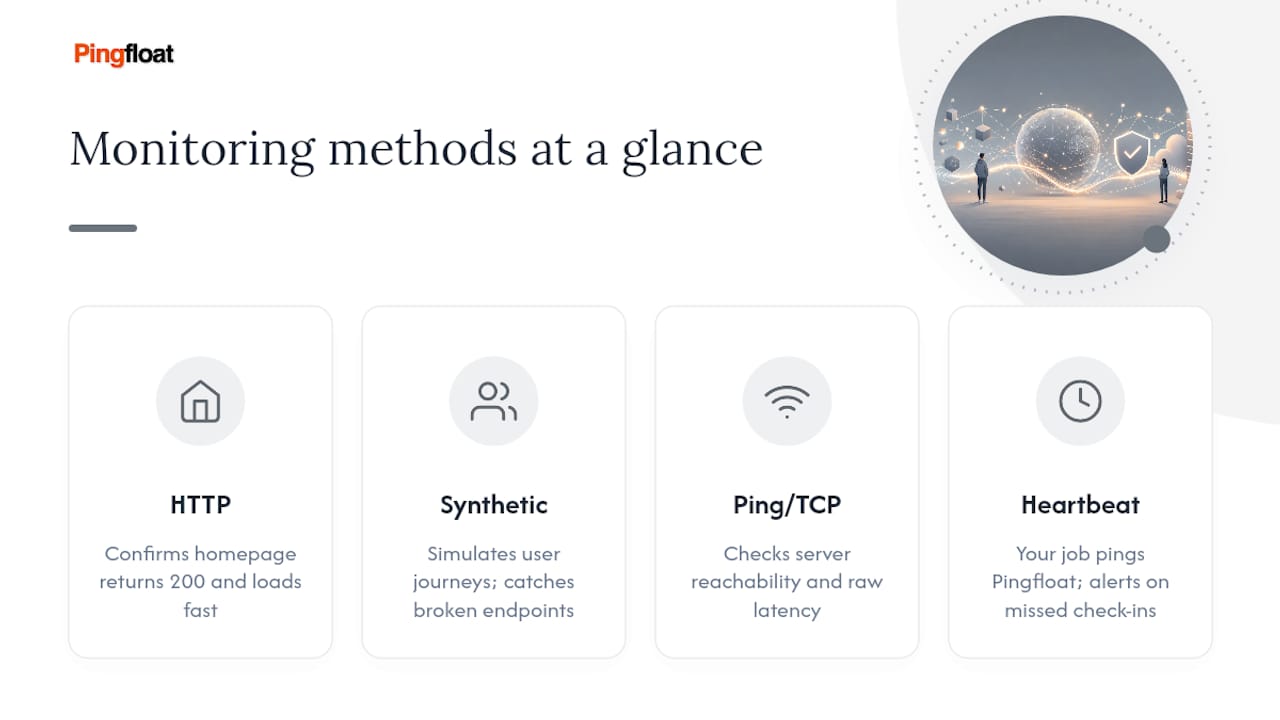
Ping and TCP checks operate a level below the application. They confirm the server is reachable and measure raw latency, which is useful when you suspect a network or DNS issue rather than an application bug. Heartbeat monitoring flips the model: instead of Pingfloat reaching out to you, your cron job or backup script reaches out to Pingfloat on a schedule. Miss a check-in, and you get alerted that a scheduled task silently failed, something an HTTP check would never catch.
Getting alerts to the right person, fast
An alert nobody sees is just a log entry. Route alerts to where your team already works: email for records, SMS or a paging tool for anything urgent, and Slack or Microsoft Teams webhooks for shared visibility. Reviewers consistently point to webhook and API integrations as more valuable than the raw uptime percentage itself, because automation is what actually shortens time to repair.
A working setup usually includes:
- Escalation rules so an unacknowledged alert bumps to a second on-call person.
- Deduplication and suppression windows so one flaky check doesn't page three people five times in ten minutes.
- Webhooks that auto-create a ticket or incident record the moment a check fails.
- Alerts that include the failing URL, status code, response time, and the checkpoint location that triggered it.
Pro Tip: Put the failing region in the alert subject line. "US East down, EU fine" tells your on-call engineer in two seconds whether this is your server or your CDN, before they've even opened the dashboard.
What 99.9% uptime actually costs you in downtime
Two numbers dominate every SLA conversation: 99.9% and 99.99%. The difference sounds small on paper but isn't. Payment systems and authentication services usually need the tighter target; a marketing blog rarely does. Whatever number you pick, a public status page and a logged incident history turn that abstract percentage into something customers and your own team can actually verify.
Setting up a real monitor in Pingfloat, step by step
Getting from zero to a monitor that actually protects you takes about fifteen minutes if you follow this order:
- Pick the endpoint and check type. A homepage might just need an HTTP check; a checkout flow needs synthetic/API monitoring. Set frequency (1 to 5 minutes for anything customer-facing) and choose two or three geographic checkpoints.
- Configure alert channels. Add your team's email, Slack webhook, or SMS number, then set an escalation rule for anything unacknowledged after five minutes.
- Turn on diagnostic capture. Response headers, body snippets, and screenshots at the moment of failure save you from reproducing the bug manually later. Set a retention window that matches how far back you'd realistically need to look.
- Add heartbeat checks for scheduled jobs like nightly backups or cron-based reports, plus a synthetic flow for anything revenue-critical like login or checkout.
- Know your troubleshooting order. When an alert fires, check DNS resolution first, then SSL certificate validity, then run a traceroute to isolate a network path issue. Community troubleshooting threads consistently list this sequence as the fastest way to separate "your server is down" from "your DNS provider is having a bad day."
Pro Tip: Escalate to your ops team the moment two different checkpoints confirm the same failure. One region flagging an issue is often noise; two agreeing is a real incident.
What free and paid uptime monitoring actually cost you
Price scales with four things: how many monitors you run, how often they check, how many locations you check from, and how long you keep the logs. Most vendors cap free tiers around a handful of monitors with 5-minute checks, which is genuinely enough to catch a full outage on a small site or side project.

You'll outgrow the free tier the moment you need 1-minute checks, more than a handful of monitors, or log retention longer than a few days, all common upgrade triggers as teams move from side projects to production systems. Estimate your monthly cost by multiplying monitor count by check frequency needs, then check if that tier includes the retention window you actually need. If you're already paying for broader observability tooling, bundling uptime checks into that stack sometimes beats a standalone tool. For most teams starting out, it doesn't.
A short checklist before you commit to a provider
Before you settle on a tool, run it against the same four questions:
- Does check frequency and location coverage actually match your SLA and your most critical user paths?
- Can alerts reach your existing tools (Slack, PagerDuty, webhooks) without a workaround?
- Does it check from enough regions to catch outages before your users report them, and keep logs long enough for a real postmortem?
- Does it offer an API, a usable free tier, and a visible incident history you can point to when someone asks "how reliable is this, really"?
A provider that clears all four is worth adopting. One that clears two is a placeholder you'll replace within a year.
An editor's take on realistic monitoring baselines
Small teams overbuild alerting and underbuild coverage: they wire up SMS and Slack and PagerDuty on day one, then run a single monitor from a single location and call it done. Flip that. Start with three checkpoints and one alert channel, then add integrations as incidents actually happen. Production SREs should go further and treat monitoring as part of the deploy pipeline itself, not a dashboard checked after something breaks. Wire uptime checks into CI/CD, reference them in postmortems, and put the escalation path in your runbook. Monitoring that lives outside your operational process gets ignored the first time it's inconvenient.
— Andreas
Set up your first Pingfloat monitor today
Pingfloat gives you the checklist items that actually matter, without the sign-up friction most vendors build in. Global checkpoints, HTTP and API checks, webhook and API access for automation, and a free tier that doesn't expire after a trial period. You get the same core capability reviewers praise in paid tools elsewhere, minus the price tag while you're still validating whether a site or service needs full-time monitoring at all.

| Why teams pick Pingfloat | What it means for you |
|---|---|
| Global checkpoints | Catches regional outages before customers report them |
| Free tier with real limits | Enough monitors and frequency to protect a live site |
| Webhook and API access | Plugs straight into your existing incident workflow |
| Diagnostic capture | Headers and response data saved at the moment of failure |
Set up your first uptime monitor now, point it at your homepage or checkout flow, and you'll know within minutes whether it's catching what matters. If a failure ever traces back to a certificate problem, Pingfloat's SSL checker is sitting right next to it, free, and ready when you need it.